

Have you ever found yourself lost in the rabbit hole of themes while setting up your WordPress blog? Are you an existing blogger who needs to change an outdated, unsupported theme? Many bloggers embark on this journey—one filled with excitement, anxiety, and the quest for the perfect layout.
As I look back on my blogging evolution, I can’t help but recall the days of choosing that first simple theme, a decision that would shape my entire online presence. Little did I know, this was just the beginning of an adventure that would change with every new theme and update!
How did it all begin?
The first theme I chose was straightforward. It featured a space to add a profile picture and little else. It targeted first-time bloggers who sought a simple layout and a quick start. It got me off to a great start.
As the years progressed, I became more confident in changing the theme of my blog. I wanted a side widget bar to add information, such as a follow button, links to my social media accounts, and a box with links to previous posts.
That first theme change took me a whole weekend to complete. It wasn’t particularly complicated, but it required much work to ensure everything was as I wanted. After all, my followers had increased, and more people were visiting my blog, and I didn’t want anyone to think I was stuck in 2014 or going backwards in the blogging world.
Other theme changes occurred; each time, I found it easier and took less time to change themes. Then it came to a grinding halt.
Full-Site editing themes
Fast-forward a few years, and I considered changing my blog’s theme from the Classic theme I had been using to a new Full-Site-Editing (Block) theme. However, it seemed too complicated, and I was reading posts from other bloggers detailing the difficult transition they had gone through and a list of problems they faced. It reminded me of stories I’d read when some bloggers switched from WordPress.com to self-hosting their blogs.
Today, I’m still using a supported WordPress Classic theme (Toujours), and even though I have thought long and hard about switching to a Block theme, I haven’t jumped ship.
Future themes are here, but there’s a catch!
Last week, WordPress announced that anyone using WordPress could build a blog theme using AI for free. All you have to do is give AI some information about the type of layout you are looking for, and it’ll build the theme and do all the work for you.
Not only was I excited by this news, but it got me thinking about all those bloggers experiencing problems with their blogs because the theme they use is outdated and no longer supported by WordPress. These bloggers could let AI build a theme for their blog and eliminate all the problems they’re experiencing once and for all.
But what about those who won’t use AI? Would they rather continue using outdated, unsupported themes than allow AI to help them?
Using an outdated, unsupported theme can lead to several issues. Here are a few.
1. Security vulnerabilities: Without updates, the theme may become prone to security risks that could compromise your blog.
2. Compatibility issues: As plugins and WordPress itself update, an outdated theme may not function correctly with newer versions, causing layout glitches, functional problems such as not being able to leave comments and issues with WordPress believing you are not logged in.
3. Lack of support: You won’t have access to official support for troubleshooting any issues or queries that arise with the theme. WordPress will advise you to change to a supported theme.
4. Performance issues: Unsupported themes may not be optimised for speed and performance, leading to slower load times.
5. Missed features: Regular updates often include new features and improvements; sticking with an unsupported theme means missing out on these enhancements, which could benefit your blog’s features and user experience.
We’re not quite there yet!
Unfortunately, after a few messages exchanged between a member of WordPress staff and me, I discovered that this new service of AI creating a theme for your blog is only available to those who want to start afresh with a brand new blog. The AI software can not change themes for an existing blog. However, WordPress is working on this, and it will become available sometime in the future.
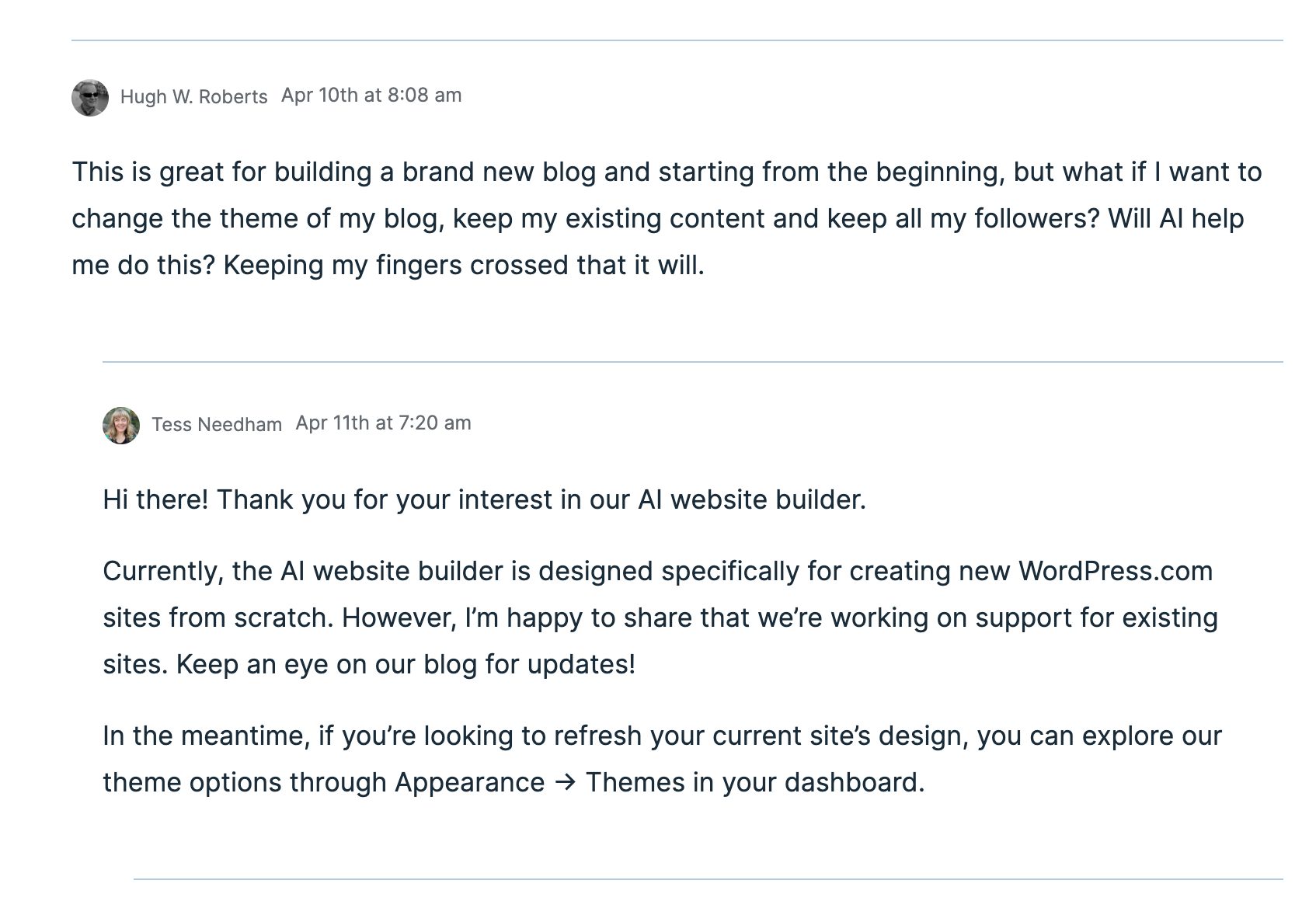
Given that I’m not confident about changing my blog’s theme from my current theme to a full-site-editing theme, I’m looking forward to AI doing the work for me. I just hope it’s something I’ll be able to do sooner rather than later.
Recommended reading about AI in blogging from other bloggers.
If you want a guide on AI on WordPress, check out this excellent article from Fedora, ‘A Guide To WordPress.Com’s AI Assistant.’
This post from Debbie at Deb’s World, “Reinventing Blogging: A Look into the Future,” dives into the controversial realm of AI in blogging, and trust me, it’s a must-read that has ignited plenty of debate. Are you ready to jump into the fray and add your voice to the discussion?
Would you use and trust AI to help change your blog’s theme? Are you still using an outdated, unsupported theme and experiencing problems? Are you someone who will never use AI, even if it means the problems you’re experiencing with your blog will continue? Drop your thoughts in the comments, and let’s chat!
The featured image of this blog post was generated using the WordPress AI blocks.
I’m getting tough with non-engaging comments. Any non-engaging comments such as ‘Nice post’ are marked as spam.
Click the buttons below to follow Hugh on Social Media
Copyright @ 2025 hughsviewsandnews.com – All rights reserved.
Discover more from Hugh's Views & News
Subscribe to get the latest posts sent to your email.
 Hugh's Views & News
I don’t know what AI is exactly, or what good it is. I’ve been a writer (or trying to) for decades; I like to think I know how to write, so what would AI do? This isn’t being critical, it is a genuine curious inquiry.
AI works like other software in that it can help detect spelling and grammar mistakes and help when researching a subject. It has lots of other uses too. It’s part of a modern world but people can take it or leave it. I use it to help when researching a post and with spelling and grammar as well as getting it come up with suggestions for blog posts titles and images.
Oh boy, Hugh! This is very exciting news! Like you, I have not switched over to Block because I find it rather cumbersome. I can’t begin to tell you how many times I have considered it, and then didn’t do anything about it!
You mentioned that the AI assistance is currently for new blogs; yes, let’s hope WordPress is going to let us know soon about the tools we can use for those of us who already have our blogs!
Thank you, dear Hugh! I really appreciate this very interesting information! Cher xoxoxo
I’m glad the information in this post was helpful, Cher.
As and when I hear from WordPress that changing themes via AI is available for those of us who already have a blog, I’ll be sure to publish a post with the information. It’s certainly going to be a big help for those of us who do not want to mess up our blogs and then find we can’t get things back to how they were. That’s why it is important to ensure the current theme we use is still active so we can go back to it if all else fails.
It might help blogger growing their reach to more people and also, I wanted to know more about your way of increasing traffic in your websites and blogs, if comfortable, I am will be greatful if you reach out to me for the suggestions, 😉
Have a look at the posts under ‘Blogging Tips’ on the menu bar of my blog. I’ve written many posts that will help.
A most interesting post, Hugh. I might try AI to create a theme, but I would start another blog as an experiment. My current theme is a Full Site Editing block theme, and WP has come a long way these themes. It’s like putting a puzzle together and I have fun tinkering with it. You have more control with the appearance of your blog using a Full Site Editing (FSE) theme. There are various patterns you can choose from. I can alter my current theme, using patterns and there are endless choices of color palettes.
Also, I enjoy the preview feature for themes. You can see what they look like without activating them.
I want to build my site but not using AI. Maybe some day when I have time.
If you’re starting a new blog, AI can already create a theme for you, Eugi. Unfortunately, it isn’t yet available for those of us wanting to change themes.
I’ve looked many times at the various Full-Site-Editing themes, and some did not come with a preview. I’m not confident yet to switch my theme to a FSE theme. When the time comes that AI can help me switch, I’ll certainly give it a go. For now, I will have to wait.
Yes, best to wait until you’re ready, Hugh. Your blog looks very nice and organized with your current theme.
I’ve embarrassed to say, at my young age, I am terrible with the themes. I use the mobile app for the majority of time so I’m not sure the themes matter much on there. I mist actually take a look at my blog theme on my desktop some day soon. Great post again Hugh!
If you are happy with your blog’s theme and it works well, you don’t need to change it, Wayne. However, if you start encountering problems with your blog and the theme is retired, the only way to resolve those issues will be to change the theme.
Absolutely Hugh!
Thanks for the shout-out and link to my post Hugh, it’s much appreciated! I’m open to using AI for some things and like the idea of changing themes using new AI enhancements when it becomes available. It is a big thing to change themes isn’t it? My creative story was helped along a bit by AI as I disclosed in my post and I’m getting better at knowing what to ask for, as you pointed out in creating the image for your post.
Quick question – how do bloggers know if the theme they’re using is still supported?
Thanks again and great to read your posts as always!
Hi Debbie, users can go to Appearance – Themes on their blog dashboard, and if the theme they are using is retired, they will see a message telling them so. No message means the theme is still fully supported by WordPress.
Changing a blog theme used to take days to achieve, but over the years, it has become much easier. However, the introduction of Block themes a few years ago caused many problems, most of which have been sorted out. But I’m still not confident enough to switch to a Block theme just yet. I will be willing to get help from AI to switch themes once WordPress makes it available. For now, I will continue to use the fully supported Classic theme I use.
So this was timely. I was SO sad to have to let go my retired theme and abhOr the block editing the newer options call for. I’ve been languishing in cyperpurgatory, unsure whether to keep or toss my current theme and then had planned to dive back into a retired theme (or one that’s slated for retirement) for the Classic editing I miss. GAK! I’ve wanted to leave WP but of course would never leave my readers. Thanks for the update on AI although it doesn’t remedy my current predicament.
WordPress still offers fully supported Classic themes. My advice is to choose one of the available themes rather than continue using a retired Classic theme that may cause problems. While the number of available Classic themes is much smaller compared to Block themes, for now, WordPress is still offering them to users.
Hi Hugh, another informative post! I use the classic widget with my TweakMe theme. I use a block editor on my newsletter, but I am just not willing to tackle a block editor for the blog…yet. I’ll be keeping an eye out for related posts from you.
Hi Gina, WordPress still offers many fully supported classic themes. I asked a few years ago if they’d be retiring all Classic themes, and although they encouraged me to move to a Block theme, they said that they would keep some Classic themes available, but there wouldn’t be nearly as much choice compared to Block themes.
If anyone still uses a retired Classic theme and doesn’t want to switch to a Block theme just yet, I’d recommend switching to a fully supported Classic theme.
FYI, I had to log in to post my comment. I’m on my desktop computer. Weird!
Try clearing the cache and cookies on your computer. Clearing everything out always helps me when I encounter problems logging in to any website.
I always enjoy reading your latest blog how-to posts, Hugh! Why are people so afraid of AI? Its a TOOL. The deception people remark on can be generated by anything. People exaggerate their lives on social media, blogs, etc, putting forth the best of themselves; we all do it. Isn’t that deception to a degree? Using AI-generated helps, words and images is no more deceptive than using Grammarly or photoshop. In any case, I’m always up for the latest and best tech available. I admit, I’m not an early adopter, but I’m next in line once I see results.
So…how does one know if their current WP theme is supported? I’m still using Apostrophe 2 which also has the right sidebar. Yes I see anonymous comments again lately, and sometimes I have to “log-in to a post to comment, having just left another blog where I successfully left the comment. Is that related to themes? I’m not sure. Will glitches continue with a new theme? I could ask AI? LOL!
I hope you enjoyed a relaxing Easter. We don’t celebrate Easter Monday here. Easter Sunday was busy enough. That’s why I posted Sunday Stills today, instead of Easter, LOL! Have a great week!
Likewise, I use AI as a tool, Terri. I’ve found it much better at spotting spelling and grammar mistakes than Grammarly. It doesn’t always get images right, but that might be due to my not providing AI with enough information. It’s also excellent at helping me create titles for blog posts, although the title of this post is entirely my own work. Can you recall how frightened many bloggers were when the Block editor was introduced? Now, most WordPress users utilise the Block editor. I think using AI will go the same way in the blogging world.
To determine if the theme you are currently using is retired, navigate to Appearance – Themes on your blog’s dashboard. It will display your current theme and indicate whether it is retired. You’ll receive a message like ‘Your theme is now retired,’ if it is no longer supported. However, although most themes are now block-related, many classic themes are still available.
Have you tried clearing the cache and cookies on your device? I find that doing so stops the issue of being asked to log in. Regarding anonymous comments, my blog’s settings are configured so that readers do not need to be logged in to leave a comment; therefore, they will appear as ‘Anonymous. ‘
Easter was lovely. I used to love the four-day weekend even more when I was working. Now that I’m retired, every day is like a weekend.
Good call about clearing the cache on my desktop, Hugh. I’m on my phone now with Jetpack. My Microsoft account uses copilot AI which seems good and making those pesky grammar corrections. It appears my theme is supported. I think Jetpack is acting weird. I started to leave a comment on a post using her link via Jetpack. I was asked to log in. I copied my comment, then opened her post through email, and everything was normal. Maybe I need to update Jetpack 🤔
I thought WordPress automatically updated Jetpack for WordPress.Com users, Terri. But I could be wrong. It’s definitely worth ensuring all software is updated, though.
Apparently it does. Now my internet is down. 🙄
I hope it all got sorted, Terri.
Not sure about this, WP uses AI to censor your post. Either they have gone full woke, or the AI has.
I’m not aware of that. I’ve not read or heard that WordPress uses AI to censor posts. In any case, I’ve nothing to hide, so if they do, I can’t see it being a problem. I’ve been blogging with WordPress for over 11 years, and so far, I’ve never had a post censored by them.
I’ve used them for 12 years and that was the first time. I tried their AI generated title a while back and the word murder Hornets was in the post. AI would not generate a title because of that one word, nor would it generate a picture. I emailed them about this but have not recieved a reply. I have used their AI for pictures in the past and had no problems. Also, I have seen post that should have been censored but were not.
You can report posts to WordPress. Fortunately, I’ve never had to do this, but I would certainly do it if I came across anything that I believe should not be online.
Thank you, I will do that in the future. I started blogging in 2008 on a different platform. WordPress, even with its glitches is the best platform.
I agree. It’s the best blogging platform out there.
This is a very interesting development. Thank you for highlighting it, Hugh, and for also making us aware that it’s for new blogs at the moment. I’m sure it won’t take them too long before it’s available to current blog users for their existing blogs. Your blog always looks eye-catching.
Thank you, Esther. I’m still using a Classic theme, but it’s still active and supported by WordPress. I hope they don’t retire it before I switch to a Block theme. Once the AI can make the switch, I’ll give it a go.
Hi Hilugh, I had the same thoughts as you about getting AI to redesign my site. Guess I’ll be waiting with you. I’ve set a date to start publishing again. I guess I could tinker with designs before then but its a big gamble to get it right.
Yes, especially if you are still using one of the retired themes, Brenda. You can’t go back to a retired theme, but you can go back to a supported theme if you don’t like the results of any new themes you have tried.
It’ll be good to see you back in the blogging world.
I think my theme is still active, so thats something.
It’ll be good to be back … im looking forward to being back 🙂
I haven’t had to confidence to change either, Hugh, but this sounds almost too good to be true! I’d definitely look in it when it becomes available.
I’m looking forward to letting AI do all the work for me when changing my theme next, Cathy. Provided we tell it exactly what we want from the theme, I’m sure it’ll do a good job and also make any tweaks we ask it to after it provides the results. I think it will save us a lot of time and stress.
I like that feature image at the top, Hugh. I’m not against using AI in the future, but I’m holding off for now. I also feel that when someone uses AI, they should disclose this, so their readers are not “deceived.”
When it comes to these new AI functions and creations, I’d rather wait until the issues have been resolved than jump on the bandwagon early. Let it pass the beta stage. :)
The featured image was created by the AI that WordPress offers, Liesbet. However, it took me seven attempts to get the image I wanted, probably because I wasn’t giving it all the information I wanted. Some of the images were rather strange, including one of a figure without a head! I think WordPress still has work to do on its AI software.
I also use AI for spelling and grammar issues. I find it works much better than Grammarly.
I agree with not using new software straightaway, but I am quite excited about AI creating a blog theme for me. Given that it’s already working for those wanting a brand new blog, hopefully, most of the bugs will have been ironed out.