Have you noticed the new feature WordPress has added to your blog’s dashboard? It’s located on the ‘My Home‘ page in the top right corner.

But what does this new feature do?
Light blue image with the words 'How To Use This New Easy Feature For Your Blog's Settings On WordPress' in white text.
This new ‘settings’ feature is easy to use. But what does it do?

For this post, I’m using an Apple iMac desktop computer and the ‘Default‘ view setting of my blog’s dashboard.

Image highlighting the new blog settings feature on WordPress
You’ll find this new feature on the ‘My Home’ page of your blog’s dashboard

Let’s get started

  • Click on the meatball menu (three horizontal dots) to open a new menu.
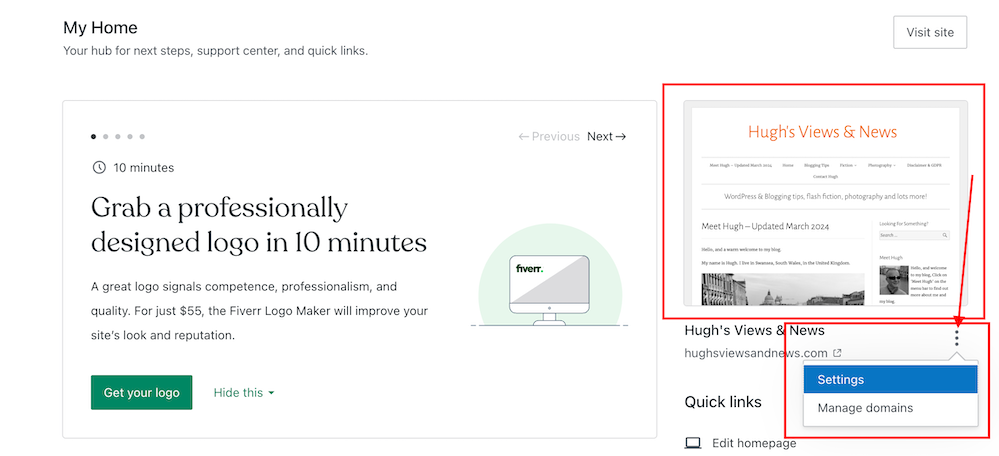
Image highlighting the kebab settings and new menu on the new blog settings feature on WordPress
Click the kebab menu to open a new menu

The menu contains two options – Settings and Manage Domains.

Let’s take a look at the two options

  1. Settings – this option takes you to the General Settings page of your blog.

You can make many changes to your blog on this page, including your blog’s icon (photo or image), name, and tagline.

Image highlighting where to edit your WordPress blog's icon, title and tagline
Edit your blog’s icon, title and tagline
  • Click the ‘Save Settings‘ button if you make any changes.

On the same page, you can also create a logo for your blog via Fiverr logo maker (note that there is a charge for this) and set/change your blog’s primary language and timezone. Remember to save any changes you make.

Another option includes setting privacy settings for your blog.

Privacy – This is where you can set your blog to public viewing (anyone can view it) or private viewing (only visible to you and logged-in members you have approved to view it). There is also a ‘Coming Soon‘ option, so your blog is hidden from view until it’s ready for viewing.

Image showing the 'Privacy' settings on a WordPress blog
Set privacy settings for your blog

Two other options are also available.

If ticked, the ‘Discourage search engines from indexing this site‘ option will prevent search engines from indexing your blog, but note that it is up to search engines to honour your request.

The ‘Prevent third-party sharing‘ option should be ticked if you want to restrict your blog’s content from AI training and third-party use. It will exclude your blog’s public content from WordPress’s network of third-party content and research partners. It also adds known AI bots to the ‘disallow’ list in your blog’s robots.txt file to stop them from crawling your site, though it is up to AI platforms to honour this request.

Click the ‘Save Settings‘ button if you make any changes.

Other settings include –

Accept a gift subscription – turn this setting on to accept gift subscriptions from visitors to your blog.

Footer credit: Here, you can choose or edit a footer credit that appears at the bottom of your blog’s pages and posts.

Site tools – this section allows you to do the following.

  • Register a new domain or change your blog’s URL address.
  • Transfer your blog to another blogging provider.
  • You can reset your blog and start afresh while keeping the same domain/blog name. (If you choose this option, all your posts, pages, and media will be deleted).
  • Delete your blog and give up your blog’s domain/address.

2. Manage Domains — This option takes you to the part of your blog where you can manage your blog’s domains.

It’s worth checking this page to see what domains you have and to see offers for other domains you may be interested in purchasing for your blog.

While you may not visit your blog’s settings page regularly, it’s worth knowing that there is now an even quicker way to find these settings.

Any questions? Leave them in the comments section.

Did you enjoy this post? Then you may also like –

Layout, content, settings, and format might differ on self-hosted blogs.

Click the buttons below to follow Hugh on Social Media

Copyright @ 2024 hughsviewsandnews.com – All rights reserved.


Discover more from Hugh’s Views & News  

Subscribe to get the latest posts sent to your email.

38 responses to “How To Use This New Easy Feature For Your Blog’s Settings On WordPress.”

  1. Y3 Story Chat Summary #16: “Cruising at Half Speed” by Suzanne Vickery – Marsha Ingrao – Always Write avatar

    […] top on for the remainder of the holiday. Okay, so I’m a prude. Happy to be so! Hahahaha!”Hugh’s Views and News “It’s nice to have a bit of comedy on Story Chat, and this short story did not disappoint. […]

  2. Marsha avatar

    I think admin is part of the fun of blogging in that it’s like putting your own creative spin on the blog. That’s what makes our blogs so different from each others. However, like housekeeping to keep our homes sparkling and interesting, our blogs need updating, too. Thanks for sharing, Hugh! :)

    1. Hugh W. Roberts avatar

      I’ve been following some blogs that haven’t changed in the 10 years I’ve blogged, Marsha. They all look very outdated now. Some I ditched because of so many broken links and technical bugs. I don’t know why some bloggers don’t feel the need to keep their blogs updated and in good order.

      1. Marsha avatar

        WordPress provides lots of reasons to update. Mostly, they quit working right. I’m sad about all the problems that Charli has had with her blog. She is a force in the blogging world.

        1. Hugh W. Roberts avatar

          I miss Charli so much. I’m not 100% sure, but I think she moved to another blogging provider. Some of her community are still here, and I’m sure they’ll let us know once her blog is up and running again.

          1. Marsha avatar

            I hope so! I miss her too!

Feel free to leave a comment. Engagement helps keep blogs alive and forms community.

I’m Hugh

Welcome to my blog. I’m delighted to have you here. This is the place to discover tips on blogging and WordPress, flash fiction, photography, and more. I enjoy engaging with my readers, so please feel free to explore, join discussions, and contact me. I’m happy to assist! Find out more about me and my blog by clicking the ‘Meet Hugh’ button.

Let’s connect

Subscribe to Hugh’s Views And News

Latest Posts

Follow Hugh in the Fediverse

Hugh's Views & News  
Hugh's Views & News  
@hughsviewsandnews.com@hughsviewsandnews.com

WordPress & Blogging tips, flash fiction, photography and lots more!

403 posts
6 followers

Recommend Blogs To Follow


Boomer Eco Crusader
Boomer Eco Crusader
Live Green | Declutter | Simplify Life

Jacqueline Lambert
Jacqueline Lambert
Award-Winning Travel Humour Writer

Spo-Reflections
Spo-Reflections
To live is to battle with trolls in the vaults of heart and brain. To write; this is to sit in judgment over one's Self. Henrik Ibsen

Anne R. Allen’s Blog… with Ruth Harris
Writing about writing. Mostly.

Fancying France
The musings of a ‘femme d’un certain âge’ who divides her time between SW France and SE England

SONGS AND SCRIPTS AND DUNKING BISCUITS
Every day tales of a winging-it creative

Marsha Ingrao         Always Write
Marsha Ingrao Always Write
Having fun blogging with friends

Curiosities, Castles and Coffee Shops
The musings of a curious mind

WrookieSchU
WrookieSchU
Live life 🙌🏼

WPcomMaven
WPcomMaven
Helping you make the most of your free WordPress.com website since 2011

Second Wind Leisure Perspectives
Fun, Photography & Friends

Share Your Light
Share Your Light
You are a miracle – Let it happen

No Facilities
No Facilities
Random thoughts, life lessons, hopes and dreams

Esther Chilton
Writer, Tutor and Editor

Roaming About
A Life Less Ordinary

Saying nothing in particular
Jan … JT Twissel

The Chicago Files
The Chicago Files
A Canadian Perspective on Living in the Windy City!

Thank you to all my visitors

469,688 hits

253,008 visitors

Most Viewed Posts & Pages

Copyright Protected Blog

COPYRIGHT ©2011-2031 Hugh’s Views And News BLOG – All Rights Reserved.

This work by Hugh W. Roberts, and/or Hugh’s Views And News blog, is licensed under a Creative Commons Attribution-Noncommercial-NoDerivatives 4.0 International License. Unauthorised use and/or duplication of this material (text and images) without express and written permission from this blog’s author and/or owner is strictly prohibited. If you want to use posts, excerpts, photos and links, you may contact me first. You must give full and clear credit to Hugh W. Roberts and Hugh’s Views And News dot com with links to the original content.








