3 Quick And Easy Ways To Promote Your Old Blog Posts

Are there easy ways to promote your old blog posts, and should you feature them on your blog again?

Can old blog posts bring in more visitors, followers and comments?

The answer is YES.

Light blue image with the words '3 Quick And Easy Ways To Promote Your Old Blog Posts' in white text
Have you killed off your old blog posts?

One of the biggest mistakes many bloggers make is forgetting their old blog posts. They publish posts and quickly forget about them.

Yet, If they’ve been regularly publishing blog posts, their blog archive will be a treasure trove of opportunities waiting for them to bring posts alive again. Just think about all those followers, readers and visitors who have never seen those posts.

Rather than ignoring these old blog posts, there are ways to bring them back to the attention of your audience.

These old blog posts probably never got anywhere near as many views and comments as your recent blog posts, but did you know that they could quickly bring you many more views, comments and followers?

My three quick and easy tips for bringing these old blog posts back to life are easy to follow and will deliver results as soon as you implement them.

1. Display ‘related’ posts at the end of all your blog posts. 

I’m always surprised by how many WordPress bloggers don’t have this feature switched on.

Here’s a screenshot of the related posts that featured at the end of one of my recent blog posts. 
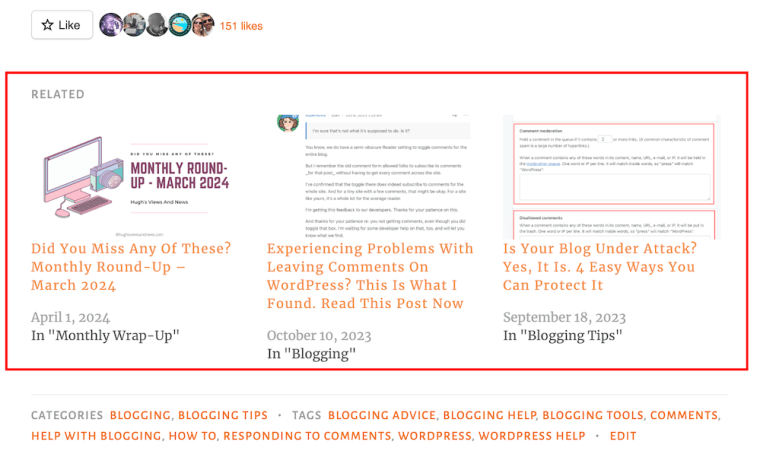
Image highlighting 'related' blog posts at the end of a blog post.
Promote similar older blog posts at the end of new blog posts.

WordPress automatically chooses which of your posts to display. 

If you’re not already showing related blog posts at the end of newly published blog posts, follow this guide.

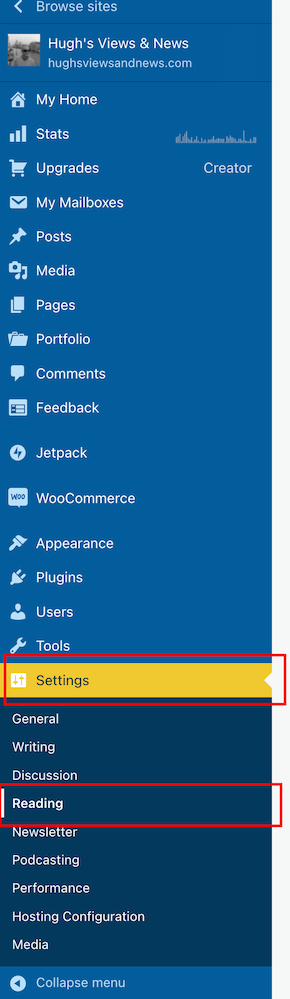
  • On the dashboard of your blog, click on Settings and Reading
Image highlighting 'Settings - Reading' on the dashboard of a WordPress blog.
Select ‘Settings’ – ‘Reading’
  • On the Reading Settings page, look for Related Posts and ensure ‘Show Related Content After Posts’ is switched on.
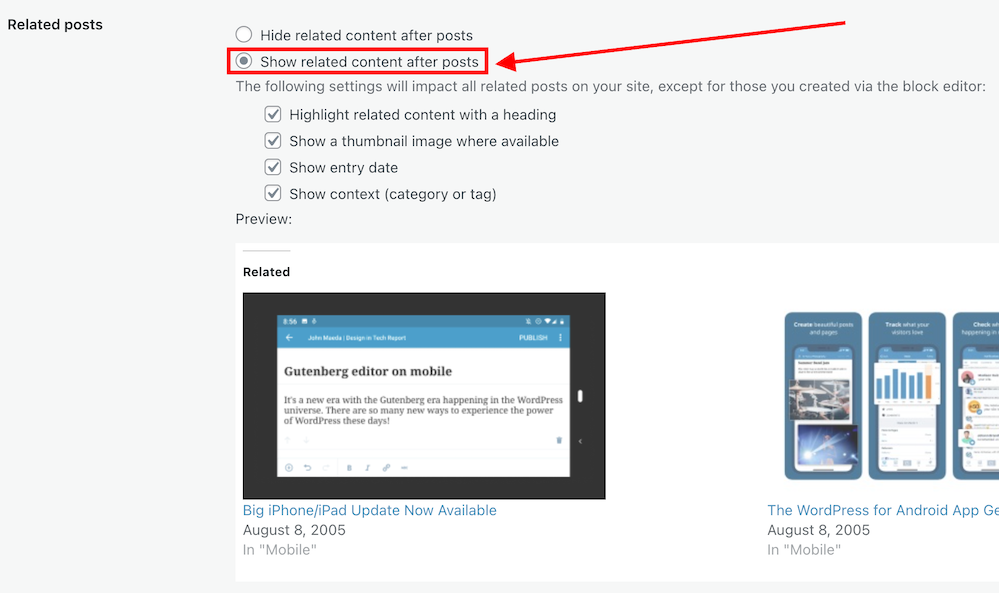
Image highlighting the 'Show related content after posts' option on WordPress
Switch on ‘Show related content after posts.’
  • Choose which other settings options you want to use.
  • At the bottom of the screen, click on the Save Changes button.
  • Future posts will now display three related posts from your archives, resulting in those posts being seen again. 

2. The ‘Blog Posts’ Block

Those using the Block Editor can use a terrific block called the’ Blog Posts’ block. It allows bloggers to choose which of their previous blog posts to promote on newly published posts.

  • Insert the ‘Blog Posts’ block in the place where you’d like to feature it on your upcoming new post. You’ll find the ‘Blog Posts’ block under the ‘Widgets’ section, or you can search for it by entering ‘Blog Posts’ in the search bar.  
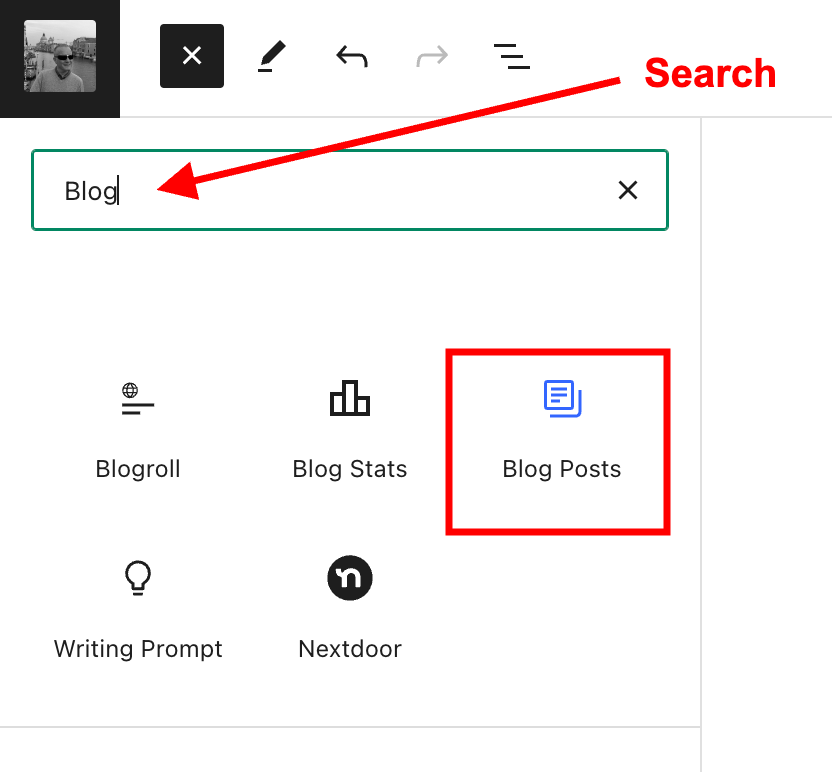
Image highlighting the search box when searching for a block, and the Blog Posts block.
Select the ‘Blog Posts’ block
  • The Blog Posts block defaults to showing the last three blog posts you published, but you can change this. You can leave it as it is or switch to other settings.
  • Today, I will show you how to choose the blog posts you want to display.  
  • When you insert the block, a toolbar will open on the right-hand side of the page. Under Display Settings, look for Choose specific posts and slide the button to the ‘on‘ position. 
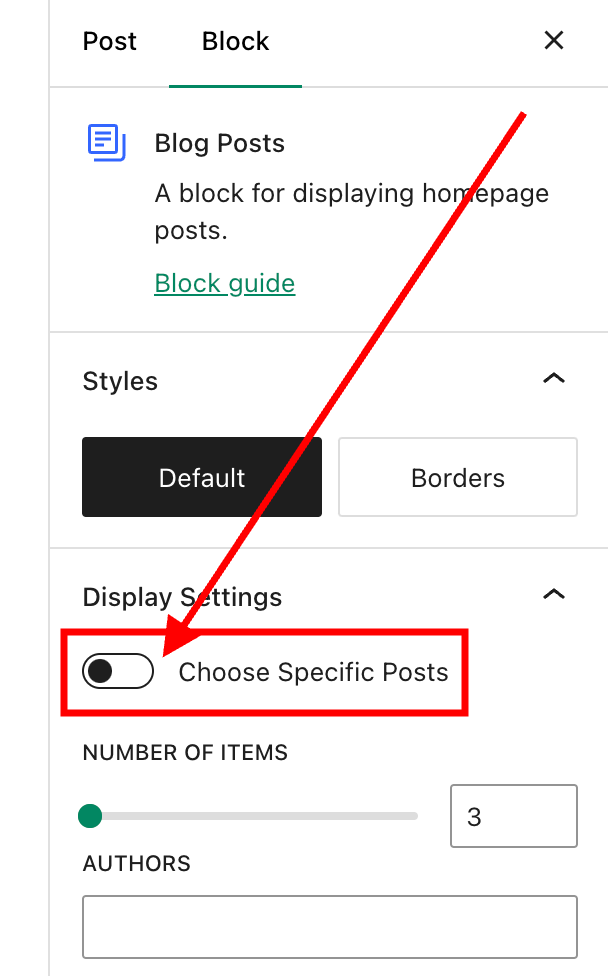
Image highlighting the 'Choose Specific Posts' option on WordPress
Switch on the ‘Choose Specific Posts’ option
  • In the ‘Posts‘ box, type in the blog post title you want to display. As you type, suggestions for blog posts with the words you are using will appear. 
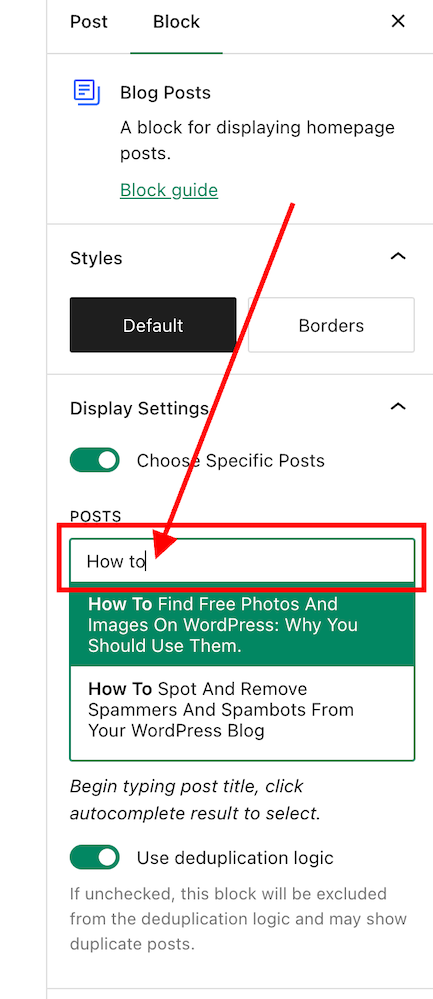
Image highlighting the search box in the Blog Posts block on WordPress
Search for the posts you want to promote on your new blog post.
  • Select the blog post you want to feature.
  • If you’re going to add more blog posts, search for them by typing in more words in the Posts box.
  • I recommend that you add no more than three posts. 
  • The Blog Posts block has many other settings, which you can read about here.

3. Add pingbacks to previous blog posts. 

If you’re unsure what a pingback is or how to add it to blog posts, my post, ‘The Power Of Pingbacks: How To Create One,’ will help.

There’s nothing wrong with adding pingbacks and linking back to your previous blog posts. Lots of bloggers do it.

In fact, I recommend that you include at least a couple of pingbacks in all your blog posts. However, you should always ensure that what you’re writing about is connected to the post you’re linking back to.

Pingbacks can also be added to images, pictures, and photos in blog posts and captions.

Let’s wrap it up!

  • Your blog’s archives are a treasure trove of blog posts that can attract new visitors, comments, and followers.
  • Don’t allow old blog posts to remain idle and not work for you. Use them.
  • Your previous blog posts may not have been read by new followers. Introduce them to your new audience.
  • People who may have read your older posts are often thankful for the opportunity to read them again, especially if the post includes tips and advice.
  • Ensure you keep old blog posts up to date.
  • WordPress has made several blocks available on the Block editor to promote old blog posts. The ‘Blog Posts’ block is just one of those blocks.
  • Consider switching it on if you’re not already using the ‘Related Posts’ feature.
  • Remember that you can create pingbacks to old blog posts from any images or photos in future blog posts.

Do you promote your old blog posts? If not, why not? How do you promote them? What way(s) of promoting old blog posts have worked best for you? Have you had much success promoting old blog posts?

Any questions about this post? Leave them in the comments box.

Layout, content, settings, and format might differ on self-hosted blogs.

Follow Hugh on social media. Click the buttons below.

Subscribe to receive further updates from Hugh

Copyright @ 2024 hughsviewsandnews.com – All rights reserved.


Discover more from Hugh’s Views & News  

Subscribe to get the latest posts sent to your email.

53 responses to “3 Quick And Easy Ways To Promote Your Old Blog Posts”

  1.  avatar
    Anonymous

    these are great ideas, the blog post option in the editor is new to me. One thing I did a couple of times was to copy the post and make a new one based on the old post. Then delete the old post. I did this for posts that had very few views in the beginning. They were good posts, but at the time I published them I didn’t have followers.

    I

    1. Hugh W. Roberts avatar

      You can copy posts by going to the posts page of your blog and clicking on the three horizontal dots next to the post you want to copy. Click the copy post option from the menu that opens.

      9 Hidden Useful Tools You May Not Know About On The Posts Page Of A WordPress Blog

  2. D. Wallace Peach avatar

    Great tips, Hugh. All so simple too. I need to remember to ping back to old posts. I rarely do that and its an easy one. :-)

    1. Hugh W. Roberts avatar

      Yes, it’s the remember to do it that can be the problem. What I tend to do is as I’m writing a post, if one comes to mind that is of a similar theme, I’ll write the title of that post in the draft and create a pingback to it.

      1. D. Wallace Peach avatar

        :-) It’s a great idea and so easy.

  3. Paul Ariss avatar
    Paul Ariss

    I may take your advice on that Hugh 😏

    1. Hugh W. Roberts avatar

      I sometimes publish posts on a Saturday, and they never do as well as the ones I publish in the week. For me, Mondays seem to be the best day to publish posts.

  4. Paul Ariss avatar
    Paul Ariss

    I published a blog in November 2022 about a local community theatre group and it landed with an absolute thud. I considered it one of my best written blogs and was really disappointed when I got two likes and two comments. I thought about quitting blogging soon afterwards. I even sent it to the community theatre group in question via Messenger on Facebook – they saw it and ignored it without comment.

    Then on Sunday I took a photograph which related to a dispute they are having with the local council, and posted it on FB in support of the theatre group (probably more than they deserved) and a link to the blog from 2022. Possibly because it suits them in their current dispute they posted the blog to all of their followers and I’ve had 132 views in two days, far more than I would normally get and it dwarfed the tepid response I originally got.

    So you’re right of course, there is life in old blogs. It also shows the power of promotion at the right time, from the right sources.

    1. Hugh W. Roberts avatar

      I agree, Paul. It can also go down to the day of the week and time something goes live. When I first started blogging, weekends were always busy with new posts and comments. But I’ve seen that change over the years, and weekends seem to be very quiet in the blogging world now. So the success of posts also goes down to when they are published. That’s why it’s a great idea to bring older posts back to life again and give them another outing.

  5. Did You Miss Any Of These? Monthly Round-Up - April 2024 avatar

    […] 3 Quick And Easy Ways To Promote Your Old Blog Posts […]

  6. Y3 Story Chat Summary #13: “In Search of Light” by Miriam Hurdle – Marsha Ingrao – Always Write avatar

    […] Hugh’s Views and News “When I first read your story, Miriam, although it was an enjoyable read, my reaction was ‘Is that it?’ I’ll be honest and say I was expecting a full story, so it wasn’t until I read the comments that I found out that your story is a part of a book you’re writing. Nothing wrong with that, but I’d have preferred to have known that information first. When I found out, I read the story again and it was more enjoyable. Although I found the characters likeable, the clip you shared with us didn’t set my mind on fire. I guess because there were no elements of surprise in the clip. It was all on one level. No peaks or toughs, apart from when I found out that these two children were the subject of abuse. However, knowing there is a lot more to this story, I’m keen to know more about their backstory, plus that of the father and stepfather. ‘Cinderella’ came to mind as I read, although I did ask myself that if Kyla loved Cole so much, surly she would have taken him with her and away from the abusive stepmother. But perhaps we’ll find out the answer to that question in the novel? Welcome to ‘Story Chat’, and thank you for sharing your writing with us, Miriam.” […]

  7. Marsha avatar

    I love this tip, Hugh. I’m featuring it on Story Chat. As long as I have been blogging, I still learn something helpful when I read your tips. Well done, my friend. :)

    1. Hugh W. Roberts avatar

      Good to hear, Marsha. I’m always delighted when somebody tells me that I’ve taught them something new with blogging.

      1. Marsha avatar

        You do a great service for all of us. Most of us don’t take the time to research when things change – for the better or worse. We complain, or we don’t make use of new technology. I’m glad I have Story Chat to highlight some of your great posts, Hugh. :)

  8. Mac's Opinion avatar

    These are all very great SEO tactics also. I make sure to link to a previous post within the content of a new post, I always have ‘related’ posts activated that will display thumbnails and excerpts of related posts at the end of my posts.

    I keep forgetting that you can actually embed an old post into new ones that are like thumbnail and excerpts and I’ve been meaning to do that in all my newer posts. You just reminded me about them again, LOL! It’s like a card within your newest posts and I keep forgetting to use it.

    1. Hugh W. Roberts avatar

      I used to use the blog post’s block a lot, but somehow fell out with it. It was while drafting this post that I remembered it. Now I just need to remember to keep using it on all posts. So far, so good.

  9. Sunday Reflections #7 – Perfect Manifesto avatar

    […] I read Hugh’s News and Views, and he has a very good post up sharing some ideas on how to promote old blog posts. […]

Leave a reply to Paul Ariss Cancel reply

I’m Hugh

Welcome to my blog. I’m delighted to have you here. This is the place to discover tips on blogging and WordPress, flash fiction, photography, and more. I enjoy engaging with my readers, so please feel free to explore, join discussions, and contact me. I’m happy to assist! Find out more about me and my blog by clicking the ‘Meet Hugh’ button.

Let’s connect

Subscribe to Hugh’s Views And News

Latest Posts

Looking for your next quick read? Try my books

An image of book covers, book, tablet and mobile phone, for the book Glimpses.
An image for the book More Glimpses - showing a book cover, tablet and mobile phone.

Follow Hugh in the Fediverse

Hugh's Views & News  
Hugh's Views & News  
@hughsviewsandnews.com@hughsviewsandnews.com

WordPress & Blogging tips, flash fiction, photography and lots more!

300 posts
6 followers
A widget with the words 'Team Effort - Story Chat Digest - Where Authors Meet - Author'

Recommend Blogs To Follow


Boomer Eco Crusader
Boomer Eco Crusader
Live Green | Declutter | Simplify Life

Jacqueline Lambert
Jacqueline Lambert
Award-Winning Travel Humour Writer

Spo-Reflections
Spo-Reflections
To live is to battle with trolls in the vaults of heart and brain. To write; this is to sit in judgment over one's Self. Henrik Ibsen

Anne R. Allen’s Blog… with Ruth Harris
Writing about writing. Mostly.

Fancying France
The musings of a ‘femme d’un certain âge’ who divides her time between SW France and SE England

SONGS AND SCRIPTS AND DUNKING BISCUITS
Every day tales of a winging-it creative

Marsha Ingrao         Always Write
Marsha Ingrao Always Write
Having fun blogging with friends

Curiosities, Castles and Coffee Shops
The musings of a curious mind

WrookieSchU
WrookieSchU
Live life 🙌🏼

WPcomMaven
WPcomMaven
Helping you make the most of your free WordPress.com website since 2011

Second Wind Leisure Perspectives
Fun, Photography & Friends

Share Your Light
Share Your Light
You are a miracle – Let it happen

No Facilities
No Facilities
Random thoughts, life lessons, hopes and dreams

Esther Chilton
Writer, Tutor and Editor

Roaming About
A Life Less Ordinary

Saying nothing in particular
Jan … JT Twissel

The Chicago Files
The Chicago Files
A Canadian Perspective on Living in the Windy City!

Thank you to all my visitors

471,536 hits

254,495 visitors

Most Viewed Posts & Pages Over The Last 24 Hours

Copyright Protected Blog

COPYRIGHT ©2011-2031 Hugh’s Views And News BLOG – All Rights Reserved.

This work by Hugh W. Roberts, and/or Hugh’s Views And News blog, is licensed under a Creative Commons Attribution-Noncommercial-NoDerivatives 4.0 International License. Unauthorised use and/or duplication of this material (text and images) without express and written permission from this blog’s author and/or owner is strictly prohibited. If you want to use posts, excerpts, photos and links, you may contact me first. You must give full and clear credit to Hugh W. Roberts and Hugh’s Views And News dot com with links to the original content.