Every day, our blogs come under attack from various elements.

Just like protecting our families, pets, and anything else we value, we should do all we can to protect our blogs from threats.
Image with light blue background with the words 'Is Your Blog Under Attack? Yes, It Is. 4 Easy Ways You Can Protect It' in white text
Are you doing enough to protect your blog from threats?

Threats come in all sorts of forms, but there are a few simple steps you can put in place to keep your blog safe.

1. Comments

What do you do if you receive unfriendly comments or comments that do not agree with what you have said in your blog post?

I’ve blogged for nearly ten years, and, in that time, I have received a handful of comments that were not only very personal but were rude, racist or homophobic.  

Because I moderate all comments before they appear on my blog, I was able to stop these comments in their tracks. They were of the nature that did not call for a reply, and I simply marked them as spam and deleted them.

And it wasn’t only me that some of these unfriendly comments are aimed at.  

I often see rude, unfriendly comments and spam appear on other blogs. Not only can they be shocking in their nature, but in many cases, the very name of the commenter can also be very offensive. 

Unfortunately, Akismet, the WordPress software that blocks unwanted spam, doesn’t always catch all of it. So, monitoring all comments before they are published on your blog posts is worth considering. 

Follow these steps to set up monitoring comments.

For the purpose of this post, instructions are via the ‘Default” view of your blog’s dashboard.

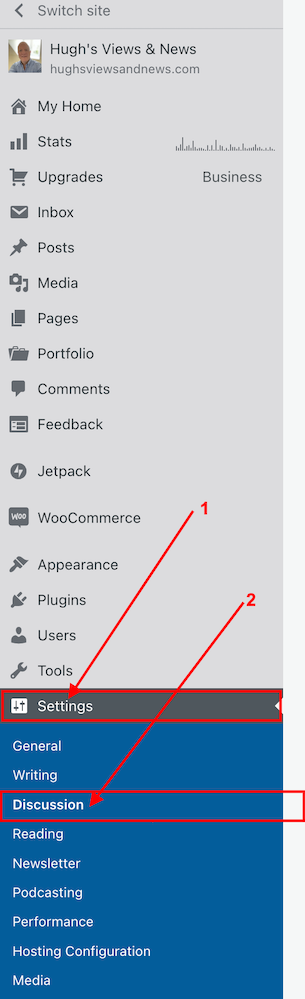
  • Click SettingsDiscussion on your blog’s dashboard.

Image highlighting the Settings and Discussion options on the dashboard of a WordPress blog.
Click Settings and Discussion
  • On the Discussion Settings page, scroll down to the ‘Before A Comment Appears‘ box and slide open the button next to ‘Comment must be manually approved.’
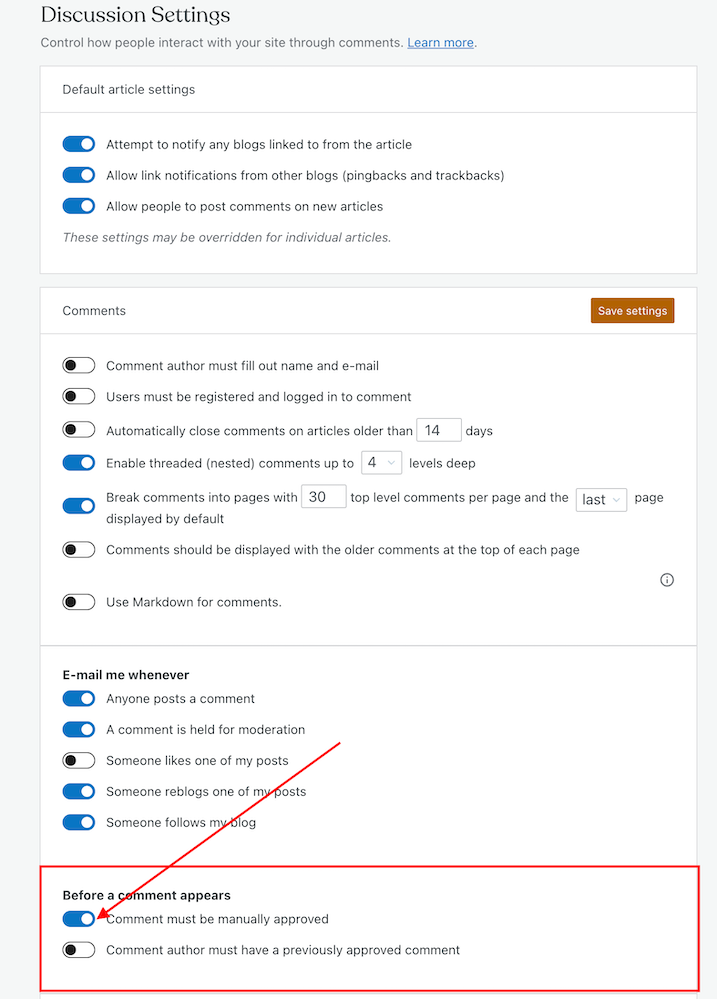
Image highlighting the 'Comment must be manually approved' button on the Discussion Settings page of a WordPress blog.
To approve all comments, select the ‘Comment must be manually approved’ button
  • Click on the ‘Save settings‘ button. 

You may also have noticed an option to allow comments to be posted straight away from people who have previously had comments approved by you. 
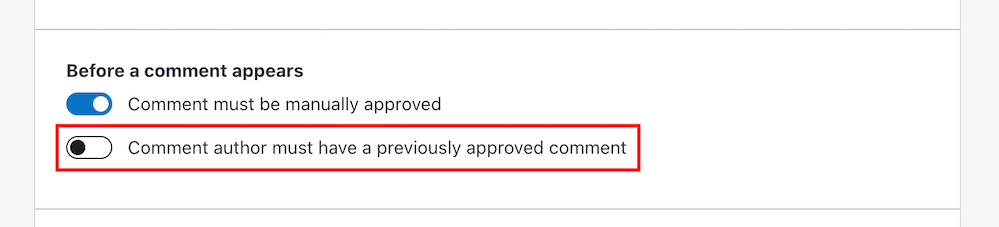
Image highlighting the 'Comment author must have previously approved comment' button on a WordPress blog.
Selecting the ‘Comment author must have previously approved comment’ means you don’t need to approve those comments.

For bloggers who are dealing with hundreds of comments daily, this is a great time-saving option as you don’t need to manually approve them. 

However, be wary. Somebody who may have left a perfectly friendly comment on an earlier post could also leave an unfriendly comment on a future one.

How to deal with people who don’t agree with you

Sometimes, I receive comments from people who may not agree with what I have to say, but that’s a part of the whole blogging experience. 

However, providing their comment has been written in a friendly and professional manner, I will approve it. 

Nobody should tolerate rudeness or bad manners, so don’t allow any of these kinds of comments to appear on your blog. 

If comments are unfriendly, rude or make you feel threatened, mark them as spam.

Allowing unfriendly, rude comments to appear on your blog can make your blog look unfriendly and unwelcoming, especially to new visitors.

And consider removing anyone who leaves a rude comment, or one that threatens you or another blogger, from your subscriber list. My post ‘How To Spot And Remove Spammers And Spambots From Your WordPress Blog‘ gives full details.

Look after your fellow bloggers

If you see a rude comment or one that is spam on a blog you follow, inform the blog’s owner of the problem. They’ll probably thank you for looking out for them.

How to block certain bloggers or readers from leaving comments

Further down the same page on the Discussion Settings dashboard, you’ll see two boxes entitled ‘Comment Moderation‘ and ‘Disallowed comments.’

Image highlighting the Comment moderation and Disallowed comments boxes on WordPress.
This is where you can blacklist other bloggers and comments

These boxes are where you can add certain words, the web address of a blog, the email address or the internet protocol of a user you want to block. 

Comments will be held in a moderation queue if they contain anything you have added to the Comment Moderation box.

Comments will be sent to the trash bin if they match anything you have added to the Disallowed Comments box.

2. Internet trolls

If you are unlucky enough to find that an internet troll has decided to try and make your blog their new home, ignore them. 

Whatever you do, don’t engage in any conversations with the internet troll. Whether through comments or if they try to contact you through your ‘contact me’ page, ignore them. 

Internet trolls will do all they can to get you to react to what they have said. They may even try to get some of your readers to engage with them by responding to comments they have left, so never approve their comments.

Don’t give internet trolls the satisfaction of acknowledging them in any shape or form. 

Remove any comments, and don’t allow them to upset you in any way. Add them to the ‘Disallowed Comments‘ box. They’ll soon get the message and move on.

3. Back-Up

How would you feel if you woke up one morning and found that all your blog content had disappeared? 

It’s the stuff of nightmares, so be kind to your blog and make sure you back up its content regularly.

Depending on your WordPress plan, your blog can be backed up via JetpackBackup on your blog’s dashboard. If you don’t have this facility, consider saving all your blog posts via an external server or hard drive.

If you’re already writing your blog posts on Word, Pages or any other writing software such as Grammarly, ensure you save the documents on the iCloud (if you have access) or on another hard drive.

Don’t lose all your hard work by not backing up your blog.  

4. Anti Virus Software

Always update anti-virus software on your device to protect your blog and ensure you have the latest version. 

If hackers can get access to well-known websites, then they may be able to get access to your computer\device.

Malware could allow cybercriminals to take control of your computer, log your keystrokes, or access your personal information and financial data, which could lead to identity theft. So, not only could your blog be at risk from hackers, but so could your bank details and other personal information.  

Remember to keep all other software on your computer up to date and use the latest software versions of any website you visit regularly.

WordPress.Com users will always have the latest version of WordPress as WordPress download updates directly. Those who have self-hosted blogs should ensure they have the latest updates installed. 

This all may sound nightmarish, and you may ask yourself who would want to attack your blog, but every blogger should take it seriously. Don’t become a victim. 

However, whatever you do, keep enjoying your blogging experience. 

Although attacks on our blogs are happening constantly, your anti-virus software (and the software supplied by WordPress) deals with most threats without you knowing about it.

Let’s Wrap It Up.

  • Make sure you protect your blog from any online attacks.
  • Don’t approve any comments that are unfriendly, rude, or racist towards you or any other bloggers.
  • Consider moderating all comments before they appear on your blog.
  • People may disagree with what you say in your posts. Only approve their comments if they’ve been written in a friendly and professional manner.
  • Unsubscribe and or/block trolls and unfriendly readers from your blog.
  • Never respond to comments from trolls or allow their comments to appear on your blog.
  • Remember to regularly back up your blog or save your blog posts on an external hard drive.
  • Keep anti-virus software updated on your devices.
  • Ensure you’re using the latest version and tools of WordPress.

Is there anything else you’d like to share with us about protecting your blog from unwanted attention and attacks? Do you have any questions? Join the discussion by leaving me a comment with the details.

Layout, content, settings, and format might differ on self-hosted blogs.

Follow Hugh on Social Media. Click on the links below.

If you enjoyed this post and want more like it, enter your email address and click ‘Subscribe’ to stay up-to-date with my latest content.

Copyright @ 2024 hughsviewsandnews.com – All rights reserved.


Discover more from Hugh’s Views & News  

Subscribe to get the latest posts sent to your email.

40 responses to “Is Your Blog Under Attack? Yes, It Is. 4 Easy Ways You Can Protect It”

  1. Resa avatar

    Great tips, thank you!

    1. Hugh W. Roberts avatar
  2. CarolCooks2 avatar

    Hello Hugh I hope you are keeping well it’s definitely a constant battle with scammers and bots I apply most of what you recommended and it works they seem to have gotten fed up with comments and now target my contact me so I just spam them and the message is getting through…:)

    1. Hugh W. Roberts avatar

      There’s been a dramatic drop in the amount of spam my blog gets, Carol. I get about one spam comment a week now. I’m not sure what WordPress did behind the scenes to get rid of all the spam, but it’s a welcome change.
      I never engage with spammers in any form. They dislike being ignored and usually move on if they don’t get a bite. Of course, spambots are a different breed of spammers, but I ignore them too.

  3. John Maberry avatar

    Thanks for the tips.
    I am on a self-hosted site with an excellent service and use Wordfence to keep away hackers–it includes country blocking options for those locations for the worst offenders. I can easily block people, URLs, etc., either via WP discussion options or Wordfence as necessary.
    Akismet works well enough for me 95 plus of the time and the spam is easily trashed. I don’t get rude comments either and make use of the previously posted comments.

    1. Hugh W. Roberts avatar

      Good to hear you have all of this well under control, John.

      I now get hardly any spam. Maybe about one spam comment a week! WordPress have done something good to get rid of the spam we used to get. Long may it continue.

  4. Did You Miss Any Of These? Monthly Round-Up - September 2023 avatar

    […] Is Your Blog Under Attack? Yes, It Is. 4 Easy Ways You Can Protect It […]

  5. Mac's Opinion avatar

    Yup, I TLDR’d this post and from what I got from my fodder shovel. I got all the checkmarks checked as you have. Although, my traffic isn’t as high as yours is, so maybe that’s why I don’t have any issues yet.

    Mind you, my old domain that was a PR 6 had TONS of traffic and spammers. Gosh, it was horrible!

    1. Hugh W. Roberts avatar

      Spam, spammers and trolls can be a nightmare, but only if you allow them to be. Interestingly, for the past three days, I’ve had no spam hit my blog. Either the spammers are fed up of me, or WordPress have worked some magic and found a way of stopping them without you having to check your spam folder.

  6. Terri Webster Schrandt avatar

    Thank you for the great advice, as usual, Hugh! I’m one who needs to check the broken links and do a backup. I have to wait until we arrive back home next week. It’s been a hectic time but all is well for now!

    1. Hugh W. Roberts avatar

      Good to hear you’re trip all went well, Terri.

      Catching up on everything when getting home can be fun to do. I enjoy crossing things off ‘to-do’ lists.

  7. Jennifer avatar

    I use the option to allow comments through by authors that were previously approved. It’s only bitten me once that resulted in me having to block someone that i previously thought was friendly.

    1. Hugh W. Roberts avatar

      Fortunately, it’s not something that happens often, but when another blogger attacked another blogger in the comments section of one of my posts, I was mortified, Jennifer. Plus, they left their awful comments in the middle of the night, so they were in full view on my post for about six hours until I spotted and removed them when I got up the following morning. It taught me a lesson.

      1. Jennifer avatar

        Yes. I can understand now why you do what you do. I don’t understand why people attack others in comments like that.

  8. Eugi avatar

    Excellent tips, Hugh. We always have to be aware of what might happen and how to prevent it. I haven’t had much spam since I switched to an FSE theme and the broken link checker is well worth the time spent.

    1. Hugh W. Roberts avatar

      That’s great news about the reduction in spam since switching to a FSE theme, Eugi. Colleen mentioned it, too.

      I agree about checking for broken links. Since I’ve started deleting or fixing broken links, I’ve had less spam and lots more traffic. SEOs do not like broken links, so I think it may have also improved my blog’s ranking.

      1. Eugi avatar

        Perhaps, I am wrong, but I feel older blogs, meaning blogs that have been around a long time are subject to more spam. Thus the reason for the broken link fixer.

        1. Hugh W. Roberts avatar

          You’re right. If you’re still using a theme that WordPress no longer supports, it will cause you problems and attract spam. Broken links also affect a blog’s ranking and attract spambots.

  9. JT Twissel avatar

    I generally create content in on my hard drive and copy and paste to WP – that way I don’t have to worry about losing my posts. (I also use the Cloud for backup). The rudest comments I’ve ever received have been from religious zealots. One actually told me that the purpose of churches should be to cram the “gospel” down people’s throats and not try to provide comfort and acceptance to its members. Ugh! All great advice Hugh – what would we possibly do without you!?

    1. Hugh W. Roberts avatar

      I’ve had those sorts of comments, too. Imagine what they said to me for being gay, too.

      It’s good to know that you’ve got your posts backed up. You just never know when you may need that backup.

      I am so pleased these posts I publish help so many of you.

      Thanks, JT.

  10. Paul Ariss avatar
    Paul Ariss

    Thanks for the backup tip, it hadn’t even occurred to me that they may get lost!

    1. Hugh W. Roberts avatar

      It’s something many bloggers don’t think about, Paul. Some will believe it’ll never happen to them, but I know a couple of bloggers who lost everything because they had not backed up their content. Better to be safe than sorry.

  11. Renard Moreau avatar
    Renard Moreau

    🙂 Hugh, I believe that strict moderation is needed where comments are concerned.

    After a certain individual had bullied some of my commenters, I made the quick decision to block them.

    As the owner of a blog, it is our responsibility to keep our commenters safe.

    Also, manually approving comments prevents spam that bypasses Akismet from making its way to our blog’s commenting section.

    1. Hugh W. Roberts avatar

      I completely agree with you, Renard. It’s why I still moderate all comments before they appear on any of my posts.

      I dislike the thought of my readers being targeted by anybody who does not care what they say. You’re right that it’s our responsibility to look after our audience. You never know when somebody who may have previously left a perfectly nice comment will suddenly turn on somebody else who has left a comment.

  12. Colleen M. Chesebro avatar

    Great post Hugh. I noticed a huge difference when I switched to the FSE themes. My spam decreased. I’m retiring Word Craft Poetry site. It is so full of broken links and problems that it’s best to let it go. Now, here’s a question. How often do you run the broken link fixer? I use Mr. Linky for my challenges now. If I don’t have the poets leave links in comments will that help the issue? What do you think?

    1. Hugh W. Roberts avatar

      Hi Colleen, that’s great news about the reduction in spam since switching to a FSE theme. I think that’s also why WordPress want to try and convince us all to switch.

      It’s amazing how many bloggers using really old, outdated themes still complain that things are not working properly and that WordPress is useless because it won’t fix these outdated themes when there are modern Classic themes which WordPress still supports. Last time I counted, there were over 50 of them. I know most of them will, at some point get retired, but I can’t understand why a blogger won’t change to a newer theme when they’re having so many problems with the old theme they’re still using.

      Yes, using something like Mr Linky will help reduce the number of broken links on your blog. I do a broken link check at least once every two months, and I’m always amazed by how many links have broken since the last check. Most broken links are links within comments or those from bloggers who have since stopped blogging or commenting.

      1. Colleen M. Chesebro avatar

        Yes. I agree with you, Hugh. I think part of it is the challenge with the new themes. By the way, the FSE themes have gotten easier to set up. The navigation block is a bit wonky on some themes, but otherwise, WP has improved the functionality of the themes. I’ve helped a few bloggers move from a discontinued theme into a classic theme. Thanks for the help with the broken link checker. I guess all you can do is remove the broken link if the blogger deleted their blog. It will be something I will have to keep up with.

        1. Hugh W. Roberts avatar

          It’s great to hear that the FSE themes have become easier to set up, Colleen. I hope they make it even easier before the last Classic themes disappear.

          Yes, it’s a case of removing broken links that have come from blogs that no longer exist. It’s a lot of work to start with, but it becomes less of a burden when you run a broken link checker regularly.

          1. Colleen M. Chesebro avatar

            Thanks again, Hugh. Your tips have really helped.

  13. Erika avatar

    Thank God, over the past almost 10 years, I only had a handful of bloggers (or comments) I needed to ban from my blog. But I did fill in the “disallowed comments” section. Your post reminded me that I am too careless regarding the backup. Will do one right away!

    1. Hugh W. Roberts avatar

      I think many bloggers forget about backing up their blogs, Erika. Although WordPress do some backing up of blogs, it’s not everything, and it’s only for those on certain plans. I have a reminder to back my blog up at the beginning of every month. Hopefully, I’ll never have to rely on those backups.

      It’s good to hear you’ve also not had to ban many readers or other bloggers. Thankfully, these types of trolls are rare in blogging, mainly because we can delete their comments before others see them.

      1. Erika avatar

        I used to do it weekly. But for whatever reason, simply forgot doing it at one point. So, thanks a lot for the reminder. I will put one in my calendar too.

        In the beginning, I let them involve me in their discussions before I noticed how useless it is. I still have the option set up that only the first comment is on moderation. It has not been necessary anymore to change this but the option is on my mind. If I am right, I can also put particular bloggers under moderation.

        1. Hugh W. Roberts avatar

          Yes, you can put whoever you want under moderation, Erika. Hopefully, you won’t hear from those bloggers again. None of the bloggers (trolls) I struck off have tried to contact me again, so once they know you’ll not bite back, they move on.

          1. Erika avatar

            I made the same experiences which tells me that it is simply but helpful tool.

  14. philosophy through photography avatar

    Extremely useful Post Hugh W Roberts.
    Recently I was a victim of cyberbullying.
    Thank you.

    1. Hugh W. Roberts avatar

      I’m so sorry to hear that you were the victim of cyberbullying. By leaving a comment on this post, I’m glad you did not allow them to win.

Leave a reply to Erika Cancel reply

I’m Hugh

Welcome to my blog. I’m delighted to have you here. This is the place to discover tips on blogging and WordPress, flash fiction, photography, and more. I enjoy engaging with my readers, so please feel free to explore, join discussions, and contact me. I’m happy to assist! Find out more about me and my blog by clicking the ‘Meet Hugh’ button.

Let’s connect

Subscribe to Hugh’s Views And News

Latest Posts

Looking for your next quick read? Try my books

An image of book covers, book, tablet and mobile phone, for the book Glimpses.
An image for the book More Glimpses - showing a book cover, tablet and mobile phone.

Follow Hugh in the Fediverse

Hugh's Views & News  
Hugh's Views & News  
@hughsviewsandnews.com@hughsviewsandnews.com

WordPress & Blogging tips, flash fiction, photography and lots more!

300 posts
6 followers
A widget with the words 'Team Effort - Story Chat Digest - Where Authors Meet - Author'

Recommend Blogs To Follow


Boomer Eco Crusader
Boomer Eco Crusader
Live Green | Declutter | Simplify Life

Jacqueline Lambert
Jacqueline Lambert
Award-Winning Travel Humour Writer

Spo-Reflections
Spo-Reflections
To live is to battle with trolls in the vaults of heart and brain. To write; this is to sit in judgment over one's Self. Henrik Ibsen

Anne R. Allen’s Blog… with Ruth Harris
Writing about writing. Mostly.

Fancying France
The musings of a ‘femme d’un certain âge’ who divides her time between SW France and SE England

SONGS AND SCRIPTS AND DUNKING BISCUITS
Every day tales of a winging-it creative

Marsha Ingrao         Always Write
Marsha Ingrao Always Write
Having fun blogging with friends

Curiosities, Castles and Coffee Shops
The musings of a curious mind

WrookieSchU
WrookieSchU
Live life 🙌🏼

WPcomMaven
WPcomMaven
Helping you make the most of your free WordPress.com website since 2011

Second Wind Leisure Perspectives
Fun, Photography & Friends

Share Your Light
Share Your Light
You are a miracle – Let it happen

No Facilities
No Facilities
Random thoughts, life lessons, hopes and dreams

Esther Chilton
Writer, Tutor and Editor

Roaming About
A Life Less Ordinary

Saying nothing in particular
Jan … JT Twissel

The Chicago Files
The Chicago Files
A Canadian Perspective on Living in the Windy City!

Thank you to all my visitors

471,520 hits

254,478 visitors

Most Viewed Posts & Pages Over The Last 24 Hours

When The Clocks Go BackWhen The Clocks Go BackOct 25, 2025Hugh W. Roberts
The Leap Day DoorThe Leap Day DoorFeb 28, 2016Hugh W. Roberts

Copyright Protected Blog

COPYRIGHT ©2011-2031 Hugh’s Views And News BLOG – All Rights Reserved.

This work by Hugh W. Roberts, and/or Hugh’s Views And News blog, is licensed under a Creative Commons Attribution-Noncommercial-NoDerivatives 4.0 International License. Unauthorised use and/or duplication of this material (text and images) without express and written permission from this blog’s author and/or owner is strictly prohibited. If you want to use posts, excerpts, photos and links, you may contact me first. You must give full and clear credit to Hugh W. Roberts and Hugh’s Views And News dot com with links to the original content.