
This Is How Easy It Is To Centre Captions Underneath Images And Photos On WordPress

Once upon a time, getting captions to centre underneath photos and images on blog posts involved adding complicated CSS code to your blog.

I don’t know about you, but it doesn’t look right to me whenever I see uncentred captions. It gives blog posts a messy look.

However, WordPress now makes it much easier to centre captions under blog posts, images and photos.

Banner for the blog post 'This Is How Easy It Is To Centre Captions Underneath Images And Photos On WordPress'
Are your captions centred?

Here’s my simple guide to centring captions.

  • Add an image or photo to a blog post.
  • Click on the image to open the image toolbar.
Image of a photo on a WordPress blog highlighting the image toolbar
How to centre a caption

You’ll see that the caption is aligned to the left under the above photo. Arghhhhh!

  • On the toolbar, click on the ‘Align‘ button and on the dropdown menu that appears, click on ‘Align Centre.’
Image highlighting the Align Centre button on WordPress
Click on the Align Centre button.
  • The image or photo will now be centred on your blog post, as will the caption.
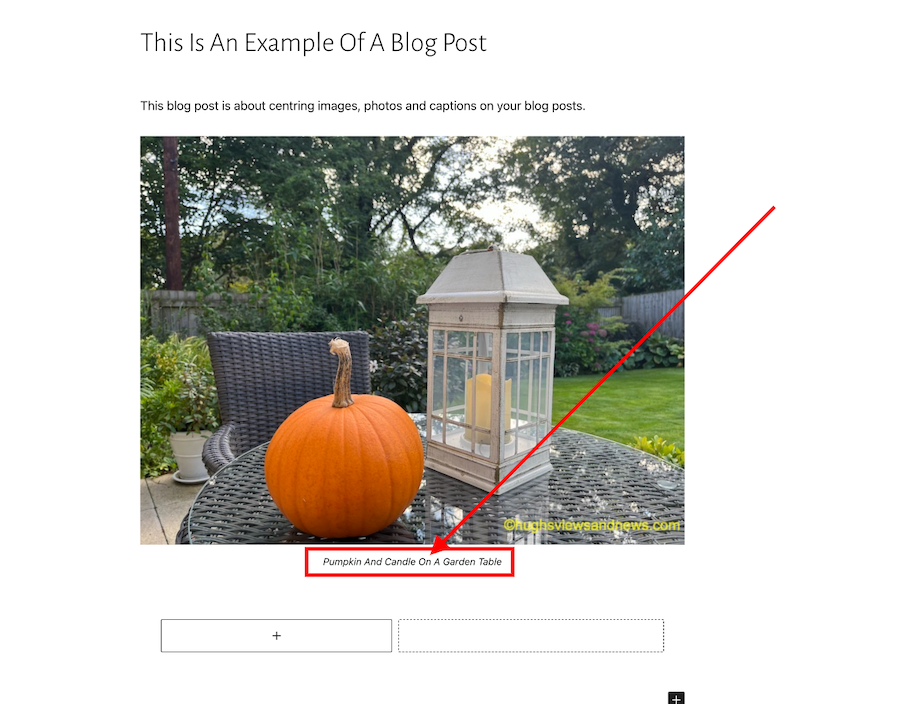
Image showing a centred caption under an image on a WordPress blog.
The caption is now centred underneath the photo.

How easy was that? No more ‘Arghhhhhs.’

The example I have given above works on the Block editor.

Of course, if you prefer captions on your blog posts to be aligned to the left or right, you can ignore everything I’ve said in this post.

If you have any questions about centring captions, leave them in the comments section.

Looking for more blogging tips? Click on the ‘Blogging Tips’ and ‘Block Editor – How To’ buttons on the menubar of my blog.

Follow Hugh on social media. Click on the buttons below.

Subscribe to receive further updates from Hugh

Copyright © 2022 hughsviewsandnews.com – All rights reserved.


Discover more from Hugh’s Views & News  

Subscribe to get the latest posts sent to your email.

56 responses to “This Is How Easy It Is To Centre Captions Underneath Images And Photos On WordPress”

  1. Mthobisi Magagula avatar

    Thanks for the tips Hugh, it is super easy to caption picture.

    1. Hugh W. Roberts avatar
  2. Janice Wald avatar

    I didn’t know about this. I make my graphics at Canva for the most part. Do I need this skill?
    Congratulations Hugh, your post won the Inspire Me Monday Linky Party. You’ll be featured on my blog tomorrow.
    Janice

    1. Hugh W. Roberts avatar

      Only if your captions are not aligning to the centre under any images and photos (and you want them to), on your blog posts, Janice.

      Thanks for the great news about winning the inspire Monday Link party.

      Have a great week.

  3. dgkaye avatar

    Great share Hugh. I couldn’t be without the align option. :) x

    1. Hugh W. Roberts avatar

      Same here, Debby. Everything looks so messy if it’s not aligned. Thank you.

  4. Eugenia avatar

    Thank you for this information, Hugh!

    1. Hugh W. Roberts avatar
  5. BookerTalk avatar

    Good to know this is now so easy. If only they would make image editing more robust.

    1. Hugh W. Roberts avatar

      I think they are working on it, Karen, although I know that the gallery options in the Block editor are not to everyone’s liking. Many bloggers use the Classic block when adding photo galleries to get around the problems.

  6. petespringerauthor avatar
    petespringerauthor

    I can always get the pictures centered, but the captions don’t seem to center consistently. Sometimes they’re centered in the draft and switch to left justification when I hit publish.

    1. Hugh W. Roberts avatar

      Pete, there are a few things you can try to fix the issue –

      1. I don’t know which method you use when adding captions, but try a different way. If you add them in the block, try adding them in the media library instead, and vice-versa. I use both methods, which always work for me.

      2. Try adding a CSS code to your blog to centre captions. The code I previously used was –

      /* align caption on center-aligned images KG-15020525-hc */ .wp-block-image .aligncenter> figcaption { text-align: center; } /* KG-15020525-hc */

      However, some bloggers informed me that it didn’t always work. It always worked for me, though.

      3. I don’t know what theme you use, but if it’s a retired theme, WordPress will ask you to choose a current one they’re still supporting. A few years ago, I was having issues and discovered that the theme I was using was retired and no longer supported by WordPress. I had to choose a new theme to get rid of the bugs. It worked!

      4. It could be a theme bug that is making the caption align to the left despite you having used the ‘Align Centre’ button. Contact the Happiness Engineers and ask them if they can help check and fix the bug (if there is one).

      I hope that helps.

      1. petespringerauthor avatar
        petespringerauthor

        Thanks for taking the time to make all these suggestions, Hugh. Interesting that some themes work and others don’t. I don’t think I want to change themes, but I’ll try some of your other recommendations.

        1. Hugh W. Roberts avatar
  7. orthodoxmom3 avatar

    Thanks! I haven’t worried about this one yet but what an easy fix!

  8. Erika avatar

    I second that, it is absolutely simple!

    1. Hugh W. Roberts avatar

      Thanks for the backup, Erika.

  9. Brenda avatar

    Hugh you’re such a font of essential and helpful information. Another new tip to help improve. Thank you.

    I’m also learning so much just from the conversations in your comments 😁

    1. Hugh W. Roberts avatar

      The comments section can hold a wealth of new information, Brenda. I always read them. Sometimes they can be more interesting than the post.

  10. JT Twissel avatar

    I must admit, I have suffered with the left leaning captions! Thanks for the tip!

    1. Hugh W. Roberts avatar
  11. Liesbet @ Roaming About avatar

    I’ll have to try this again, Hugh, as until recently, my caption would show up “vertically” with every word underneath the previous one. Also, creating galleries – with captions for each photo – was still not possible when I last checked this out on the block editor. That’s why I’m still using the classic blocks for photos and galleries on my blog. It is possible to center the photos in the classic editor as well, which I always do.

    1. Hugh W. Roberts avatar

      I’m going to have to play around with the galleries on the Block editor and see if I can get captions to centre on them, too, Liesbet. Thank heavens we have the Classic Block, although I do find it rather strange that some bloggers still refuse to use the Classic block.

      I’ll let you know how I get on.

      1. Liesbet @ Roaming About avatar

        Thanks, Hugh. As far as I know, galleries don’t even show up correctly in the “new” Editor, let alone the captions…

        1. Hugh W. Roberts avatar

          Which gallery do you use the most, Liesbet?

      2. Liesbet @ Roaming About avatar

        I always use the classic block gallery, Hugh. If it ever comes to using the newer photo blocks, any gallery would do. I like being able to put 4-8 photos in the same “block”, because grouping my many photos according to a theme or a place makes most sense.

        Right now, in the classic block, the captions show when someone clicks on the photo in a gallery or hovers their mouse over it. Not sure how the captions would show up in a block other than the classic one. They might partly cover the photos… I would have to play around with it more but don’t have time for that right now.

        1. Hugh W. Roberts avatar

          OK, thanks, Liesbet. I’ll also play around with some of the gallery blocks and let you know how I get on.

  12. Terri Webster Schrandt avatar

    I remember your last post on this subject and used the code for centering. Ot worked but only intermittently. I scrolled through and see that my captions are centered, but the caption is the same size as my body font. Always appreciated when you post these how-to’s Hugh!

    1. Hugh W. Roberts avatar

      Hi Terri, the font size could have something to do with the theme you’re using or the font sizes you have chosen if not using the default font sizes for the theme. Some themes have the option for users to change the size of the font. I tend to leave them alone unless the font size is too small, although I’d probably choose another theme if the font size could not be changed and was too small.

      1. Terri Webster Schrandt avatar

        I believe you are right, Hugh. Not a big deal, I don’t think it detracts from the post. At least their centered!!

        1. Hugh W. Roberts avatar

          Absolutely! Thanks, Terri.

  13. Colleen M. Chesebro avatar

    I’ve struggled with this forever! Thanks so much Hugh. I’ll give this a go. On my new author blog I can’t get my messages from the little bell icon on the front page of my blog. I have to go into the dashboard. I contacted WP… they claimed it was my browser, but it happens no matter what I do. Both Chrome and Safari have the issue. But on WordCraftPoetry I can use the bell to retrieve messages. I think the how we retrieve messages is going to change soon.

    1. Hugh W. Roberts avatar

      You’re welcome, Colleen.

      I use Chrome and can access my messages from the bell icon anywhere it appears on my blog. I wonder if it’s a problem with the theme of your blog, as many of the older ones no longer have support? However, I don’t use the bell icon much because it sometimes does not always show all the messages, so I use the comments dashboard. I switch between the Default and Classic views, especially when dealing with spam, although I don’t get much spam any more since doing a big cleanup and housekeeping exercise on my blog.

      1. Colleen M. Chesebro avatar

        Thanks, Hugh. It could be the theme but this is a new blog. I’ve had issues receiving comments here. It’s so frustrating. I’m on Premium and you would think we would get some better themes. It seems all the specialty blogs are getting the themes.

        1. Hugh W. Roberts avatar

          I’d recommend using the comments section on the dashboard of your new blog, Colleen. I think it’s far more reliable, although do check your spam folder for genuine comments that could end up in there.

          Once upon a time, you could check whether the theme you were using was active or retired, but WordPress seems to have moved or removed that option. I recommend you ask them the question next time you speak with them.

          1. Colleen M. Chesebro avatar

            Thanks, Hugh. That’s sound advice. ❤️

  14. Michelle (Boomer Eco Crusader) avatar

    Once again, Hugh, you have solved one of my little annoyances with my blog. Now I need to go back and update some posts. LOL

    1. Hugh W. Roberts avatar

      Good to hear, Michelle. I’m glad it has helped. And it’s so quick to do, although it may take some time to update your older posts (depending on how many you have).

      1. Michelle (Boomer Eco Crusader) avatar

        I have a lot but some are more picture-heavy than others. I will tackle them first.

        1. Miss Judy avatar

          Michelle – this bit of CSS might work and save you a lot of tedious updating. Use in your site Customize – Appearance – Advance CSS
          .wp-block-image figcaption {
          text-align: center;
          }

          1. Michelle (Boomer Eco Crusader) avatar

            Thanks Judy. I will give that a try!

  15. Cathy Cade avatar

    I don’t often add captions to my blogs.
    I would have thought the instructions above were obvious, had I not, fairly recently, added one and found it impossible to centre, in spite of trying the obvious. I’ll go back and try again.
    How can it have taken so long to make this possible?

    1. Hugh W. Roberts avatar

      It used to be done by adding CSS code to your blog, but as the Block editor has developed, WordPress is adding many features, so you don’t need to do the work.

      This new way has been available for quite some time because I’ve been using it, but I still see many blog posts with inconsistent captions. To me, it looks so wrong. Hopefully, this post put things right.

      1. Cathy Cade avatar

        I suppose once we’ve failed to get the effect we want we give up tryinng :( thanks for the update.

        1. Hugh W. Roberts avatar

          You’re welcome, Cathy.

      2. Miss Judy avatar

        I’d be interested to know the CSS code so it would automatically be done. Do you have it?

        1. Hugh W. Roberts avatar

          Here’s the code I used, but I can not guarantee it works anymore.

          /* align caption on center-aligned images KG-15020525-hc */ .wp-block-image .aligncenter> figcaption { text-align: center; } /* KG-15020525-hc */

          Let me know how you get on.

          1. Miss Judy avatar

            I found this snippet of code on helpmegeek.com. It seems to have worked and has even updated older posts. The post describes how it works, if you are interested.
            .wp-block-image figcaption {
            text-align: center;
            }

            1. Hugh W. Roberts avatar

              Thanks so much for that piece of information. I’m sure it will help many people who want to update the captions on their older posts.

Leave a reply to Michelle (Boomer Eco Crusader) Cancel reply

I’m Hugh

Welcome to my blog. I’m delighted to have you here. This is the place to discover tips on blogging and WordPress, flash fiction, photography, and more. I enjoy engaging with my readers, so please feel free to explore, join discussions, and contact me. I’m happy to assist! Find out more about me and my blog by clicking the ‘Meet Hugh’ button.

Let’s connect

Subscribe to Hugh’s Views And News

Latest Posts

Follow Hugh in the Fediverse

Hugh's Views & News  
Hugh's Views & News  
@hughsviewsandnews.com@hughsviewsandnews.com

WordPress & Blogging tips, flash fiction, photography and lots more!

402 posts
6 followers

Recommend Blogs To Follow


Boomer Eco Crusader
Boomer Eco Crusader
Live Green | Declutter | Simplify Life

Jacqueline Lambert
Jacqueline Lambert
Award-Winning Travel Humour Writer

Spo-Reflections
Spo-Reflections
To live is to battle with trolls in the vaults of heart and brain. To write; this is to sit in judgment over one's Self. Henrik Ibsen

Anne R. Allen’s Blog… with Ruth Harris
Writing about writing. Mostly.

Fancying France
The musings of a ‘femme d’un certain âge’ who divides her time between SW France and SE England

SONGS AND SCRIPTS AND DUNKING BISCUITS
Every day tales of a winging-it creative

Marsha Ingrao         Always Write
Marsha Ingrao Always Write
Having fun blogging with friends

Curiosities, Castles and Coffee Shops
The musings of a curious mind

WrookieSchU
WrookieSchU
Live life 🙌🏼

WPcomMaven
WPcomMaven
Helping you make the most of your free WordPress.com website since 2011

Second Wind Leisure Perspectives
Fun, Photography & Friends

Share Your Light
Share Your Light
You are a miracle – Let it happen

No Facilities
No Facilities
Random thoughts, life lessons, hopes and dreams

Esther Chilton
Writer, Tutor and Editor

Roaming About
A Life Less Ordinary

Saying nothing in particular
Jan … JT Twissel

The Chicago Files
The Chicago Files
A Canadian Perspective on Living in the Windy City!

Thank you to all my visitors

469,292 hits

252,718 visitors

Most Viewed Posts & Pages

Copyright Protected Blog

COPYRIGHT ©2011-2031 Hugh’s Views And News BLOG – All Rights Reserved.

This work by Hugh W. Roberts, and/or Hugh’s Views And News blog, is licensed under a Creative Commons Attribution-Noncommercial-NoDerivatives 4.0 International License. Unauthorised use and/or duplication of this material (text and images) without express and written permission from this blog’s author and/or owner is strictly prohibited. If you want to use posts, excerpts, photos and links, you may contact me first. You must give full and clear credit to Hugh W. Roberts and Hugh’s Views And News dot com with links to the original content.