Reasons to Act Immediately If You Receive This WordPress Email

Back in November 20025, I published a post, ‘The Latest Blogging and Publishing Scams You Need to Be Aware Of Now,‘ which outlined a number of scams aimed at bloggers, writers, and authors.

This week, I received an email that appeared to be from WordPress, but which raised my suspicions.

Firstly, I was fortunate that my email system identified the message as spam and moved it to my spam folder. However, it made me consider other WordPress bloggers who might have received or will receive the email, but whose antivirus or email security software does not recognise it as spam or a scam.

Here are two images of the email’s contents. I’ve highlighted some areas which I encourage you all to check before clicking on any link and risking becoming a victim of a scammer.
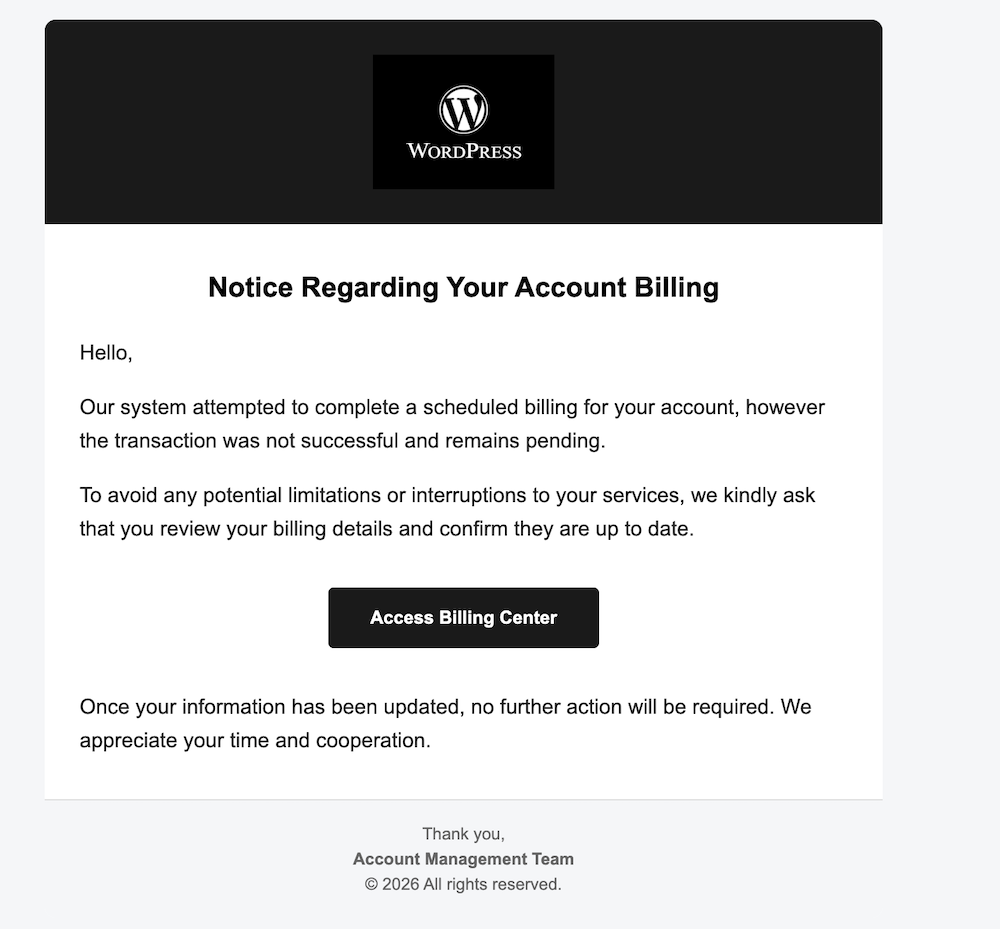
An image of a scam email that appears to be from WordPress about a problem with a WordPress account. There is a button to click to access the WordPress account's billing centre.
An image of a scam WordPress email

The image above may seem fine, but one clue indicates it’s not a genuine WordPress email. What is that clue?

  • Not being addressed by name in any company email is a strong clue that the email is not genuine.
  • The scammer simply said ‘Hello,’ which is a tactic used because addressing everyone by name is too time-consuming.
  • Scammers send these emails to thousands of recipients hoping that some will respond.
  • All the scammer needs is for one person to click the link to obtain login and username details.
  • Once they have that information, they can lock you out of your blog and wreak havoc.
  • Scammers are often more interested in obtaining any credit or debit card details you have on your account. If they obtain those details, they could go on a spending spree.

Here’s the next image.

An image of the email details from a scammer pretending to be WordPress. The email address has been sent from a completely different email to that of WordPress
Look for the clues when suspicious of emails
  • The scammer couldn’t even get the correct format for ‘WordPress’.
  • The ‘P’ in ‘WordPress’ is always capitalised; the scammer missed this detail.
  • The details after the first part of the email don’t match WordPress.
  • The email address hidden behind what appears to be a WordPress email does not contain any WordPress information.

I was worried that somewhere out there, a scammer either has a list of email addresses for WordPress bloggers or has taken a chance, sending emails to addresses on a list, probably from the dark web. This email did not go to my private email address, but to the email address I use for my blog. I hate to think of my email address on a scammers’ list anywhere, but unfortunately, it can happen.

I contacted WordPress regarding the scam email, and they requested me to forward it so they could investigate.

If you receive a suspicious email from WordPress, the best way to report it is to forward it to phishing@automattic.com so their security team can investigate and act against the scammers.

As a quick tip:

  • Legitimate WordPress.com emails always come from @wordpress.com or @automattic.com addresses. Note that any mention of WordPress before the ‘@’ will be the correct format of WordPress.
  • They will never ask for passwords or payment info via email or a text message.

In the unlikely event that you click on any links or enter any information from a scam email that claims to be from WordPress, change your WordPress.com password as a precaution by visiting your ‘Profile‘ settings and selecting the ‘Security‘ tab.

If you are not sure or are suspicious of any email, always contact the company the email claims to be from before clicking any links or providing any information.

Summary:

  • Always be aware of suspicious emails, not just from WordPress but from any company, especially if they include links and do not address you by name.
  • Look for spelling mistakes, especially in the sender’s email address.
  • Send any suspicious emails to the company they claim to come from. All reputable companies will have a dedicated email address for scam emails.
  • Companies will never ask you for your passwords or payment information in an email or text message.
  • If you click any suspicious links, change your password immediately.

Have you ever received a suspicious email claiming to be from WordPress or another service? What was your initial reaction? What steps do you take to verify the authenticity of an email before clicking on any links? Can you share any personal experiences with online scams you have encountered?

The featured image on this blog post is sourced from Pixabay. AI reviewed spelling and grammar errors.

You can follow me at the following sites.

Copyright @ 2026 hughsviewsandnews.com – All rights reserved.

How to Fix Commenting Issues on WordPress Email Notifications: A Simple Solution

If you receive email notifications from WordPress about new blog posts, you might face difficulties leaving comments on certain blogs.

When I attempt to leave a comment, I receive an error message.

Image of an error message that appears when trying to leave a comment on WordPress.
The error message.

This issue only impacts comments made when opening posts from email, not those via the WordPress Reader or the bell icon in the notification centre of my blog.

The issue still exists at the time of this post. However, I have found that comments go through when replying to the You can also reply to this email to leave a comment message (see the image below).

Image highlighting the 'You can also reply to this email to leave a comment' link on a new post notification from WordPress.
Leave your comment via the ‘You can also reply to this email to leave a comment’ link.

You’ll see that it’s like replying to an email rather than leaving a comment on the post, so press the reply button to the email, draft your comment and click the send button. When you check the post, you’ll see your comment unless it’s waiting for approval by the blogger for which you’re leaving the comment.

I recently came across this message. I’m unsure how long it’s been appearing in WordPress emails, whether WordPress has temporarily added it to email notifications to address the issue, or whether it’s a permanent fix. Next time I talk with WordPress, I’ll ask them and update this post.

The important thing is that this method of leaving comments works, so there’s no longer a need to remember to copy comments before submitting them.

Update: See the below response from a staff member at WordPress to me.

An image of a comment from a member of staff at WordPress about the problem involving not be able to leave comments via the WordPress new blog post notification email.
WordPress is working on the problem that is causing some comments to fail.

I inquired with WordPress about whether the text ‘You can also reply to this email to leave a comment at the bottom of their notifications is a recent addition. They confirmed that this specific wording is new; however, the ability to leave comments by replying to emails has been available for a long time.

Update 2

WordPress has now resolved this problem. I’m no longer seeing the error message.

However, if you still get the ‘Sorry, this comment could not be posted’ message when leaving comments, please contact WordPress.

Is this commenting problem affecting you? Please feel free to ask any questions by leaving a comment.

Click the buttons below to follow Hugh on Social Media

Copyright @ 2025 hughsviewsandnews.com – All rights reserved.

WordPress: Excerpts Are Working Again!

Earlier this week, in my post, ‘Is This WordPress Problem Affecting You? It’s Been Reported.’ I outlined a problem where excerpts no longer appeared in WordPress’s new post email notifications.

Is This WordPress Problem Affecting You? It’s Been Reported

I’m delighted to say that the problem has now been fixed. Unfortunately, users will need to change the ‘For each new post email, include‘ setting back to ‘Excerpt,’ as the fix has caused the setting to default back to ‘Full text.’

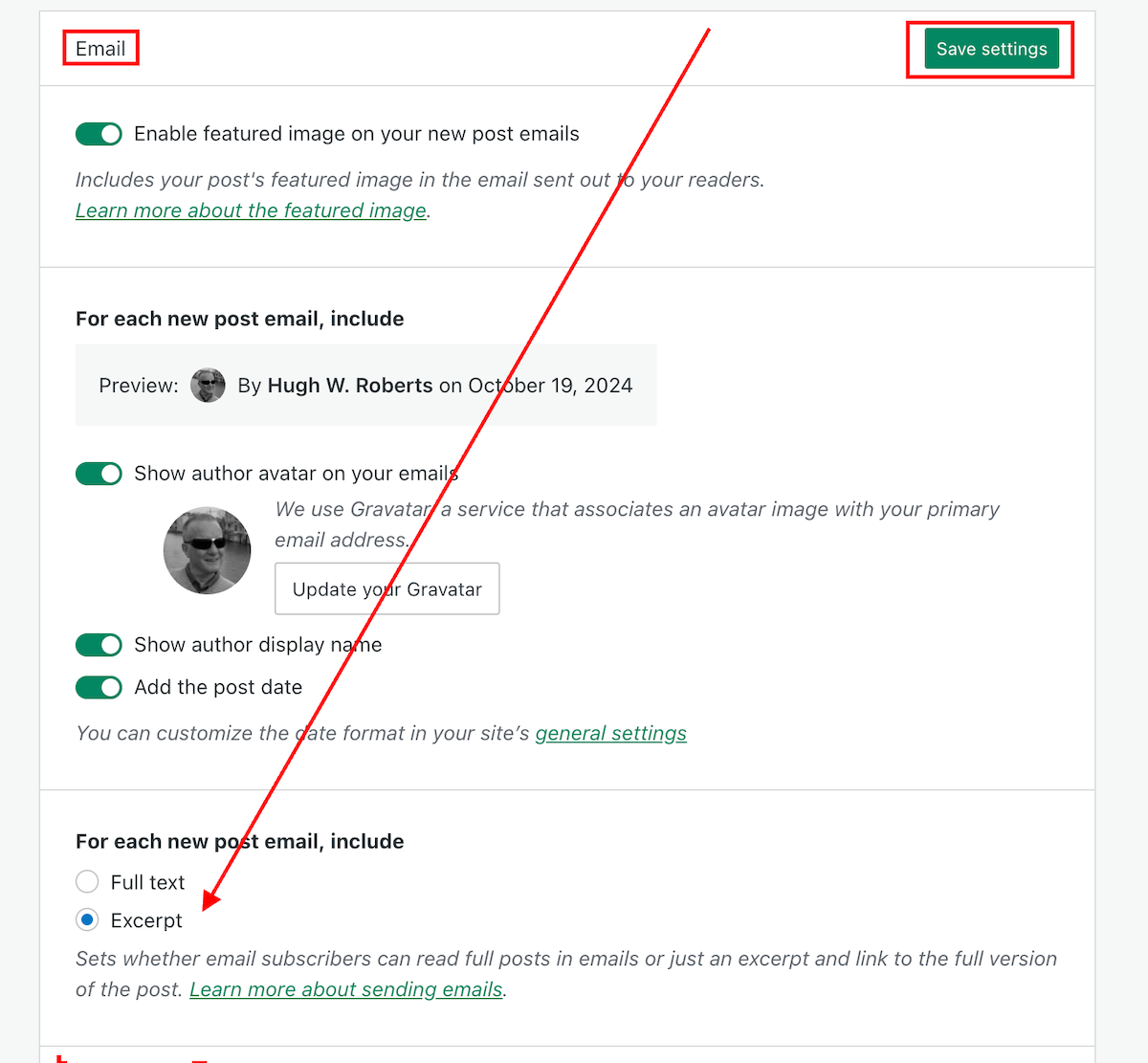
Do the following now if you want your new post email notifications to only show an excerpt.

  • On the dashboard of your blog, go to Settings – Newsletter.
  • Scroll down to the Emails sections of the Newsletter settings page, and change the ‘For each new post email, include‘ setting back to ‘Excerpt.’
  • Click the ‘Save Settings‘ button.
Image highlighting where to change the 'For each new post email, include..' setting to 'Excerpt,'
Change this setting to ‘Excerpt.’

Your new post notification emails will now only show an excerpt rather than the full post.

The ‘For each new post email, include‘ setting can also be found on your blog’s dashboard under SettingsReading.

My thanks to Dave Martin at Automattic and WordPress for fixing this problem.

Layout, content, settings, and format might differ on self-hosted blogs.

Any questions? Leave them in the comments section.

Follow Hugh on social media. Click the links below.

Copyright @ 2024 hughsviewsandnews.com – All rights reserved.