


When I joined Bluesky in November 2024, I thought it might be just another social media platform, but I was mistaken. It has now become a place where I visit and engage every day. Plus, it’s already driving traffic to my blog and has introduced me to many amazing people worldwide.
Bluesky is a friendly, easy-to-use platform for interacting with other users, and many bloggers, writers, authors, and photographers have already joined.
However, it’s not all plain sailing. Bluesky has its fair share of bots and scammers, but they’re easy to deal with.
How does Bluesky work?
If you have ever used Twitter or X, the Bluesky platform runs similarly. However, Bluesky is the new kid on the social media block, so it doesn’t do everything you could do on Twitter/X. However, it does have a couple of features that Twitter/X does not have.
Since it has over 33 million users (as of this post), it’s a social media platform every blogger, writer, and author should consider joining.
How Bluesky Works
Users publish posts (known by some as Skeets), including links to blog articles, books, images, and photos. Other users can view these posts and engage by commenting, clicking the ‘like’ button, and resharing the post (a ‘reskeet’). It’s very similar to what occurs in the blogging world.
The more you interact with other users, the more rewarding and effective your results from Bluesky will be.
Here are the key components of how Bluesky functions:
- User Registration: To start, users must create a quick and straightforward account. A missing banner, avatar or profile description makes you look like one of those quickly thrown-together bot/scam accounts that frequent many social media platforms. Be sure to include that you’re a writer, blogger, author or photographer in the description. That helps ensure you connect with fellow writers or photographers rather than those who post about subjects you’re not interested in.
- Publishing Posts: Users can share content, including text posts, links to blog entries, images, videos and photos. They can also reshare (known as reskeeting) the posts of other users.
- Engagement Mechanisms: Other users can engage with posts by commenting, liking, and resharing. This interaction helps foster a sense of community and encourages dialogue.
- Discoverability: Bluesky’s algorithm allows users to discover posts that may not be directly connected to the author, broadening the audience reach. For example, I am also interested in astronomy and have connected with users who publish images, photos and posts about space.
- User-Friendly Interface: The platform is designed to be intuitive, making it easy for users to navigate and effectively use its features. I quickly learned how the platform works.
- Building Connections: Users can follow others, creating a network of connections that enhances the engagement on the platform.
- Community Guidelines: Bluesky implements guidelines that users are encouraged to follow to maintain a friendly environment. These guidelines help minimise conflicts and foster positive interactions. Unlike other social media platforms, Bluesky does not tolerate any hate speech.
With over 33 million users at the time of writing, Bluesky is emerging as a significant platform for bloggers and content creators seeking to broaden their reach and engage with a broader audience.
What not to do on Bluesky
I’ve seen numerous bloggers share links to their posts and then leave immediately. They do not interact with any other users.
It’s no surprise that their posts receive little, if any, engagement or shares.
Unsurprisingly, in the four months I’ve been on Bluesky, I’ve not seen any increase in the number of users who follow them or the number of accounts they follow.
Their accounts resemble stepping onto a new planet that could rapidly be populated but is desolate due to a lack of visitors and engagement.
Avoid dropping links to your own posts and then running away. The general advice for any social media platform is that 80% of your posts should feature the content of other users, while the remaining 20% can be your own material.
Avoid overlooking comments on your posts (except those from scammers or bots). At the very least, show appreciation to anyone who leaves a comment.
Be friendly, helpful, and positive toward others. Remember that Bluesky differs from X/Twitter. Avoid seeking out or engaging in arguments. Ignore, delete, and block any comments from spammers, bots, or troll accounts.
How to spot bot accounts and scammers on Bluesky
The majority of bot and scammer accounts can be easily spotted.
They generally have a high following count but a very low follower count, while the number of published posts is low and primarily consists of posts shared from other users.
Lots of numbers will appear after their BlueSky user name – e.g. hughblogger123456789.bsky.
The account will have a generic, poorly written Al bio and posts.
The account will primarily feature reposts, with very few original posts.
If you accidentally follow one, they will immediately send you a direct message saying ‘Hello’ or asking how you are or where you are from.
They will continue to bombard you with direct messages.
Their bio may sometimes indicate they are seeking love, a partner, or requesting a donation. Some will also claim to be experts in book/blog marketing or able to make you lots of money with little effort.
Their profile pictures may seem too good to be true and are often taken from other sources online. Be cautious of accounts featuring military uniforms and those revealing body parts you might not anticipate seeing in their bio picture.
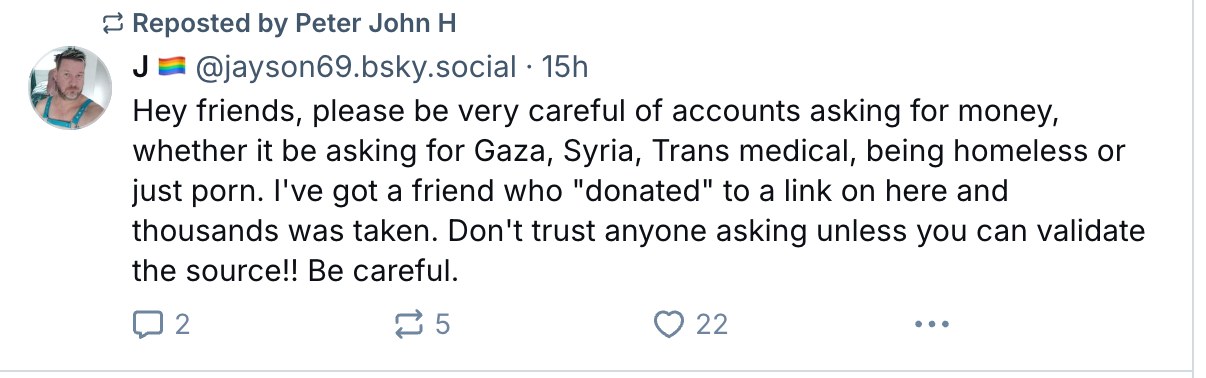
Here’s an image of a scam account that recently followed me. I immediately blocked it.

Sadly, 338 people are following this account, some of which will have donated.
Here’s a warning from one Bluesky user about the type of scam account I mentioned.
More helpful tips from other Bluesky users.
Helen describes ways to stop receiving direct messages (DMs).
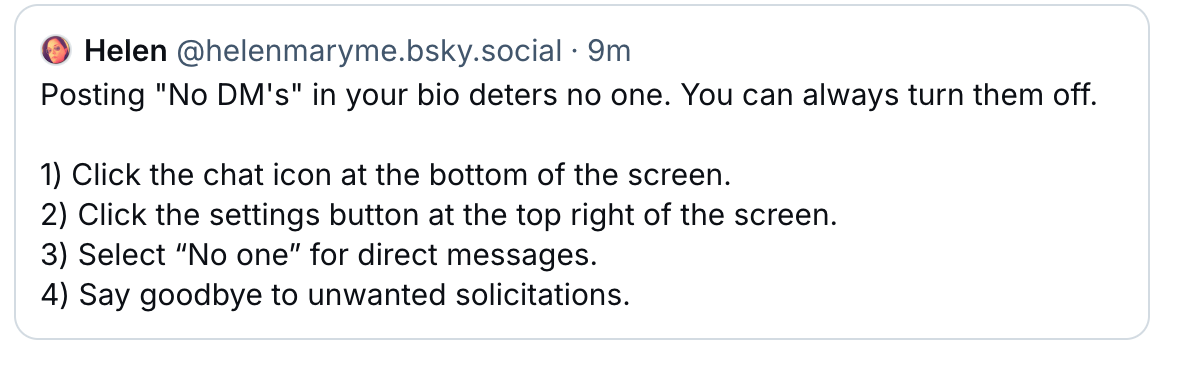
Follow Helen on Bluesky at @helenmaryme.bsky.social.
Follow these two accounts on Bluesky to discover which hashtags are trending: @trendtags.bsky.social and @alphasky.social.

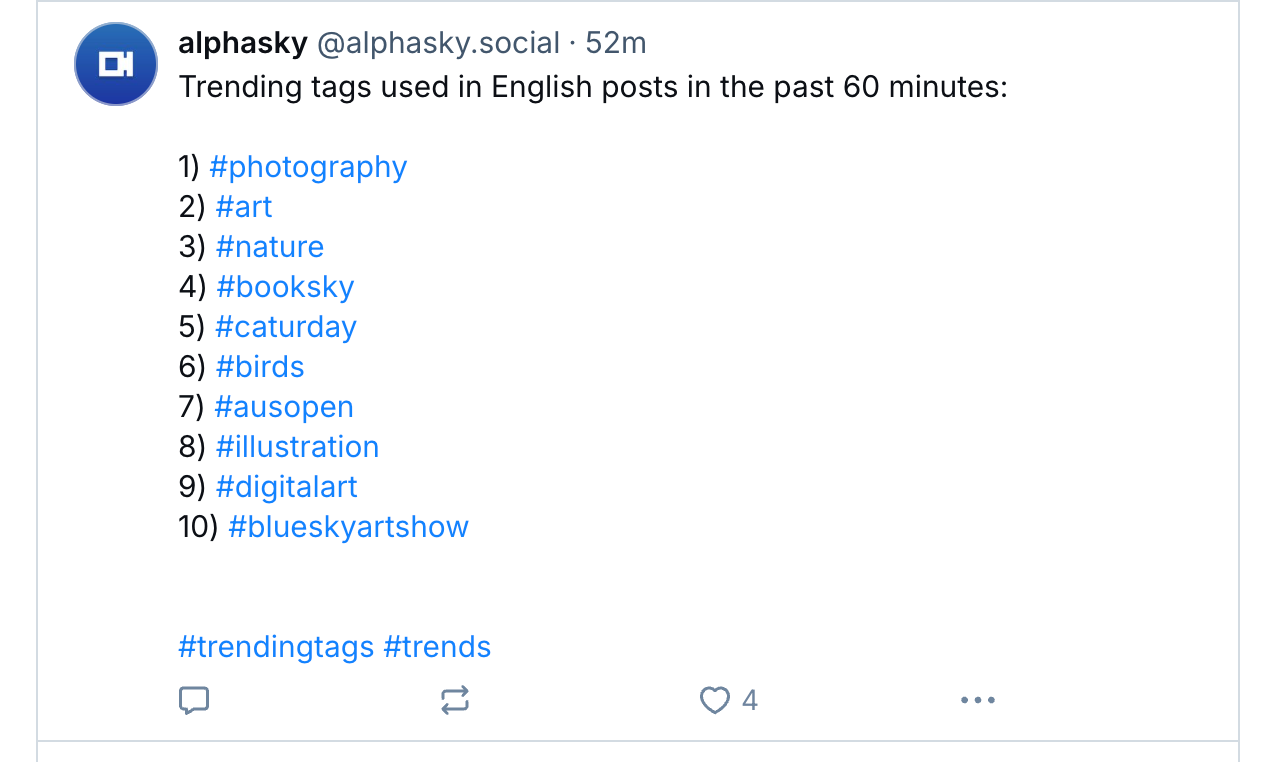
Bluesky encourages the use of hashtags, so I recommend using them.
Curious about who has blocked you or added you to lists or starter packs on Bluesky? Follow @listifications.app.

For authors, some Bluesky users offer to add details about your books to their author websites. While this may initially seem suspicious, I recommend sending information only to those you have been following or believe are trustworthy. Here are the details of one author who recently posted, inviting other authors to send him details of their books so he could add them to his author’s website. As you can see, I took up his kind free offer.

Follow JP (James) at @pangeanchronicles.bsky.social. Visit James’ author’s website by clicking the following link.
Create and get yourself added to BlueSky Starter Packs.
I highly recommend creating at least one starter pack and trying to get added to the starter packs of other Bluesky users. This will allow you to connect with numerous other Bluesky users who share similar interests, thereby increasing your exposure and that of your blog.
For more information about the benefits of Starter Packs on Bluesky, click the following link.
Introducing Bluesky Starter Packs
I have created a Starter Pack for Bloggers. Click the link or scan the QR code below to see it.
Please let me know if you’d like to be added to my bloggers’ Starter Pack by leaving a comment with your Bluesky handle.
And finally…
Don’t forget to add the BlueSky sharing button to your blog.
Ready to dive into Bluesky? Share your best tips for navigating the platform! If you have questions or want some help with its features, don’t hesitate to reach out. Feel free to drop your Bluesky handle here so others can easily connect with you.
Click the buttons below to follow Hugh on Social Media
Copyright @ 2025 hughsviewsandnews.com – All rights reserved.




 Hugh's Views & News