


Reasons to Act Immediately If You Receive This WordPress Email

Back in November 20025, I published a post, ‘The Latest Blogging and Publishing Scams You Need to Be Aware Of Now,‘ which outlined a number of scams aimed at bloggers, writers, and authors.

This week, I received an email that appeared to be from WordPress, but which raised my suspicions.

Firstly, I was fortunate that my email system identified the message as spam and moved it to my spam folder. However, it made me consider other WordPress bloggers who might have received or will receive the email, but whose antivirus or email security software does not recognise it as spam or a scam.

Here are two images of the email’s contents. I’ve highlighted some areas which I encourage you all to check before clicking on any link and risking becoming a victim of a scammer.
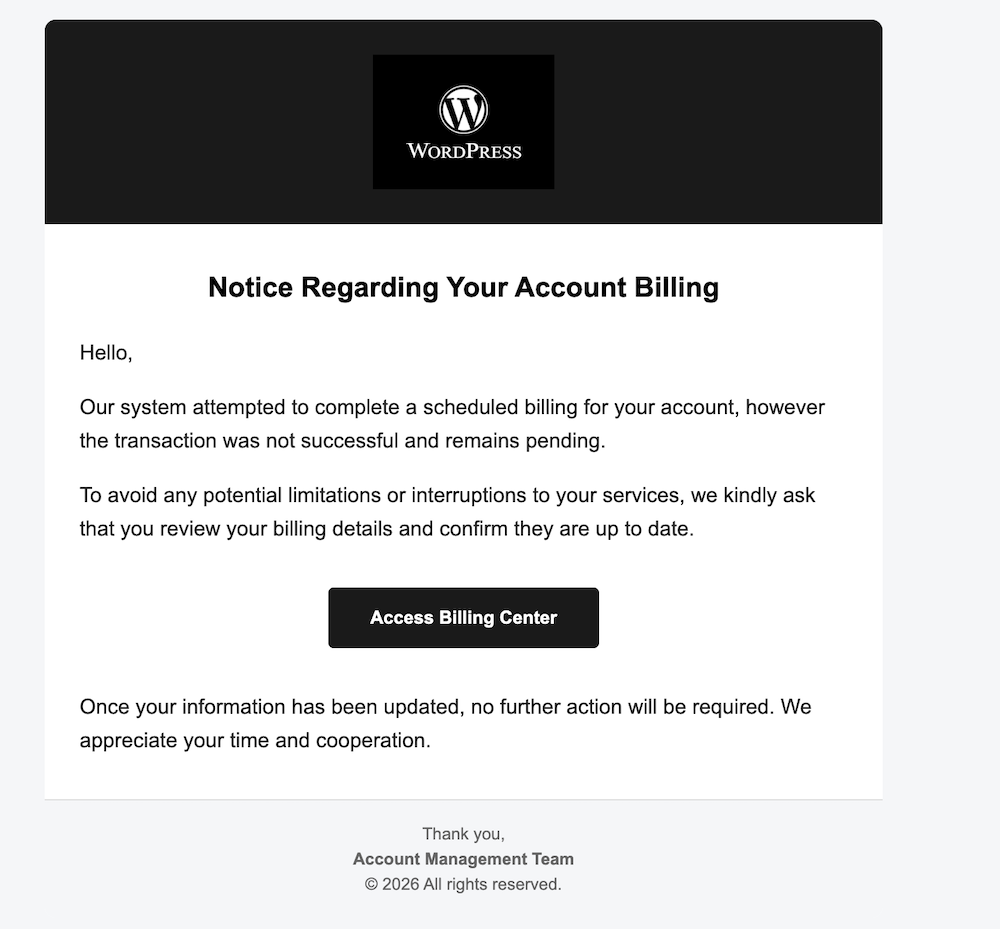
An image of a scam email that appears to be from WordPress about a problem with a WordPress account. There is a button to click to access the WordPress account's billing centre.
An image of a scam WordPress email

The image above may seem fine, but one clue indicates it’s not a genuine WordPress email. What is that clue?

  • Not being addressed by name in any company email is a strong clue that the email is not genuine.
  • The scammer simply said ‘Hello,’ which is a tactic used because addressing everyone by name is too time-consuming.
  • Scammers send these emails to thousands of recipients hoping that some will respond.
  • All the scammer needs is for one person to click the link to obtain login and username details.
  • Once they have that information, they can lock you out of your blog and wreak havoc.
  • Scammers are often more interested in obtaining any credit or debit card details you have on your account. If they obtain those details, they could go on a spending spree.

Here’s the next image.

An image of the email details from a scammer pretending to be WordPress. The email address has been sent from a completely different email to that of WordPress
Look for the clues when suspicious of emails
  • The scammer couldn’t even get the correct format for ‘WordPress’.
  • The ‘P’ in ‘WordPress’ is always capitalised; the scammer missed this detail.
  • The details after the first part of the email don’t match WordPress.
  • The email address hidden behind what appears to be a WordPress email does not contain any WordPress information.

I was worried that somewhere out there, a scammer either has a list of email addresses for WordPress bloggers or has taken a chance, sending emails to addresses on a list, probably from the dark web. This email did not go to my private email address, but to the email address I use for my blog. I hate to think of my email address on a scammers’ list anywhere, but unfortunately, it can happen.

I contacted WordPress regarding the scam email, and they requested me to forward it so they could investigate.

If you receive a suspicious email from WordPress, the best way to report it is to forward it to phishing@automattic.com so their security team can investigate and act against the scammers.

As a quick tip:

  • Legitimate WordPress.com emails always come from @wordpress.com or @automattic.com addresses. Note that any mention of WordPress before the ‘@’ will be the correct format of WordPress.
  • They will never ask for passwords or payment info via email or a text message.

In the unlikely event that you click on any links or enter any information from a scam email that claims to be from WordPress, change your WordPress.com password as a precaution by visiting your ‘Profile‘ settings and selecting the ‘Security‘ tab.

If you are not sure or are suspicious of any email, always contact the company the email claims to be from before clicking any links or providing any information.

Summary:

  • Always be aware of suspicious emails, not just from WordPress but from any company, especially if they include links and do not address you by name.
  • Look for spelling mistakes, especially in the sender’s email address.
  • Send any suspicious emails to the company they claim to come from. All reputable companies will have a dedicated email address for scam emails.
  • Companies will never ask you for your passwords or payment information in an email or text message.
  • If you click any suspicious links, change your password immediately.

Have you ever received a suspicious email claiming to be from WordPress or another service? What was your initial reaction? What steps do you take to verify the authenticity of an email before clicking on any links? Can you share any personal experiences with online scams you have encountered?

The featured image on this blog post is sourced from Pixabay. AI reviewed spelling and grammar errors.

You can follow me at the following sites.

Copyright @ 2026 hughsviewsandnews.com – All rights reserved.

November 2025 – This is a first! But I Have Good Reasons

The past three months have been busy outside the world of blogging, so much so that I didn’t get the chance to write and publish monthly round-up posts for September or October.

Did I feel bad? Did I apologise? No. Sometimes life gets in the way of schedules, and my blogging routine was thrown off course, but it happens to everyone, and nobody needs to apologise. From what I saw, my posts from September, October and November continued to receive engagement, and for me, it’s all about interacting with other bloggers, writers, and readers.

Better late than never. Without further ado, here is the monthly round-up for the past three months on Hugh’s Views and News.

  • WordPress has introduced a new blog recommendation feature that displays recommended blogs on your Gravatar profile, improving visibility. My post details how to add the blogs you love the most.

This New WordPress Feature Helps Promote The Blogs You Love

  • Here’s a fresh writing challenge that everyone is encouraged to try. Can you write a story using only 101 words (no more, no less) based on a featured image?

Bloggers/Authors: Are You Ready For A Writing Challenge?

  • Where do the images and photos in your blog posts originate? Are you certain you’re not infringing the law by using copyrighted images?

Where To Legally Source Amazing Images For Your Blog Posts

  • How easy do you make it for visitors to share your blog posts and boost the visibility of your blog? Take action: These nine options are easy to find and activate.

9 Important Options on Your WordPress Blog to Check Now!

  • This is why you should never forget to put the clocks back before going to bed.

When The Clocks Go Back

  • Springtime in Paris! Sounds romantic, doesn’t it? Think again!

Experience the Magic of Spring in Paris! But not as you know it!

  • Are photography blog posts worth commenting on? Why I Decided to Stop Publishing My Photography.

4 Never Before Seen Photos And Why You Need To See Them

  • This post outlines various scams affecting bloggers, including voicemail scams and email phishing claims that appear to come from WordPress. Don’t become a victim of a scam or fined for downloading copyrighted material.

The Latest Blogging and Publishing Scams You Need to Be Aware Of Now

The featured image on this blog post is sourced from Pixabay. AI reviewed spelling and grammar errors.

Follow Hugh On Social Media.

Copyright @ 2025 hughsviewsandnews.com – All rights reserved.
The Latest Blogging and Publishing Scams You Need to Be Aware Of Now

Let me begin with a new scam that is unrelated to blogging or publishing. It’s a scam that comes via a voicemail message on mobile phones.

I’ve lost track of how many times I’ve had the same call and message saying, ‘Please add my number to WhatsApp.’ Each time, the number the scammer uses is slightly different, but it’s always the voice of the same woman.

Thanks to Apple’s advanced AI, my phone now does a great job at identifying spam calls and sends them straight to voicemail. It doesn’t even ring. The spammers’ numbers then show in my call list, which I mark as ‘Spam – Delete and send details to Apple.’ I should add that since I enabled AI on my phone, the number of spam calls I receive has dropped significantly.

The latest Blogging scams

Recently, I encountered a concerning blogging email scam. It purportedly originated from WordPress, claiming that my payment details were incorrect in my account and included a link for me to click to rectify them.

I immediately recognised the email as fraudulent because the email failed to address me by name. All it said was ‘Dear WordPress User,’ But what alarmed me was that the same scammer went on to also send me the same email through the ‘Contact Hugh‘ form on my blog, neglecting to begin the message with ‘Dear Hugh.’ It’s important to note that I request anyone using the form to begin their message with ‘Dear Hugh,’ as this practice helps identify potential spam, particularly from automated spam bots.

I don’t know how the scammer obtained my email address, but it must have appeared on a list with some connection to WordPress. This is likely how they discovered I had a WordPress blog, although nowhere on my blog do I provide an email address. Anyone wanting to contact me must go via the ‘Contact Hugh’ form.

Although this was an easy scam for me to spot, I still feel bad for any blogger who falls for it. If you are unsure whether an email from WordPress is genuine, always log in to your WordPress account to verify any details. Never click on any uninvited links and never give an email address anywhere on your blog.

An image highlighting the word 'Scam'
Image generated using WordPress AI

However, more concerning was news of a blogging scam that involved using royalty-free platforms, such as Pixabay. Author, writer and blogger Jacqueline Lambert left a comment on my recent post, Where To Legally Source Amazing Images For Your Blog Posts.’ outlining how she was almost scammed by a company after using a royalty-free image from Pixabay on one of her posts.

I strongly encourage you to read Jacqueline’s insightful post ‘Bloggers Beware The Copyright Trolls – Even If You Use Royalty-Free Images‘ to glean valuable lessons from her experience. It is imperative to remain vigilant and not become a target of such scams that specifically seek to exploit bloggers.

I would also like to reiterate that downloading and publishing copyrighted images or photographs on your blog is strictly prohibited. Always verify that such materials are free for use. This also applies to reblogging blog posts from other bloggers that contain images or photos. If you share copyrighted images from another blogger’s post, you could be fined.

A plea to you – yes, you!

Despite my recent post addressing copyright infringement, I continue to observe bloggers (you know who you are) using images and photos in their posts without proper attribution regarding their sources. They probably believe that nobody will come after them for downloading and using copyrighted images, but I know of two bloggers who have been fined for doing so. Never believe that it will never happen to you.

Even if the images and photos are your own, I recommend that you indicate in your post that they are your property. If you don’t believe me, read Jacqueline’s post. As she elaborates, numerous companies are employing image recognition technology to scan the internet for unauthorised use of images and photographs, especially in blogging posts. Some bloggers have even been threatened with legal action and fines for using their own pictures.

The latest publishing scam

My thanks again to Jacqueline, who recently published a guest post by author Peter Barber about a publishing scam he fell for. Titled ‘Publish and Be Damned: How I Got Scammed, Learned My Lesson, and Came Out Fighting‘, Peter details how he fell head-over-heels for a scam many authors will probably encounter at some point in their writing lives. I urge you to read his post and learn from it because it could happen to you.

Are you aware of any current scams related to blogging or publishing? Please share details in the comments section. Have you ever fallen victim to a blogging or publishing scam? If so, what happened?

The featured image on this blog post is sourced from Pixabay. AI reviewed spelling and grammar errors.

You can follow me at the following sites.

Copyright @ 2025 hughsviewsandnews.com – All rights reserved.