
Is your blog plagued by spam, spammers and spambots? Do they annoy you? Do you even know they’re there and how much damage they could be doing?
This is a reposted blog post that I’ve updated because of changes WordPress have made.
Many different types of spammers exist in the blog world. From those who leave uninvited links to those who flood your posts with pleas to check out their blog and follow them, to spambot comments, they can all be a nuisance.
Allowing spammers and spambots to follow your blog makes it easier for them to flood it with spam comments. In turn, this opens the floodgates, and your readers may fall victim to scams or have their computer, tablet, or phone infected with malware.
Why Spam Is a Bigger Problem Than You Think
- Some spammers are easy to spot. The clues are in their name.

- Some spammers try a little harder to trick you.

The above comment may sound genuine, but look at the web address it came from.
A few years ago, many WordPress blogs were flooded with spam comments from dog breeders.
How Spammers Use the ‘Like’ Button Against You
I witnessed some bloggers approve and respond to comments from these spambots. These spammers not only leave comments, but also click the ‘like’ button on all your posts and on comments left by other bloggers. The comments look genuine, but they’re not. Here’s an example of a spam comment from one of the dog breeders.

Approving and allowing comments from spammers and spambots on your blog posts will hurt your blog’s ranking. It may also cause genuine readers to click links in comments or visit scammers’ sites, becoming victims of scams or having their computers infected with malware.
As I already mentioned, some spammers who follow your blog will also click the ‘like’ button on all your posts, hoping other readers will see their Gravatar icon and visit their site. Once there, the reader risks being scammed or having their device infected.
WordPress has improved your blog’s subscribers page. This not only helps you spot spammers and spambots, but it also makes it easy to remove them as subscribers to your blog.
How to Spot The Most Common Comments From Scammers and Spambots ?
Although WordPress’s Akismet Anti-Spam software is excellent at blocking spam, it doesn’t always catch everything.
Comments from spammers rarely include an image in their Gravatar, but many are now getting clever and adding one to their profiles, usually images or photos they have stolen from the internet.
Spambots tend to leave broad, blanket comments designed to fit any blog post so they can automatically send them to thousands of sites. Examples are ‘Great post, thanks for sharing’ or ‘Very informative, keep up the great work.’ Some will try to deceive you by saying they have been reading your blog for a long time and love what you write, but they never provide a single reference or detail from any of your posts.
Instead of human names, some will use a business name or mix a human name with a business name, e.g., hugh123@cheapholidays.domain.
Most comment spammers aim to drive traffic to shady sites or build illegal backlink networks.
Their comments will include links to unrelated third-party sites, such as cryptocurrency scams, fake goods, or adult content sites. Some will link to fake social media sites or to a page claiming you won a prize and asking for your personal details so they can send you what you won. You never receive anything and end up giving personal information that scammers will use or sell on to other scammers.
Some comments will also include links mid-sentence, usually under a phrase like ‘Click here’ or ‘Check this out’ or the name of a fake company where you have to enter personal details (and usually credit card details) to view all content.
As AI advances, scammers are getting cleverer, often fooling even the most alert bloggers. If something seems too good to be true, it’s likely a scam.
How to check and remove spammers and spambots as subscribers to your blog.
- On your blog’s dashboard, go to ‘Jetpack‘ – ‘Newsletter,’
- Ensure the ‘Subscribers‘ tab is open.
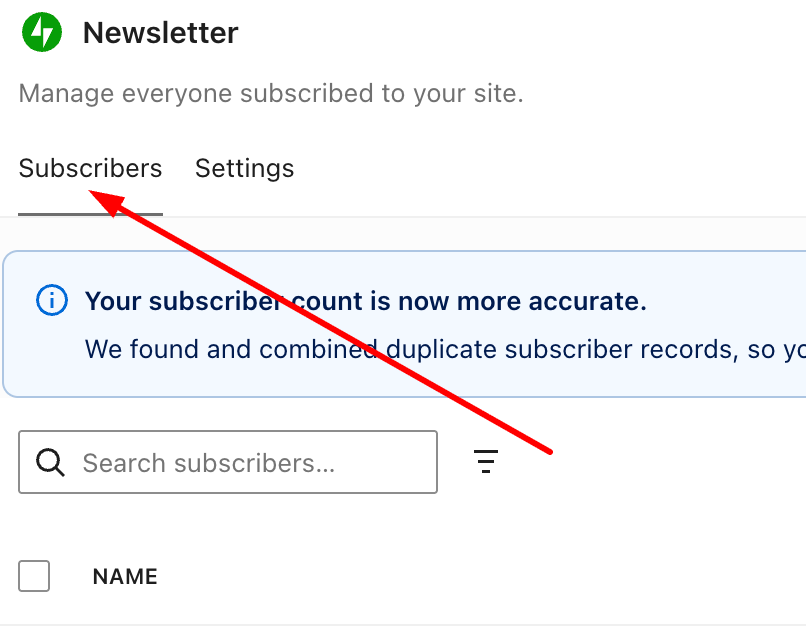
- Review the subscriber list and unsubscribe anyone you don’t want following your blog by clicking the kebab menu (three vertical dots) in the ‘actions’ column, then selecting ‘Remove subscriber.’
- You can also use the search box to find specific subscribers you want to remove.
Spammers who follow your blog are more likely to flood your posts with spam comments because they get notifications when you publish new posts. You can mark those comments as spam, but I’d also recommend unsubscribing them from your blog.
Of course, nothing stops spammers from subscribing to your blog again (that dog breeder spammer kept resubscribing to my blog), but every time they follow, unsubscribe them. They soon get fed up with having to keep subscribing to your blog.
Let’s Wrap It Up
- Don’t allow spammers, scammers, or spambots to invade your blog or stress you out.
- Spotting spammers, scammers, and spambots is easy. Follow the guide in this post.
- Never approve or respond to spam comments.
- If you’re unsure whether a comment is from a spammer, hover your mouse over their web address to preview their site.
- Always unsubscribe spammers, scammers and spambots from your blog. This post explains how to do it.
- Although WordPress’s Akismet Anti-Spam software catches most spam, it won’t catch all of it.
- Approving and allowing comments from spammers and spambots on your blog posts will hurt your blog’s ranking. It may also cause genuine readers to click infected links in comments, visit the linked website, and become victims of scams or malware.
- Look after your readers, not the spammers, scammers or spambots.
How do you deal with spam, spammers and spambots on your blog? Please share details in the comments section.
Copyright @ 2026 hughsviewsandnews.com – All rights reserved.
Layout, content, settings, and format might differ on self-hosted blogs.
The featured image in this post was created using the WordPress image generator. AI was used to check for grammar and spelling mistakes and to help with the layout of the post.
Follow Hugh on social media. Click the buttons below.















 Hugh's Views & News
Feel free to leave a comment. Engagement helps keep blogs alive and forms community.