
Why Now Is The Time To Pull Up My ‘Big Boy’ Trousers’ About My Blog

Have you heard of the saying, ‘Don’t put off today what can be done tomorrow’? I should tell myself that more often because tomorrow becomes tomorrow, and that tomorrow becomes another tomorrow. Before you know it, weeks, months or even years have passed you by, and you still haven’t done what you were putting off until tomorrow.

Last week, after visiting some blogs, I asked myself, ‘Why haven’t I done what they have done yet?’ And the simple and truthful answer was ‘Because of me.’ But what am I referring to?

‘What if?’ moments. Do you ever have them?

A ‘What if’ moment is those moments in life when you believe something is holding you back from doing something you know needs to be done, but you have doubts about it. The problem is that it isn’t the doubts that are holding you back.

The ‘What if’ moment I’ve been having has lasted for the best part of two years.

‘What if changing the theme of my blog from Classic to Block causes problems?’

Given that thousands of other bloggers have done it, I know that, while problems may occur, they can be resolved!

When WordPress introduced the Block Editor, which now seems like many years ago, I disliked it and did everything I could to avoid giving it a chance. I fought myself, declaring I’ll never use it and that I hated the change. And there was my downfall – ‘change.’ I wasn’t willing to accept it.

Then another blogger said in one of her posts, ‘The Block Editor isn’t hard to use; it’s just different.’ That got me thinking, and it was not long before I realised that the reason I didn’t like the change was that I hadn’t set aside any time to read tutorials and watch them, and to give the Block editor a try.

It wasn’t long before I was telling myself that trying out the Block Editor was like switching up from black-and-white to colour television.

Why then has it taken me so long to begin the switch from a Classic to a Block theme? The answer to that question is ‘Me.’ What if something goes wrong? What if I break my blog? What if all my posts disappear? What if my blog disappears without a trace?’ Why if, what if, what if?

The problem with all those questions is that they are not problems. They are excuses. Excuses to stop myself from making changes. And I have found in life that change opens new doors and brings new opportunities. And that’s what switching to using the Block editor did.

But why fix what’s not broken?

I hear people say, ‘Why fix what’s not broken?’ But nobody is fixing anything. All websites have to keep up with technological changes; they would lose many paying customers if they didn’t adapt. It’s paying customers who keep companies alive by buying their products or services, allowing some users to use the site for free.

Now, replace the question ”Why fix what’s not broken?’ with, ‘Why update what is not broken?’ You now have your answer.

Not all WordPress users are lucky enough to have had a choice between a Classic and a Block editor. Many have never known anything but the Block Editor, and they all seem to be doing a great job. However, did you know that the Block editor includes a Classic block that allows users to use the Classic editor?

What’s about to happen on my blog?

Over the next few weeks, you may notice a few changes with my blog as I switch from a Classic to a Block theme. If you notice anything wrong, please let me know, so I can resolve it. There’s plenty of support available on WordPress when you take the time to find it. Part of the excitement for me is choosing a new theme, but another reason I am making the switch is that I gain access to many more blogging tools and options, many of which help users save time.

Finally, I’m pleased to say I’ve changed concerns into excitement. I’m no longer allowing change to stop me from moving ahead on my blogging journey. I want my blog to become part of today’s technology, rather than remain stuck in yesterday’s.

This is my final post using a Classic theme on my blog. Bear with me while I make the changes to a Block theme. Hopefully, it won’t be long before I see you on the other side.
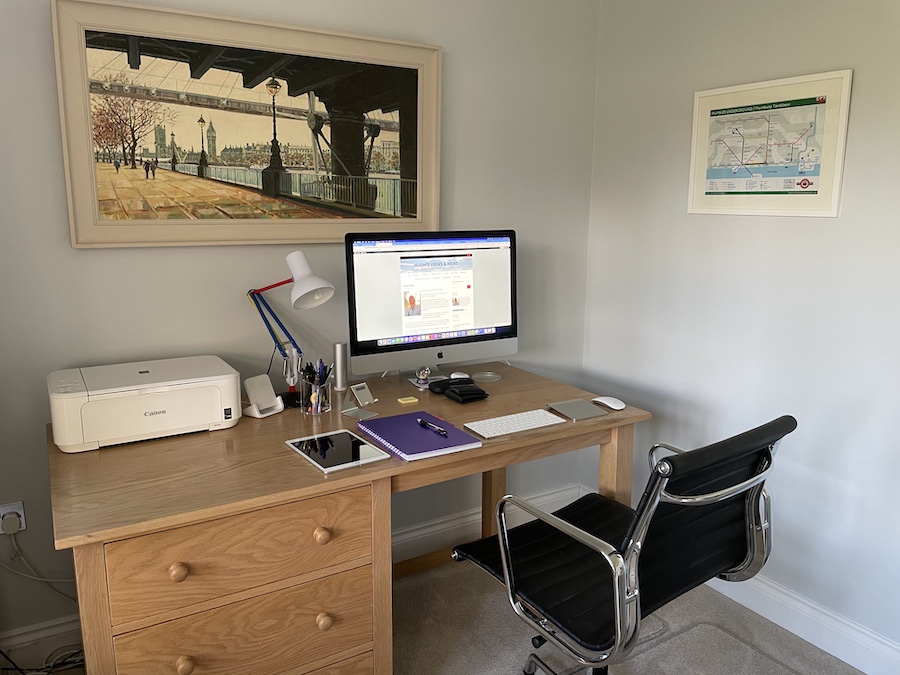
A photo of a neat and tidy desk with a desktop computer, lamp, iPad, keyboard, printer and stationery items on it.
Where I blog from

Update – I did it! I made the change. Check my post How I Finally Switched My Blog to a Block Theme – Challenges, Wins, and Must-Know Tips for WordPress Bloggers for all the details.

Have you changed the theme of your WordPress blog from Classic to Block? Did you encounter any problems? What were they, and how did you resolve them?

The featured image on this blog post is sourced from Pixabay. AI reviewed spelling and grammar errors.

You can follow me at the following sites.

Subscribe to receive further updates from Hugh

Copyright @ 2026 hughsviewsandnews.com – All rights reserved.

Fediverse reactions

Discover more from Hugh’s Views & News  

Subscribe to get the latest posts sent to your email.

87 responses to “Why Now Is The Time To Pull Up My ‘Big Boy’ Trousers’ About My Blog”

  1. Janis @ RetirementallyChallenged.com avatar

    Interesting. I’ve been editing my posts using Block for a while and I know you’ve talked about using it too. So, what’s the difference between using the Block Editor and switching to a Block Theme? What are the benefits?

    1. Hugh W. Roberts avatar

      The WordPress Block editor (formerly known as Gutenberg) is now the default content management interface introduced by WordPress in 2018. It uses a modular, “block-based” system where every page element—text, images, videos, or buttons—is treated as a separate, draggable block. It replaced the text-based “classic editor” as the default editor.

      WordPress block themes are modern themes designed for Full Site Editing (FSE), allowing users to customise every part of their website—including headers, footers, and templates—using the block editor instead of a traditional customiser. They use blocks for layout, offering better performance than Classic themes and tend to cause many less problems.

      The Block editor works much better with Block themes than Classic themes. So, again, less things tend to go wrong.

      I hope that helps.

      1. Janis @ RetirementallyChallenged.com avatar

        Thanks, Hugh. Your second two paragraphs answered my question. It sounds like switching to a block theme will allow more flexibility and customization. I imagine, knowing WP, classic themes will slowly be completely retired.

        1. Hugh W. Roberts avatar

          There are still around 50 Classic themes available, Janis. However, who knows when WordPress will retire them. I’d be surprised if they retired them all. I think they are likely to retire all but two or three.

  2. Michelle (Boomer Eco Crusader) avatar

    Good luck with the change, Hugh. I’ve always used the block editor so I don’t know any different. Mind you, I’ve had similar debate over choosing a new theme as I’ve been using the same one for 7 years now. One day!

    1. Hugh W. Roberts avatar

      I love using the Block editor, Michelle. I’d never switch back to the Classic editor. But now it’s time to move my blog to a Block theme, as I’ve been told the Block editor works much better with it.

  3. JT Twissel avatar

    The Block Editor lets you move around blocks of text and photos easier but sometimes it’s hard to delete specific blocks because they butt up to each other. There’s probably an easier way to remedy that problem but I generally put a space between blocks. Also I have to center photos otherwise I have problems with layout – which probably wastes a lot of space! Good luck ! Is that a photo of Big Ben I spy – or a painting over your desk? I feel very naughty getting a peek at your workstation! : )

    1. Hugh W. Roberts avatar

      I like the Block editor alot, but been told (and read) it works much better with Block themes. It’s one of the reasons why I am making the switch from a Classic to a Block theme. Fortunately, I don’t experience many problems with my blog, probably because the Classic theme I am using is still supported by WordPress and has not been retired. It’s retired Classic themes that can cause a lot of the problems.

      Yes, the painting above my desk does have Big Ben (or the Elizabeth Tower) on it. Big Ben is the bell inside the tower, but the majority of people know the tower as Big Ben.

  4. EsmeSalon avatar
    EsmeSalon

    You can do it Hugh. All the best and looking forward to the new look.

  5. Author Jan Sikes avatar

    We do tend to resist change, Hugh. I like the block editor and have had no issues with it at all. Good luck!

    1. Hugh W. Roberts avatar

      I like the Block editor a lot, too, Jan. But now it’s time for me to change from a Classic to a Block theme. I’ve heard that the Block editor works much better with Block themes.

  6. Esther Chilton avatar

    Good luck with the change, Hugh. I’m sure it will go far better than you initially thought. It’s so easy to put things off, though, so well done for announcing it here – you’ll have to do it now!

    1. Hugh W. Roberts avatar

      Your blog was one that I saw now has a Block theme, Esther. It looks great and is one that doesn’t look as if it has been left behind in the past. Thanks for the inspiration.

      1. Esther Chilton avatar

        Thank you, Hugh. I was worried about taking that leap and changing it but I really like it. I’m glad you do. I’m looking forward to seeing yours.

  7. Liesbet @ Roaming About avatar

    Good luck with the switch, Hugh!

    I have kept the same theme since I strated blogging (Hemingway), but I’m pretty sure my posts are created with the block editor, since it all works in blocks – on the main page and in the side bar – and, just for my photo galleries in the posts, I use a classic block. I’m happy with the way it looks right now.

    1. Hugh W. Roberts avatar

      Good to hear, Liesbet. If you are happy with the way your blog looks and works, stick with it if you don’t want to make any changes.

      The Hemingway theme is a Classic theme, and it’s still supported by WordPress as they haven’t yet retired it.

      One of the other reasons why I am changing from a Classic to a Block theme is that I’ve been told (and read) that the Block editor works much better when your blog has a Block theme. Plus, it also helps with getting rid of bugs and errors. I’m looking forward to using all the additional tools that come with Block themes.

      I’ll be letting you all know how goes.

  8. Gina avatar

    Great post, Hugh. I am still on Classic Editor. I keep thinking, I’ll make the time to work on switching to Block, but… I don’t. I completely reworked my blog & my focus this year. That probably would have been the perfect time to switch. My purpose is now on calm, consistent book blogging. I will start working on my templates to see how they transfer to block. Maybe it will be easier than I fear. Lol

    1. Hugh W. Roberts avatar

      Thanks, Gina.

      I made the switch to the Block editor a few years ago. I set up a draft post where I could practice with the various blocks. The confidence soon grew, and the more I tried it out, the easier it got. And now, it’s much easier to use than it was years ago.

      I still have a little doubt about switching the theme of my blog to a Block theme, but so many of the blogs I follow have done it, and all without any major problems, so I thought it about time I did the same.

  9. RasmaSandra avatar

    Best of luck. It seems that every time I have gotten comfortable around WP, suddenly something has changed, but luckily I manage to roll with the punches.

    1. Hugh W. Roberts avatar

      Good to hear. That’s what it is all about. Plus, learning something new can be fun and help expand our minds and reach.

  10. noelleg44 avatar

    I was so frustrated when WP changed to block. I kept the classic as long as I could but eventually, the change just happened. I am still struggling to use it, but I can do the basics. GOOD LUCK!

    1. Hugh W. Roberts avatar

      I found that the more I used the Block editor, the easier it got. I only use about half a dozen of the available blocks, but they certainly make blogs look far more appealing and inviting.

      Now to switch to a Block theme. I’m excited about it.

      1. noelleg44 avatar

        Good for you! I never got excited about it! But then, I’m more or less a digital idiot.

  11. Danny Watts avatar

    Good luck Hugh. I have only known the block editor. Unfortunately, the App vs the tablet app vs the web version are all different. Depending on the type of update I want to make, I use the ipad app for some changes and the Web version for design (color photo sizing, etc).

    1. Hugh W. Roberts avatar

      I use a desktop computer for 99% of my blogging, Danny. My fingers seem too big for blogging on a phone or an iPad.

      I know many bloggers who have only ever known the Block editor, and all seem to be just fine with it. Many don’t know about the Classic block (where the Classic editor is), and some have even said ‘Why would I want to use the Classic editor? I dip into it occasionally, mainly for photo galleries, but the Block editor has got its act together with most of the image galleries now.

  12. Cathy avatar

    Good luck, Hugh. I haven’t the mindset to think about changing at the moment.

    1. Hugh W. Roberts avatar

      I was saying that about a year ago, Cathy. It was much more difficult switching from a Classic to a Block theme back then, but WordPress have since made it much easier to do. I’ll let you all know how it goes on my next post (if there is a next post😀).

      1. Cathy avatar

        I’m sure you’ll be fine. Hugh. You seem very good with WP. I’ll look forward to your post!

  13. Jacqueline Lambert @WorldWideWalkies avatar

    I could have wept when WP changed to the block editor – another thing to learn; another thing to go horribly wrong…

    But I have got used to it and it wasn’t so bad after all. Actually, now I know my way around it, I find it much easier.

    I have a simple block theme on my travel blog, which is relatively simple to use. The serious block theme on my author website is not as intuitive as my travel blog block theme. I am sure it is way more powerful than what I am asking it to do, but I muddle through!

    Best of luck with the change. I have no doubt you’ll do it seamlessly :-)

    1. Hugh W. Roberts avatar

      What’s the saying, Jacqueline? ‘The more you use something, the easier it gets.’ It’s like getting a new TV. Takes a while to find out where everything is and what does what, but the more you use the television, the easier it gets to use.

      Do you know the names of the Block themes you use on your blogs?

      1. Jacqueline Lambert @WorldWideWalkies avatar

        Yes – WorldWideWalkies.com is on Shawburn, which is quite intuitive to use and closer to the clean look of your blog (which I prefer).

        JacquelineLambert.co.uk is on Organizer, which is a bit more involved to edit and set up the front page (or I find it so!) although the blogging side is as equally straightforward as on Shawburn. What I don’t like about Organizer are the tiny capitalised headings, which don’t stand out!

        I chose it mainly for the cream background, which looked quite professional and ‘authory’, and the fact it will integrate with things like MailerLite etc, I believe. I keep being told I should have a mailing list as well as an author website, but haven’t got around to doing it in earnest yet :-)

        1. Hugh W. Roberts avatar

          Thanks for answering my questions and for all the information, Jacqueline. It’s all very helpful.

          I don’t have a mailing list, but I’ve been told all authors should have one. I don’t tend to read newsletters either, so it’s always put me off. Anything I want to annonce, goes on my blog.

          1. Jacqueline Lambert @WorldWideWalkies avatar

            Tee hee – I feel a little bit that way myself! I have an email list of sorts through my blog subscribers. But they get posts – not a welcome sequence and all that jazz. :-)

            I scan read a couple of newsletters from my favourite people, but I don’t really have time. And because of that I get a bit frustrated with this new trend of ‘storytelling’ – I look at those and just think GET TO THE POINT!

  14. Cathy Cade avatar

    I changed early. I usually do when new versions appear, as it gives me more time to get used to it before support for the old version is withdrawn. (Or to undo the change if it’s a disaster, as Outlook was for a while.)

    I hadn’t been blogging for long anyway, so there wasn’t much to re-learn. Then, as web manager for our local u3a, I was tasked with moving the whole thing over to a new system, which turned out to be WordPress, so I fortunately didn’t have much to relearn in the process (except there were a lot more interesting image presentation options than I can afford to subscribe for on my personal blog). I’ve since relocated and now belong to a different branch of the u3a, so am no longer involved with the website (phew!).

    Your older posts will remain as they are in Classic format unless you open them and ask for them to be updated to block. I still have a few Classic posts in my early archives. If I want to repost I always tick the option to update them to Block that appears and nothing has crumbled around me so far.

    1. Hugh W. Roberts avatar

      I’ve done the same in ticking the box to change Classic posts to Block posts, Cathy. Such an easy thing to do, and without any problems.

      I think I was more worried about all the bugs in the Block editor when it was first launched. But over the years, WordPress have made it much easier to switch to a Block theme. There’s still that tiny ‘what if’ moment that I have occasionally, but I’ve witnessed so many people do it that I told myself to join them.

      Thanks for your input.

  15. lifelessons avatar

    I’m still a Classic user. I choose the easiest way! Good luck in your sojourn into Block.

    1. Hugh W. Roberts avatar

      Thank you. I’m only changing the theme of my blog to a Block theme. I’ve been using the Block editor for years. The more I used it, the easier it got to use.

Leave a reply to lifelessons Cancel reply

I’m Hugh

Welcome to my blog. I’m delighted to have you here. This is the place to discover tips on blogging and WordPress, flash fiction, photography, and more. I enjoy engaging with my readers, so please feel free to explore, join discussions, and contact me. I’m happy to assist! Find out more about me and my blog by clicking the ‘Meet Hugh’ button.

Let’s connect

Subscribe to Hugh’s Views And News

Latest Posts

Follow Hugh in the Fediverse

Hugh's Views & News  
Hugh's Views & News  
@hughsviewsandnews.com@hughsviewsandnews.com

WordPress & Blogging tips, flash fiction, photography and lots more!

403 posts
6 followers

Recommend Blogs To Follow


Boomer Eco Crusader
Boomer Eco Crusader
Live Green | Declutter | Simplify Life

Jacqueline Lambert
Jacqueline Lambert
Award-Winning Travel Humour Writer

Spo-Reflections
Spo-Reflections
To live is to battle with trolls in the vaults of heart and brain. To write; this is to sit in judgment over one's Self. Henrik Ibsen

Anne R. Allen’s Blog… with Ruth Harris
Writing about writing. Mostly.

Fancying France
The musings of a ‘femme d’un certain âge’ who divides her time between SW France and SE England

SONGS AND SCRIPTS AND DUNKING BISCUITS
Every day tales of a winging-it creative

Marsha Ingrao         Always Write
Marsha Ingrao Always Write
Having fun blogging with friends

Curiosities, Castles and Coffee Shops
The musings of a curious mind

WrookieSchU
WrookieSchU
Live life 🙌🏼

WPcomMaven
WPcomMaven
Helping you make the most of your free WordPress.com website since 2011

Second Wind Leisure Perspectives
Fun, Photography & Friends

Share Your Light
Share Your Light
You are a miracle – Let it happen

No Facilities
No Facilities
Random thoughts, life lessons, hopes and dreams

Esther Chilton
Writer, Tutor and Editor

Roaming About
A Life Less Ordinary

Saying nothing in particular
Jan … JT Twissel

The Chicago Files
The Chicago Files
A Canadian Perspective on Living in the Windy City!

Thank you to all my visitors

470,413 hits

253,574 visitors

Most Viewed Posts & Pages

Copyright Protected Blog

COPYRIGHT ©2011-2031 Hugh’s Views And News BLOG – All Rights Reserved.

This work by Hugh W. Roberts, and/or Hugh’s Views And News blog, is licensed under a Creative Commons Attribution-Noncommercial-NoDerivatives 4.0 International License. Unauthorised use and/or duplication of this material (text and images) without express and written permission from this blog’s author and/or owner is strictly prohibited. If you want to use posts, excerpts, photos and links, you may contact me first. You must give full and clear credit to Hugh W. Roberts and Hugh’s Views And News dot com with links to the original content.








