This New WordPress Feature Helps Promote The Blogs You Love

I recently began receiving emails from WordPress informing me that another blogger has recommended my blog.

Of course, there’s an easy way to recommend another blog simply by writing and publishing a post and linking to that blog, but this new way of recommending another blog was something I thought was much better.

After all, once you read a post recommending a blog, it isn’t long before that post gets pushed down your reader list, until it’s probably forgotten about. So, if you haven’t read the post or maybe thought you’d come back to it later, you probably won’t.

However, this new method of recommending a blog is better because the blogs you recommend appear on your Gravatar profile when using the WordPress Reader, which means that anyone checking your Gravatar will see a list of the blogs you recommend.

It’s easy to add the blogs you want to recommend. I’m using an Apple iMac desktop computer to demonstrate this. Here’s how to do it.

  • On the dashboard of your blog, click the ‘Reader‘ icon (represented by a pair of spectacles).
An image showing the 'Reader' icon on a WordPress blog.
Click the ‘Reader’ icon.
  • On the Reader menu, open ‘Lists‘ and click on ‘Recommended Blogs.’
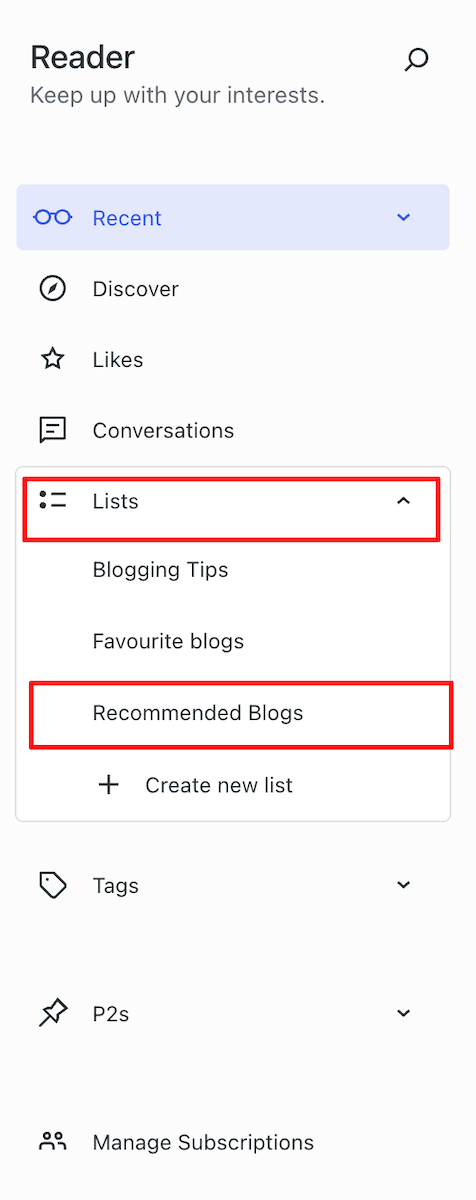
An image showcasing 'Recommended Blogs' on the 'Reader' list of a WordPress blog.
Click the Recommended Blogs link.
  • Click the ‘Edit‘ button and open the ‘Sites‘ tab. As you will see from the image below, I’ve already recommended some blogs.
An image displaying the Sites tab on the Recommended Blogs page of the WordPress Reader.
Click the ‘Sites’ tab.
  • To remove a recommended blog, click on the ‘Remove‘ button.
  • To add a blog, start typing the name of the blog in the ‘Search or enter URL to follow‘ box, and a list of suggestions will appear.
An image displaying a list of blogs that appear as you type in the search box.
Start typing to display a list of blogs.
  • Click the ‘Recommend‘ button to add a blog to your Recommended Blogs list. Note that if you are already following a blog, you’ll see ‘Subscribed‘ next to it.
  • The blog you recommended is now added to your Recommended Blogs list and will appear whenever anyone hovers their mouse over your Gravatar profile in the WordPress Reader. Click the ‘View All‘ link to see a list of all the blogs they recommend.
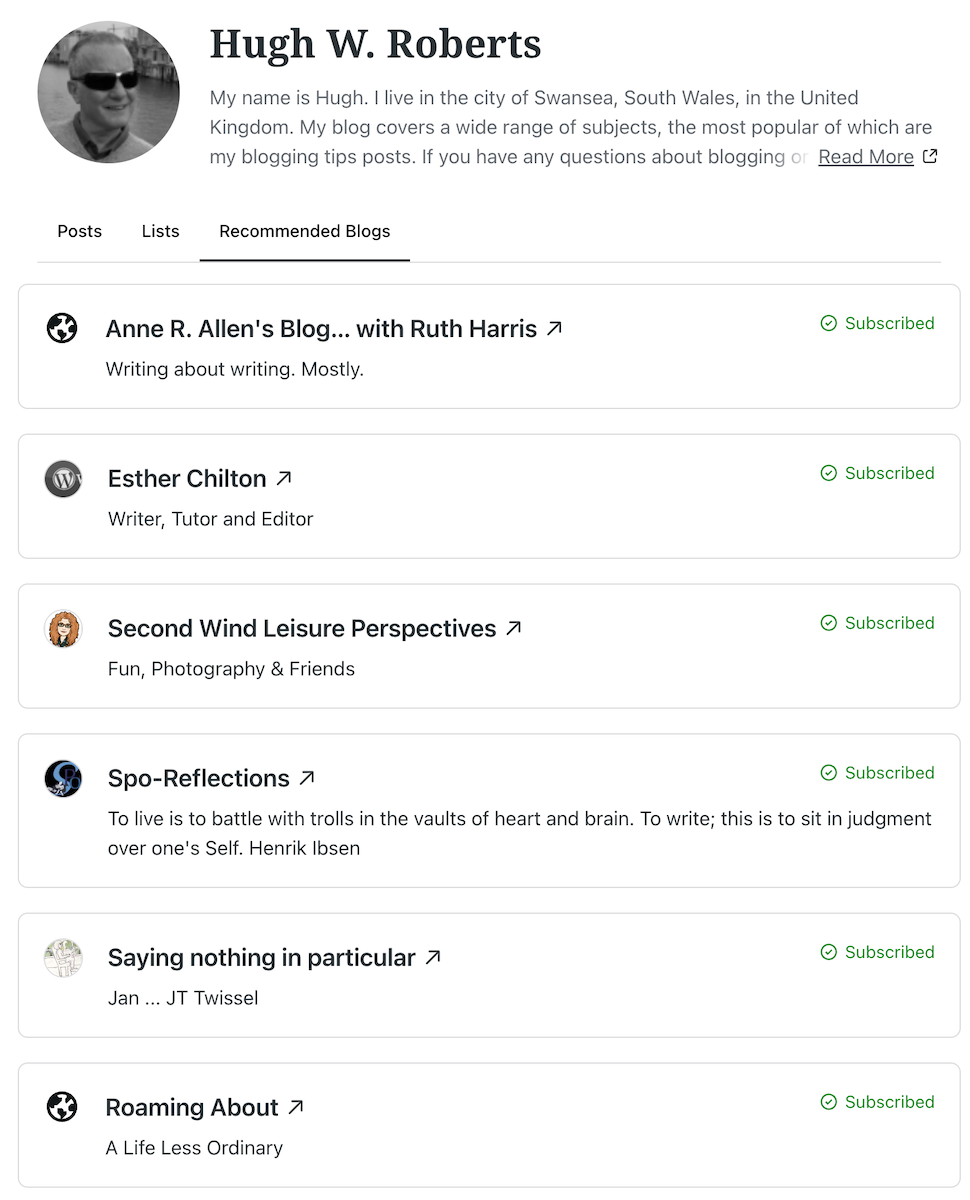
An image of a list of recommended blogs when hovering over a Gravatar profile.
As you recommend blogs, they will appear on your Gravatar profile.

Whenever another blogger recommends your blog, you should receive a notification email from WordPress with the details of who has recommended your blog, provided you have not switched off notifications. However, I’ve not yet seen these notifications appear under the notification bell icon.

Based on my observations, after clicking on the Gravatars of many bloggers, few have recommended any blogs so far. Additionally, some bloggers haven’t included their blog details on their Gravatar, making it harder for others to find their blog. And remember that if you leave comments on other blogs, your Gravatar will appear next to your comment.

Have you seen this new feature on WordPress? Has anyone recommended your blog in this way? Will you start using the ‘Recommend Blog’ feature? Have you added your blog details to your Gravatar?

Layout, content, settings, and format might differ on self-hosted blogs.

The featured image in this blog post is taken from Pixabay. AI checked spelling and grammar mistakes.

Click the buttons below to follow Hugh on Social Media

Copyright @ 2025 hughsviewsandnews.com – All rights reserved.


Discover more from Hugh’s Views & News  

Subscribe to get the latest posts sent to your email.

62 responses to “This New WordPress Feature Helps Promote The Blogs You Love”

  1. masgautsen avatar

    Thank you for the tip Hugh, I had not seen this feature and did not know of it.

    1. Hugh W. Roberts avatar

      It’s a new feature from WordPress, not one that has been around for long, but I’m delighted they’ve introduced it so we can recommend our favourite blogs other than in a blog post.

  2. Dan Antion avatar

    I’ve seen notices of recommendations, but I honestly didn’t know what it was all about. I don’t use the Reader very often, but I think I’ll give this feature a look. Thanks for the information, Hugh.

    1. Hugh W. Roberts avatar

      I don’t use the WordPress Reader much either, Dan. However, I do use it when searching for particular posts on WordPress from blogs I’m not already following. I hope the ‘recommended blogs’ feature will one day also apply to Gravatars when not in the WordPress Reader.

  3. Janis @ RetirementallyChallenged.com avatar

    I have (happily) received several of these notices that my blog has been recommended but I didn’t know what caused that to happen. Thanks so much for the information… now I intend to use your tutorial to recommend a few blogs that I love (including yours, of course 😊).

    1. Hugh W. Roberts avatar

      Thank you for the blog recommendation, Janis. I’m delighted that this post answered some of your questions.

  4. Liesbet @ Roaming About avatar

    Thanks for this post, Hugh. When I saw it appear in my inbox and I read the title, I was going to comment: “Aha, that’s what happened. Thank you,” since I noticed a message recently about you recommending my blog and I’d never seen that feature before. I had been wondering how this happened, hence my delight about your post. I was double surprised when you used my blog in one of your example screenshots. :)

    This is a wonderful WordPress feature, indeed! Since you mentioned in your previous blog post how your views and stats have gone up, I was wondering if it maybe had to do with this new feature and other bloggers recommending yours?

    1. Hugh W. Roberts avatar

      This is a new feature that WordPress recently introduced, Liesbet. However, I hear it’s also available on other blogging platforms.

      I hope you didn’t mind me using your blog in the screenshots. It was my next recommendation while drafting the post, so it worked out.

      While researching this post, I found that very few bloggers were already using the feature and promoting blogs they loved, although some of them might have been aware of it. I believe the rise in my stats during August is mainly due to the performance of some of my posts with SEOs. Some of my older posts are doing exceptionally well, especially the True Story posts I used to write. Search engines bring in the most traffic to my blog. I’m also good at promoting my posts on social media and gaining a lot of support from other social media users, too. It all helps.

      1. Liesbet @ Roaming About avatar

        I was flattered by the screenshot and seeing my blog mentioned here, Hugh. Please, feel free to use or do whatever you’d like regarding Roaming About. You have 100% my permission. :-)

  5. Miriam Hurdle avatar

    Thank you for sharing the “how to” do the recommended blogs, Hugh!

    1. Hugh W. Roberts avatar

      I always include a ‘How To’ section on these types of posts, Miriam. I’ve been told that the screenshots also help.

      1. Miriam Hurdle avatar
  6. Erika avatar

    I just found out about this because I received an e-mail that my blog got recommended. This is really cool and I will go recommend blogs asap!

    1. Hugh W. Roberts avatar

      Thank you for recommending my blog, Erika. I hope you find this new feature beneficial.

      1. Erika avatar

        It is my pleasure, Hugh, and I love this new way of supporting blogs I appreciate. Let’s see how this develops.

  7. Lokesh avatar

    These changes make WordPress look like Medium.

    1. Hugh W. Roberts avatar

      I’ve not used Medium, so I can’t comment on whether that’s the case, but it’s great that on WordPress, we can now recommend other blogs.

  8. Terri Webster Schrandt avatar

    Ah, that’s what’s going on. Thanks so much, Hugh!

  9. Author Jan Sikes avatar

    What a cool new feature! I’m off to try it out!

    1. Hugh W. Roberts avatar

      You’re welcome, Jan.

  10. beetleypete avatar

    Thanks for solving the ‘mystery’, Hugh. I hadn’t realised they would appear on my Gravatar profile.

    Best wishes, Pete.

    1. Hugh W. Roberts avatar

      You’re welcome, Pete.

  11. Debbie D. avatar

    Thanks for explaining this so thoroughly, Hugh! I have recommended several blogs, including yours, but don’t see a recommended list anywhere on my Gravatar profile. I tried adding it as a link, but got a 403 Forbidden message. I checked your Gravatar profile and didn’t see a recommended list there either. Where do we find it? Thanks!

    1. Hugh W. Roberts avatar

      Hi Debbie,

      How strange. Let me check this out. It’s possible that WordPress has removed it for maintenance or moved it elsewhere. I’ll come back to you.

        1. Hugh W. Roberts avatar

          Hi Debbie,

          Apparently, you need to be in the WordPress Reader to view ‘Recommended Blogs.’ It only works there.

          I’ll update the post.

          1. Debbie D. avatar

            Thanks, Hugh! I have now added it as a link to my Gravatar profile. You could do that as well. Initially, it gave off a 403 Forbidden message, but it’s there now.

  12. Esther Chilton avatar

    I didn’t know you could do that. Thank you so much for the helpful tip. What would we do without your knowledge, Hugh? Thank you.

    1. Hugh W. Roberts avatar

      This is a new feature WordPress recently introduced, Esther. It was therefore no surprise that I didn’t see many bloggers who had already recommended other blogs.

  13. Terri Webster Schrandt avatar

    This needs further investigation, Hugh! Thanks for the how-to! And thank you for the recommendation 😊

    Speaking of sharing, I added Mastodon to my socials. But when I want to share after tapping the share button, im asked to add the url… strange. Perhaps I set something up incorrectly. I had some trouble…

    1. Hugh W. Roberts avatar

      The Mastodon sharing button isn’t very friendly, Terri. However, as long as you have set up all your new posts to share automatically on Mastodon, they will appear there.

      If you want to share another blogger’s post on your Mastodon account, the best thing to do is either boost it from your own timeline (you need to be following the blogger on Mastodon) or copy and paste the full URL of your Mastodon account into the URL box that appears when clicking the button. The best place to find the URL address is by going to your blog’s dashboard, clicking on Jetpack – Social, and looking for the Mastodon connection.

      Hope that helps.

  14. Stevie Turner avatar

    I don’t see ‘Recommended Blogs’ when I click on ‘Lists’. I wonder if this isn’t available for free WordPress sites?

    1. Hugh W. Roberts avatar

      I have another blog, hosted on a free WordPress plan, which I use for testing and other purposes. The ‘Recommended Blogs’ feature is also available for me to use there.

      1. Stevie Turner avatar

        Oh, I’ll have another look. Thanks Hugh.

        1. Hugh W. Roberts avatar

          I hope you find it, Stevie. The only reason I can think of as to why you can not see it is that you’re using a retired theme no longer supported by WordPress. But hopefully, you’ll find it.

  15. wrookieschu avatar

    Great post Hugh. I have saved this to investigate further when I have time but I’m definitely in favour of promoting my favourite blogs for others to enjoy.

    1. Hugh W. Roberts avatar

      Likewise, Wayne. It’s great to be able to promote the blogs you love the most through something that isn’t in a post and is visible to anyone checking out your Gravatar.

Leave a reply to Hugh W. Roberts Cancel reply

I’m Hugh

Welcome to my blog. I’m delighted to have you here. This is the place to discover tips on blogging and WordPress, flash fiction, photography, and more. I enjoy engaging with my readers, so please feel free to explore, join discussions, and contact me. I’m happy to assist! Find out more about me and my blog by clicking the ‘Meet Hugh’ button.

Let’s connect

Subscribe to Hugh’s Views And News

Latest Posts

Follow Hugh in the Fediverse

Hugh's Views & News  
Hugh's Views & News  
@hughsviewsandnews.com@hughsviewsandnews.com

WordPress & Blogging tips, flash fiction, photography and lots more!

402 posts
5 followers

Recommend Blogs To Follow


Boomer Eco Crusader
Boomer Eco Crusader
Live Green | Declutter | Simplify Life

Jacqueline Lambert
Jacqueline Lambert
Award-Winning Travel Humour Writer

Spo-Reflections
Spo-Reflections
To live is to battle with trolls in the vaults of heart and brain. To write; this is to sit in judgment over one's Self. Henrik Ibsen

Anne R. Allen’s Blog… with Ruth Harris
Writing about writing. Mostly.

Fancying France
The musings of a ‘femme d’un certain âge’ who divides her time between SW France and SE England

SONGS AND SCRIPTS AND DUNKING BISCUITS
Every day tales of a winging-it creative

Marsha Ingrao         Always Write
Marsha Ingrao Always Write
Having fun blogging with friends

Curiosities, Castles and Coffee Shops
The musings of a curious mind

WrookieSchU
WrookieSchU
Live life 🙌🏼

WPcomMaven
WPcomMaven
Helping you make the most of your free WordPress.com website since 2011

Second Wind Leisure Perspectives
Fun, Photography & Friends

Share Your Light
Share Your Light
You are a miracle – Let it happen

No Facilities
No Facilities
Random thoughts, life lessons, hopes and dreams

Esther Chilton
Writer, Tutor and Editor

Roaming About
A Life Less Ordinary

Saying nothing in particular
Jan … JT Twissel

The Chicago Files
The Chicago Files
A Canadian Perspective on Living in the Windy City!

Thank you to all my visitors

469,131 hits

252,586 visitors

Most Viewed Posts & Pages

Copyright Protected Blog

COPYRIGHT ©2011-2031 Hugh’s Views And News BLOG – All Rights Reserved.

This work by Hugh W. Roberts, and/or Hugh’s Views And News blog, is licensed under a Creative Commons Attribution-Noncommercial-NoDerivatives 4.0 International License. Unauthorised use and/or duplication of this material (text and images) without express and written permission from this blog’s author and/or owner is strictly prohibited. If you want to use posts, excerpts, photos and links, you may contact me first. You must give full and clear credit to Hugh W. Roberts and Hugh’s Views And News dot com with links to the original content.