Now This Is Why Keeping Your WordPress Site Updated Matters

WordPress has introduced a useful new feature that benefits all users, including those with a ‘Free’ plan.

With just a few clicks, you can check whether the version of WordPress you are using is up to date, whether any plugins you have installed are current, and if the theme of your WordPress site is the latest release.

Here’s how to verify that all your WordPress installations are up to date. I am using an Apple iMac desktop computer for this guide.

  • Go to the dashboard of your blog and click on Dashboard – Updates.
An image emphasising the 'Update' button on the dashboard of a WordPress blog.
Click the ‘Update’ button.
  • After clicking on Updates, you will see a page that informs you whether you are using the latest version of WordPress, plugins, and the WordPress theme you have installed.
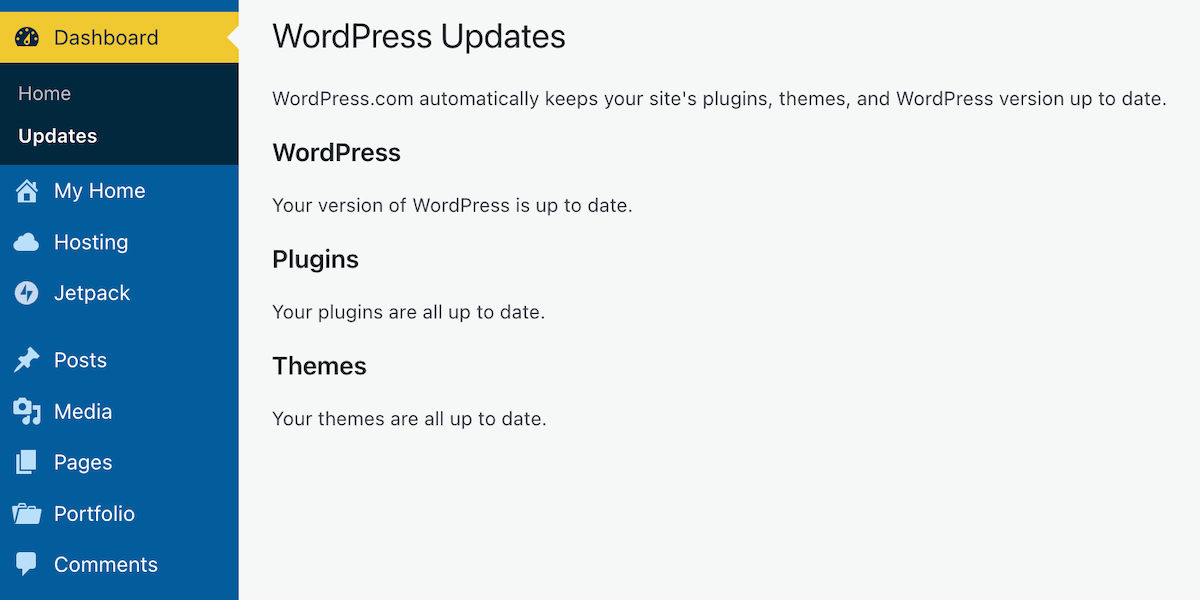
An image of a page on a WordPress blog informing if WordPress, plugins and themes are all up to date.
Is everything on your WordPress blog updated?

If, like me, you are a WordPress.com user, WordPress will keep all these items up to date for you. So, why am I then informing you of this feature? Well, it’s all about retired themes and plugins that cause problems.

If you are using any plugins or a theme that has been retired, even if it appears you have the latest versions, any bugs affecting the theme or plugin since the final update will no longer be fixed because WordPress has withdrawn support.

How do I find out if the WordPress theme I’m using is still supported?

To find out if the WordPress theme you are using is still supported (and receiving updates), visit your blog’s dashboard and click Appearance – Themes. You will see a message indicating your theme is retired if it is no longer supported by WordPress. As we all know, using outdated themes can cause numerous problems for users.

Although a retired theme might not cause problems now, it could in the future. Some users attempt to use a workaround to avoid issues, but this is not advised, as it may lead to further problems. Instead of a workaround, switch to a current theme fully supported by WordPress. You don’t have to move to a Block theme if you prefer not to, since many Classic themes remain supported by WordPress. I am still using a Classic theme (Toujours) on my blog, which is fully supported.

Using an outdated, unsupported theme can lead to several issues. Here are a few.


1. Security vulnerabilities: Without ongoing updates, the theme may become prone to security risks that could compromise your blog.
2. Compatibility issues: As plugins and WordPress itself update, an outdated theme may not function correctly with newer versions, causing layout glitches, functional problems such as not being able to leave comments and issues with WordPress believing you are not logged in.
3. Lack of support: You won’t have access to official support for troubleshooting any issues or queries that arise with the theme. WordPress will advise you to change to a supported theme.
4. Performance issues: Unsupported themes may not be optimised for speed and performance, leading to slower load times.
5. Missed features: Regular updates often include new features and improvements; sticking with an unsupported theme means missing out on these enhancements, which could benefit your blog’s features and user experience.

If you are using a retired theme and refuse to switch to a supported one, there’s no point in blaming WordPress for any problems with your blog. It’s not their fault if you continue to use something they no longer support.

How do I change my WordPress theme?

Refer to the ‘Change Your Theme‘ page for complete details.

How do I change a retired plugin?

The best approach is to find a new plugin that provides similar functionality. You can search the WordPress plugin repository or other trusted sources for alternatives. 

Conclusion:

  • Many users often blame WordPress for blog-related issues, which are frequently due to user error or outdated software on their devices.
  • WordPress has introduced a new feature that allows users, even on the free plan, to check if their WordPress version, plugins, and theme are up to date.
  • To check for updates, navigate to Dashboard – Updates in your blog’s dashboard. If everything is updated, great!
  • However, if you’re using retired themes or plugins, you won’t receive support or fixes for any issues that arise.
  • Unsupported themes can lead to security vulnerabilities, compatibility issues with newer updates, a lack of support, performance problems, and the omission of key features.
  • To determine if your theme is still supported, navigate to Appearance – Themes in the dashboard.
  • If it’s retired, consider switching to a supported theme or plugin for better performance and security.

Have you ever faced issues with outdated themes or plugins on your WordPress blog? How did you go about resolving them? Which themes are you currently using, and have you checked if they are still supported? Do you have any WordPress tips to share with others?

Layout, content, settings, and format might differ on self-hosted blogs.

I’m getting tough with non-engaging comments. Comments such as ‘Nice post’ are marked as spam.

The featured image in this blog post is taken from Pixabay. AI checked spelling and grammar mistakes.

Click the buttons below to follow Hugh on Social Media

Copyright @ 2025 hughsviewsandnews.com – All rights reserved.


Discover more from Hugh’s Views & News  

Subscribe to get the latest posts sent to your email.

62 responses to “Now This Is Why Keeping Your WordPress Site Updated Matters”

  1. Liz Gauffreau avatar

    I wouldn’t dare use software that is no longer supported!

    1. Hugh W. Roberts avatar

      Sadly, some bloggers do, and then blame WordPress or others for things going wrong.

  2. Marsha avatar

    I’d never even looked at updates, Hugh. Mine are all up-to-date, but now I know they are. What a great post!

    1. Hugh W. Roberts avatar

      If you have a WordPress.com blog, WordPress do the updates automatically for you, Marsha. However, they don’t inform you if the theme you are using has been retired. To find out, you need to visit the themes page, which will provide the information.

      1. Marsha avatar

        As you look through all the items on the menu, have you done a post on each one? That was one that I’d never checked out. It would be good to have a manual like that. There might be something like that, but reading your posts reminds us that we might need to check.

        1. Hugh W. Roberts avatar

          All my blogging tips posts appear under ‘Blogging Tips’ on the menubar of my blog, Marsha. I don’t like menubars that make blogs look top-heavy, so I have sub-categories under the items on the menubar.

          1. Marsha avatar

            That’s a great idea! I love your page. I refer to it often.

  3. Did You Miss Any Of These? Monthly Round-Up - July 2025 avatar

    […] Now This Is Why Keeping Your WordPress Site Updated Matters […]

  4. Urspo avatar

    yes yes yes

    you are a dear – and not just for this.

  5. Norah avatar

    Thanks, Hugh. I did change and update my theme not long ago in response to a previous post of yours. It’s now all updated. Though I’m not sure I am. Haha. I still haven’t figured everything out, but I’ll get there.

    1. Hugh W. Roberts avatar

      That’s great to hear regarding the theme, Norah. Figuring everything out is all part of the fun. And, of course, the blogging community are always happy to try and help where they can.

  6. Darlene avatar

    Thanks for this valuable information. I just checked, and even though my theme is quite old, it is all up to date. That makes me feel better.

    1. Hugh W. Roberts avatar

      Have you checked that the theme you use is still supported by WordPress, Darlene? I recommend checking if it has been retired.

  7. Judith Barrow avatar

    Thanks for all your help, Hugh.

    1. Hugh W. Roberts avatar

      In the meantime you can open a new post, copy and paste the title of the post you want to share and turn the title into a pingback so anyone clicking on it goes to the post you want to share, Judith. Also, for SEO reasons, give your post a different title. For example, if you were sharing my post you could use – ‘Reblog – Now This Is Why Keeping Your WordPress Site Updated Matters. SEO does not like posts that have the exact same titles.

      1. Judith Barrow avatar

        You are a mine of knowledge and advice, Hugh – many thanks. Jx

Leave a reply to Urspo Cancel reply

I’m Hugh

Welcome to my blog. I’m delighted to have you here. This is the place to discover tips on blogging and WordPress, flash fiction, photography, and more. I enjoy engaging with my readers, so please feel free to explore, join discussions, and contact me. I’m happy to assist! Find out more about me and my blog by clicking the ‘Meet Hugh’ button.

Let’s connect

Subscribe to Hugh’s Views And News

Latest Posts

Follow Hugh in the Fediverse

Hugh's Views & News  
Hugh's Views & News  
@hughsviewsandnews.com@hughsviewsandnews.com

WordPress & Blogging tips, flash fiction, photography and lots more!

402 posts
6 followers

Recommend Blogs To Follow


Boomer Eco Crusader
Boomer Eco Crusader
Live Green | Declutter | Simplify Life

Jacqueline Lambert
Jacqueline Lambert
Award-Winning Travel Humour Writer

Spo-Reflections
Spo-Reflections
To live is to battle with trolls in the vaults of heart and brain. To write; this is to sit in judgment over one's Self. Henrik Ibsen

Anne R. Allen’s Blog… with Ruth Harris
Writing about writing. Mostly.

Fancying France
The musings of a ‘femme d’un certain âge’ who divides her time between SW France and SE England

SONGS AND SCRIPTS AND DUNKING BISCUITS
Every day tales of a winging-it creative

Marsha Ingrao         Always Write
Marsha Ingrao Always Write
Having fun blogging with friends

Curiosities, Castles and Coffee Shops
The musings of a curious mind

WrookieSchU
WrookieSchU
Live life 🙌🏼

WPcomMaven
WPcomMaven
Helping you make the most of your free WordPress.com website since 2011

Second Wind Leisure Perspectives
Fun, Photography & Friends

Share Your Light
Share Your Light
You are a miracle – Let it happen

No Facilities
No Facilities
Random thoughts, life lessons, hopes and dreams

Esther Chilton
Writer, Tutor and Editor

Roaming About
A Life Less Ordinary

Saying nothing in particular
Jan … JT Twissel

The Chicago Files
The Chicago Files
A Canadian Perspective on Living in the Windy City!

Thank you to all my visitors

469,299 hits

252,728 visitors

Most Viewed Posts & Pages

Copyright Protected Blog

COPYRIGHT ©2011-2031 Hugh’s Views And News BLOG – All Rights Reserved.

This work by Hugh W. Roberts, and/or Hugh’s Views And News blog, is licensed under a Creative Commons Attribution-Noncommercial-NoDerivatives 4.0 International License. Unauthorised use and/or duplication of this material (text and images) without express and written permission from this blog’s author and/or owner is strictly prohibited. If you want to use posts, excerpts, photos and links, you may contact me first. You must give full and clear credit to Hugh W. Roberts and Hugh’s Views And News dot com with links to the original content.