If you missed my recent post, 7 Common Mistakes To Avoid When Deciding Whether To Follow A Blog, you won’t have seen the fantastic discussions in the comments section that raised many questions.

One of those questions was, ‘How do I Unsubscribe From A WordPress Blog I’m No Longer Interested In Reading?’

Not sure why you should unfollow a blog? Read the post for the answers.
Light blue image with the words '5 Easy Ways To Unfollow A WordPress Blog' in white text.
It’s easy to unfollow a blog on WordPress.

For this post, I’m using a desktop computer.

1. From The WordPress Reader

Ensure you are viewing posts from the WordPress Reader.

Click the three horizontal dots (meatball menu) next to the blog you want to unfollow and click the ‘Unsubscribe‘ button.

2. From A Post

Open the post from the WordPress Reader.

Right-click on the post title and click ‘Open in a new tab.’

Click the ‘Subscribe‘ button in the screen’s floating action bar in the lower right corner.

You’ll now be unsubscribed from following that blog.

3. From An email Notification

If you get email notifications of new posts, click the ‘Manage your email settings or unsubscribe’ link in the email.
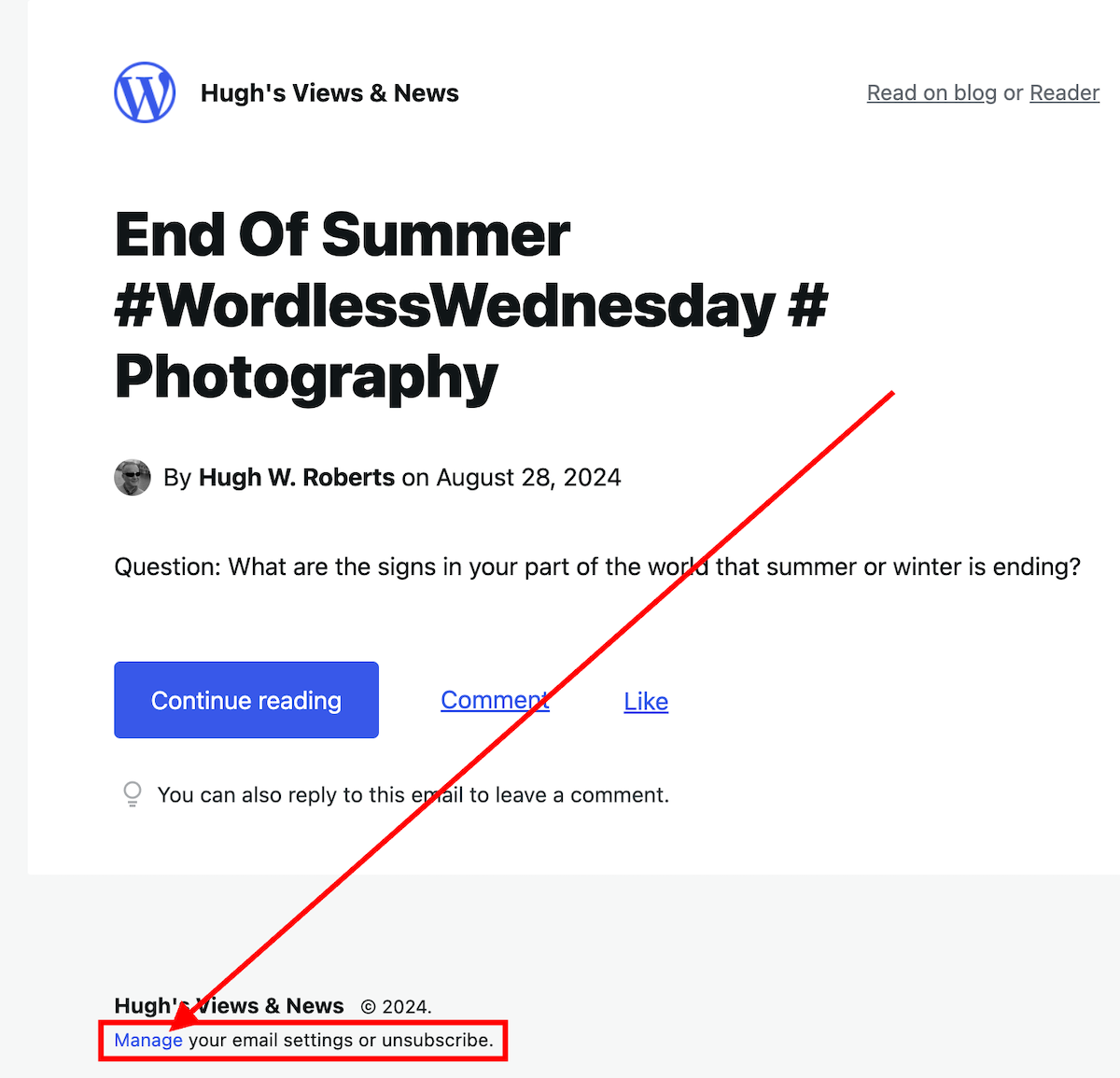
Image highlighting the 'Manage your email settings or unsubscribe' link on a WordPress new post notification email.
Click the ‘Manage your email settings or unsubscribe’ link

On the new page that opens, click the ‘unsubscribe‘ button.

4. From the ‘Manage’ subscriptions list on the WordPress Reader

From the ‘manage‘ section of the blogs you’re following, click on the ‘Manage‘ link (next to ‘Subscriptions‘).

Image highlighting the 'Manage' link in the WordPress Reader page
Click the ‘Manage’ link.

A list of all the blogs you’re following will show.

Click the three horizontal dots (meatball menu) next to the blog you want to unfollow and click the ‘Unsubscribe‘ button.

5. From a WordPress Web Address

Ensure you are signed into WordPress.

Type or click on the following URL address https://wordpress.com/following/edit

A list of all the blogs you are following will show.

Click the three horizontal dots (meatball menu) next to the blog you want to unfollow.

Click the ‘Unsubscribe‘ button.

If you have any questions, please leave them in the comments section.

More blogging tips posts from Hugh

Click the buttons below to follow Hugh on Social Media

Copyright @ 2024 hughsviewsandnews.com – All rights reserved.


Discover more from Hugh’s Views & News  

Subscribe to get the latest posts sent to your email.

25 responses to “5 Easy Ways To Unfollow A WordPress Blog”

  1. Did You Miss Any Of These? Monthly Round-Up - August 2024 avatar

    […] 5 Easy Ways To Unfollow A WordPress Blog […]

  2. Michelle (Boomer Eco Crusader) avatar

    Why did the song “50 Ways to Leave Your Lover” pop into my head when I saw the title of your post? LOL Thanks for the informative post, Hugh.

    1. Hugh W. Roberts avatar

      I hope that song didn’t play on your mind all day, Michelle.

  3.  avatar
    Anonymous

    I currently don’t subscribe to many blogs at all, but this is super helpful how-to information so I can keep on top of it all. Very much appreciated. Thank you for sharing!

    Sally | Challenge Fifty Two

    1. Hugh W. Roberts avatar

      I’m glad it helped, Sally. You may never have to do it, but at least you know how it’s done now.

  4. Eugi avatar

    Thank you for sharing these tips, Hugh. The only way I knew how to unsubscribe was by using the Manage Subscriptions list. Now I know there are other options after reading your post, which is very helpful.

    1. Hugh W. Roberts avatar

      Yes, there are a few other ways, Eugi. But there is nothing wrong with sticking to what you know. The most important thing is to remember to have a declutter of subscriptions every so often.

      1. Eugi avatar

        Yes, decluttering is important, and I need to remember to do it more often.

  5. Terri Webster Schrandt avatar

    Good idea to mark these as spam so we can teach AI what spam looks like 👍

    1. Hugh W. Roberts avatar

      Agreed. They’ll find other ways, but I’m onto them, Terri.

  6. Terri Webster Schrandt avatar

    Great how-to Hugh! I took your advice and unsubscribed to a handful the other day. I also checked a couple of others and saw that their sites were deleted. Sadly I unsubscribed to a fellow blogger’s site who passed away last spring.

    I’m dealing with a lot more spam comments, that don’t get flagged as spam. Many are from new “subscribers” who start following me. They leave a one word comment, which I check, then look at my latest subscribers. I’ve been deleting a lot of those lately as well. Not that I have anything against AI tools, but I’m sure AI has raised the frequency of spammers and fake followers.

    It’s always a good idea to spend 5 minutes a day on blog administration for these reasons. After my Facebook blog page got hacked 2 years ago, I’ve been extra careful who follows me.

    1. Hugh W. Roberts avatar

      I stopped approving one-word comments or comments with just one emoji quite a few months ago, Terri. I noticed the same thing, with some leaving the same one-word comment (nice! Beautiful! Good!), not just on my blog posts but on others. They look genuine, but if you start marking them as spam, WordPress should start sending them straight to your spam folder. Be careful because I’ve also had two-worded comments, such as ‘Beautiful post’ from the same spam blogger who leave the same comment all over the blog world, so they now get marked as spam. I’m sure you don’t, but don’t believe that they have read the post they are leaving the comment on.

      Some of these spammers subscribed to my blog, but most haven’t. I’ve removed those that have.

  7. JT Twissel avatar

    All good ways when it becomes necessary.

    1. Hugh W. Roberts avatar

      Which, in my case, is quite often. Always makes me feel like I’m decluttering.

  8. AM avatar

    Great post and very simply written. It makes it easy to follow. I wrote a similar post myself, but that was very complicated 😂.

    1. Hugh W. Roberts avatar

      In my experience, when writing ‘How To’ posts, make them simple to read and include a few images as they also help.
      I don’t recall your post about this subject. How did you title it?

      1. AM avatar

        It wasn’t a how to post per se, but here’s the link:

        1. Hugh W. Roberts avatar

          I remember it now, especially given that I commented on it. I was somewhat concerned that someone told you anyone wanting to engage with a WordPress blogger must have a WordPress account. We know that isn’t the case.

          1. AM avatar

            Yeah. It’s absolutely possible to comment using just your email. The notifications, though using just the email works pretty badly, though in my experience.

            The few times I’ve left comments using my email, because they don’t have the WordPress comments on, I’ve rarely gotten a reply. It could be because the replies never came, but still. I know I’ve missed comments and replies when doing so.

            1. Hugh W. Roberts avatar

              It could be that your comments have gone into their WordPress spam folder. Some bloggers fail to check what’s in there.
              You can also comment via a social media account or, like I have done, turn off the settings that say commenters must be signed into WordPress to be able to comment.

            2. AM avatar

              Yeah, the spam thing most likely will explain that.

  9. Dan Antion avatar

    I should post a link to this at the top of my blog, Hugh. About once a week I get a comment asking (sometimes demanding) me to unsubscribe someone. The worst are the people who are nasty about it, but don’t share their email. So, I have to find the comment and hope there’s an email, or search on the IP address. I know, if they subscribed via email, the email has an unsubscribe link in it, but they ignore that. The last person left all their contact information, except their email.

    1. Hugh W. Roberts avatar

      I’ve never had anyone ask me to unsubscribe them, but I have seen comments demanding it on other blogs, Dan.
      However, I see plenty of irate bloggers usually blaming everybody but themselves when they can’t be bothered to find out how to do something. I mark all those types of comments as spam.

      1. Dan Antion avatar

        I read and respond to every comment, and I do unsubscribe people that ask. I’d like to point out that “you could ask nicely” but I don’t want to open a dialog of that sort.

        I work hard, on my own and with WordPress, when there are problems, but some things do get frustrating. I appreciate your in-depth posts on the how-to-do-things. Some of these are things we should all know by now, but you often have a new trick.

        1. Hugh W. Roberts avatar

          The other day, I came across a comment from a blogger (on another blog) who said that they had tried leaving a comment, but the comment box wasn’t there. The comment box was there when they logged out of WordPress and signed in again. Of course, they blamed WordPress, as did the blogger for whom the comment was for (who often blames WordPress for everything). I had to roll my eyes and shake my head. I was tempted to come into the conversation but decided it was not worth it.

          I’m glad these posts help, Dan. They take a lot of time to put together, but that does not matter to me when I know my posts are helping (even if it’s just one person). Thanks again.

Leave a reply to Did You Miss Any Of These? Monthly Round-Up – August 2024 Cancel reply

I’m Hugh

Welcome to my blog. I’m delighted to have you here. This is the place to discover tips on blogging and WordPress, flash fiction, photography, and more. I enjoy engaging with my readers, so please feel free to explore, join discussions, and contact me. I’m happy to assist! Find out more about me and my blog by clicking the ‘Meet Hugh’ button.

Let’s connect

Subscribe to Hugh’s Views And News

Latest Posts

Looking for your next quick read? Try my books

An image of book covers, book, tablet and mobile phone, for the book Glimpses.
An image for the book More Glimpses - showing a book cover, tablet and mobile phone.

Follow Hugh in the Fediverse

Hugh's Views & News  
Hugh's Views & News  
@hughsviewsandnews.com@hughsviewsandnews.com

WordPress & Blogging tips, flash fiction, photography and lots more!

301 posts
6 followers
A widget with the words 'Team Effort - Story Chat Digest - Where Authors Meet - Author'

Recommend Blogs To Follow


Boomer Eco Crusader
Boomer Eco Crusader
Live Green | Declutter | Simplify Life

Jacqueline Lambert
Jacqueline Lambert
Award-Winning Travel Humour Writer

Spo-Reflections
Spo-Reflections
To live is to battle with trolls in the vaults of heart and brain. To write; this is to sit in judgment over one's Self. Henrik Ibsen

Anne R. Allen’s Blog… with Ruth Harris
Writing about writing. Mostly.

Fancying France
The musings of a ‘femme d’un certain âge’ who divides her time between SW France and SE England

SONGS AND SCRIPTS AND DUNKING BISCUITS
Every day tales of a winging-it creative

Marsha Ingrao         Always Write
Marsha Ingrao Always Write
Having fun blogging with friends

Curiosities, Castles and Coffee Shops
The musings of a curious mind

WrookieSchU
WrookieSchU
Live life 🙌🏼

WPcomMaven
WPcomMaven
Helping you make the most of your free WordPress.com website since 2011

Second Wind Leisure Perspectives
Fun, Photography & Friends

Share Your Light
Share Your Light
You are a miracle – Let it happen

No Facilities
No Facilities
Random thoughts, life lessons, hopes and dreams

Esther Chilton
Writer, Tutor and Editor

Roaming About
A Life Less Ordinary

Saying nothing in particular
Jan … JT Twissel

The Chicago Files
The Chicago Files
A Canadian Perspective on Living in the Windy City!

Thank you to all my visitors

471,927 hits

254,796 visitors

Most Viewed Posts & Pages Over The Last 24 Hours

Copyright Protected Blog

COPYRIGHT ©2011-2031 Hugh’s Views And News BLOG – All Rights Reserved.

This work by Hugh W. Roberts, and/or Hugh’s Views And News blog, is licensed under a Creative Commons Attribution-Noncommercial-NoDerivatives 4.0 International License. Unauthorised use and/or duplication of this material (text and images) without express and written permission from this blog’s author and/or owner is strictly prohibited. If you want to use posts, excerpts, photos and links, you may contact me first. You must give full and clear credit to Hugh W. Roberts and Hugh’s Views And News dot com with links to the original content.