Categorising and tagging blog posts are some of the most potent ways for bloggers to get their posts noticed. However, some bloggers don’t bother with either, meaning they’re losing the potential for new readers and followers. Are you one of them?

But what are categories and tags, and how do they work?
Light blue image with the words 'How To Make Categorising And Tagging Blog Posts Powerful' in white text
Do you categorise and add tags to all your blog posts?

What are blogging categories?

Blogging categories act like groups where blog posts that have a connection with each other are stored.

For example, if you’re a travel blogger, you could have The United Kingdom category and list the sub-categories Scotland, Wales, England, and Northern Ireland

Categories are important because they make finding specific blog posts more straightforward for visitors to your blog (especially first-time visitors).

Every blog post should have at least one category.

Unfortunately, if you don’t categorise blog posts, they will be uncategorised, which is no help to anyone.

Imagine going into a shop to find a particular book about dinosaurs and finding that none of the books has been categorised. You’d leave and go to another shop that helps customers by categorising its books to find what you’re looking for much easier.

I never return to blogs that do not categorise posts.

How to add a category to your WordPress blog post

This tutorial uses an Apple iMac desktop computer and the WordPress ‘Default’ dashboard.

  • While drafting a blog post, you’ll see a toolbar in the settings area on the right-hand side of the page. This is where you can add categories.
Image highlighting where to find the category box on the draft page of a WordPress blog
Every blog post should have at least one category.

If a blog post doesn’t fit into one of your existing categories, click ‘Add New Category‘ and create a new one.

Remember to do some housekeeping regularly for the categories on your blog. For example, delete categories that are no longer being used or update categories by giving them a new name if something works better. 

How to edit the categories on your blog.

  • On your blog’s dashboard, click on Posts to open a submenu, and click on Categories.
Image highlighting where to find Categories on the dashboard of a WordPress blog.
Click Posts and Categories.
  • To edit a category, click the three verticle dots (meatball menu) next to the category you want to edit.
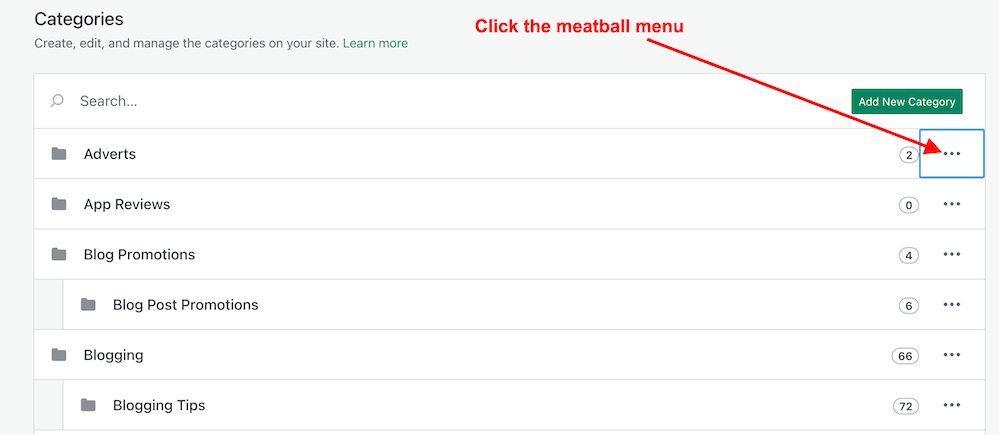
Image highlighting the meatball menu in Categories on a WordPress blog.
Click the meatball menu to edit a category.
  • The meatball menu displays four options: edit, delete, view posts, and set as a default.
  • Edit – Edit the name or description of the category.
  • Delete – Delete the category.
  • View posts – View a list of all your posts under the category.
  • Set as default – Useful when most posts fall under a particular category.
  • Remember to click the ‘Update‘ button to save any changes you make.

The number next to each category tells you how many posts are under that category. I recommend deleting any categories that are not being used.

Any sub-categories will show under each category.   

Tip: Setting your default category to ‘Uncatorigised‘ allows you to search for any blog posts you may have forgotten to categorise.

What are tags?

Tags are popular keywords that can be added to a blog post. For example, some of the tag words I’ve added to this post are –

  • blogging
  • bloggingtips
  • categories
  • tags
  • WordPress
  • HowTo

Each tag should be separated with a comma or by pushing ‘Enter’ on your keyboard.

Tags containing more than one word (such as ‘Blogging tips’) act as one tag word, but you must add them without any space between the words, i.e., ‘ blogging tips’ becomes ‘bloggingtips.’

Generally, tags do not need to connect with each other, but when used correctly, they can generate a lot of extra traffic to a blog post.

Like categories, tags can be added to blog posts in the settings area toolbar on the right side of a draft post. 
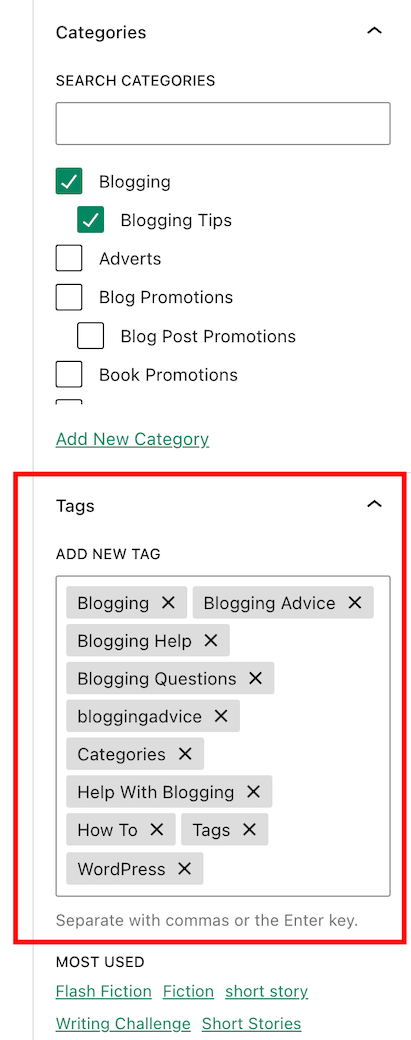
Image highlighting where to add tags on a WordPress blog post
Always add keywords (Tags) to your blog posts.

When adding tags to your post, consider the keywords somebody would add to the WordPress search bar when looking for specific blog posts. Or think of words you would use to search for your post.

Check out the tags I’ve added for this blog post. They appear at the end of every post.  

Important information – Did you know this…?

The cardinal tagging rule on WordPress.com is that you should never add more than 15 tags and categories (combined) to your post; otherwise, it won’t appear in the WordPress Reader. This cap prevents spam posts from appearing on the reader list, as spammers and spambots tend to use many categories and tags to lure readers in

15 tags and categories can seem like a lot, but you don’t need to use all of them.

Never tag your blog post with words that have nothing to do with the post’s subject. Otherwise, visitors will come to your blog under false pretences and probably won’t return.

Generally, I add no more than three categories and between six and ten tags to my blog posts. 

As with categories, it’s also essential to do some housekeeping for the tags you use on your blog. 

How to delete and update tags

  • On the dashboard of your blog, click on Posts – Tags.
  • A page showing your tags and how many blog posts containing each tag appears.
  • To edit, view and delete posts containing a tag word, hover your mouse over each tag word and click edit, quick edit, view or delete.
  • You can also view the posts containing the tag word by clicking the number in the ‘Count’ column. I recommend deleting any tag words that are no longer being used.

Let’s wrap it up!

  • All blog posts should be categorised and tagged.
  • Categorising and tagging your blog posts makes them user-friendly, meaning people will likely return to your blog.
  • Not categorising your blog posts means they’ll be challenging to find.
  • When tagging posts, think of keywords others will use when searching for your blog post.
  • Don’t use tag words that have nothing to do with the subject of your blog post.
  • WordPress users – never add more than 15 tags and categories (combined) to your posts; otherwise, they won’t appear on the WordPress Reader.
  • Remember to perform regular housekeeping of categories and tags on your blog.
  • Adding the proper tags to your blog posts will increase the number of readers who find them. More readers mean higher stats, more comments, and new followers.

Do you categorise and add tags to all your blog posts? If not, why not? Which tags-words work best for you? Is there anything you’d like to add or ask regarding categories and tags in blog posts? Join the discussion by leaving a comment.


Did you enjoy reading this post? Then you may also like…

Layout, content, settings, and format might differ on self-hosted blogs.

Follow Hugh on social media. Click the buttons below.

Copyright @ 2024 hughsviewsandnews.com – All rights reserved.


Discover more from Hugh’s Views & News  

Subscribe to get the latest posts sent to your email.

59 responses to “How To Make Categorising And Tagging Blog Posts Powerful”

  1. Why Do You Use The WordPress Reader? This Is Why You Should Use It. avatar

    […] posts in which ‘WordPress’ had been used as a category or tag (this shows how important categorising and tagging your posts […]

  2. Y3 Story Chat Tips Summary #1: “How to Write Fantastic Stories that will Impact Readers” by Hugh W. Roberts – Marsha Ingrao – Always Write avatar

    […] Hugh’s Views and News – author – “Your number of drafts is nothing to be embarrassed about. You should see some of the drafts of my blog posts and how many versions of them there are. I don’t know why some writers write and publish something so quickly without at least sleeping on that first draft. It’s as if they’re in some race to get it done as quickly as possible, as if it’s a hot potato in their hands. I’ve seen the same thing happen with book covers, too. They’ll go with the first one they put together without returning to it or asking for some new sets of eyes to help.” […]

  3. Marsha avatar

    You are the king of engagement. What I like, Hugh, is that you take a genuine interest in people. You go the extra mile to help them out even to following up with an email. It doesn’t get any better than that! Thanks for all you do in the blogging world, my friend.

    1. Hugh W. Roberts avatar

      I enjoy discussions with my readers, Marsha. That’s why I do my best not to leave short, non-engaging comments on any posts, as I think it’s disrespectful to the person who has written the post.
      I enjoy sharing the blogging knowledge.

      1. Marsha avatar

        One of the problem that most people run into is time management. They become close to many bloggers then feel obligated to visit them frequently. Then people like me include lots of links, and they want to be good citizens of the blogosphere and visit at least a few of the links and comment on them. After a very short time, they get overwhelmed. I’ve done a few tip posts years ago on finding balance, but honestly, it took years to find that balance. Some people drop off for a while, and I drop away sometimes. We have to learn to be forgiving of ourselves and others when that happens. The other thing that happens is that some of our blogging relationships have blossomed into real life – like Terri and I, and my Arizona and Oregon friends. We keep each other apprised of things going on on other people’s blogs. We also have very different interests and know different bloggers. I can’t even keep up with all of their blogs. LOL

        1. Hugh W. Roberts avatar

          And that’s the problem, Marsha – feeling obliged. But here’s the thing-you’re not obliged. Nobody should feel obliged to visit, read, and leave a comment on every blog. It’s okay to not engage with every blog post. This realisation can liberate everyone from the burden and bring back the fun of blogging. After all, I’ve never come across a blog where all the posts have been interesting and inspired me to leave a comment.

          You’re absolutely right, Marsha. Finding the right balance is the key. Many bloggers, especially those who feel they must follow every blog that follows them and comment on every post, often find themselves overwhelmed. But there’s a sense of relief that comes with finding that balance. I’ve written about this subject many times and always had comments thanking me for bringing the subject up. They often feel much better after reading my post about the topic.

          As somebody once said to me when I first started blogging -‘leaving one genuine and engaging comment every once in a while is worth a million short, non-engaging comments.’ Comments do matter, and they make a difference. But don’t feel pressured to leave a comment on every post. Instead, focus on making comments meaningful and engaging.

  4. Did You Miss Any Of These? Monthly Round-Up - June 2024 avatar

    […] How To Make Categorising And Tagging Blog Posts Powerful […]

  5. patc44 avatar

    Thanks for the prompt. I do tag and categorise, and add images. Most of the time. I need to get better at doing thus when doing quick blogs on my phone though.
    Time to spend on housekeeping.

    1. Hugh W. Roberts avatar

      It’s good that you categorise and add tags to your posts. We can all probably get better at doing it. Sometimes, it is just about finding the right tags to add so that more readers see our posts in search results.
      Many bloggers overlook blog housekeeping because they don’t think it matters. But it’s one of the most important parts of blogging.

  6. SCY3 # 1 Tips: How To Write Fantastic Stories That Will Impact Readers by Hugh W. Roberts – Marsha Ingrao – Always Write avatar

    […] to a new feature of Story Chat Year Three – Tips/Author Shop Talk. Hugh W. Roberts, of Hugh’s Views and News, wrote the initial story that launched Story Chat. Of course, we start off this fabulous writing […]

  7. Kymber Hawke avatar

    Hi there! I knew about the 15 tag count, but did not know about the other things in your post. Thank you so much for posting these tips! 🌺

    1. Hugh W. Roberts avatar

      You’re welcome, Kymber. I’m glad this post has helped.

  8. Terri Webster Schrandt avatar

    I almost missed this important post, Hugh! Guess I was busy last week, LOL! Thanks for the reminder to adjust my tags. What I like about this post is that you tell us two important concept: appropriate categories and tags used to bring readers to our posts. Using too many tags is counterproductive, so I keep mine at that number or under. I rarely use more than 3 categories. Apparently my default category is leisure, then I add the appropriate categories with each post.

    Today is a good day to update both! Thanks again for all of your great blogging tips!

    1. Hugh W. Roberts avatar

      I’m glad this post has helped, Terri. I saw it as an opportunity to remind many bloggers to housekeep their tags and categories and not to overdo them when tagging and categorising posts. Some bloggers blame WordPress when their posts do not appear on the reader, yet if they only stopped using so many tags and categories, they’d solve the problem.

      1. Terri Webster Schrandt avatar

        Seems like a simple strategy, Hugh 😀

  9. Linda Schaub avatar

    Good info Hugh … I didn’t start doing this until I had been blogging for awhile.

    1. Hugh W. Roberts avatar

      It wasn’t until I took a WordPress course that I learned the importance of categorising and tagging blog posts, Linda. Fortunately, I took the course a month after creating my blog.

      1. Linda Schaub avatar

        Well timing was everything for you Hugh. I think I should go back and update some of my posts so they show up in my newer posts.

        1. Hugh W. Roberts avatar

          The archives of our blogs are full of treasure, Linda.

          1. Linda Schaub avatar

            Yes they are Hugh.

  10. Debbie D. avatar

    Thanks for the info, Hugh! I use categories and tags all the time, but I wasn’t aware of the maximum 15 rule. Good to know. Shared as well. :)

    1. Hugh W. Roberts avatar

      You’re welcome, Debbie. Thank you for sharing.

  11.  avatar
    Anonymous

    This is very helpful, Hugh. I use tags and categories but I’ve always been unsure I am using the proper tags. Your post is very beneficial to me in the use of tags and thank you.

    1. Hugh W. Roberts avatar

      That’s great to hear. I always aim for these posts to be helpful and straightforward to follow.

Feel free to leave a comment. Engagement helps keep blogs alive and forms community.

I’m Hugh

Welcome to my blog. I’m delighted to have you here. This is the place to discover tips on blogging and WordPress, flash fiction, photography, and more. I enjoy engaging with my readers, so please feel free to explore, join discussions, and contact me. I’m happy to assist! Find out more about me and my blog by clicking the ‘Meet Hugh’ button.

Let’s connect

Subscribe to Hugh’s Views And News

Latest Posts

Follow Hugh in the Fediverse

Hugh's Views & News  
Hugh's Views & News  
@hughsviewsandnews.com@hughsviewsandnews.com

WordPress & Blogging tips, flash fiction, photography and lots more!

403 posts
6 followers

Recommend Blogs To Follow


Boomer Eco Crusader
Boomer Eco Crusader
Live Green | Declutter | Simplify Life

Jacqueline Lambert
Jacqueline Lambert
Award-Winning Travel Humour Writer

Spo-Reflections
Spo-Reflections
To live is to battle with trolls in the vaults of heart and brain. To write; this is to sit in judgment over one's Self. Henrik Ibsen

Anne R. Allen’s Blog… with Ruth Harris
Writing about writing. Mostly.

Fancying France
The musings of a ‘femme d’un certain âge’ who divides her time between SW France and SE England

SONGS AND SCRIPTS AND DUNKING BISCUITS
Every day tales of a winging-it creative

Marsha Ingrao         Always Write
Marsha Ingrao Always Write
Having fun blogging with friends

Curiosities, Castles and Coffee Shops
The musings of a curious mind

WrookieSchU
WrookieSchU
Live life 🙌🏼

WPcomMaven
WPcomMaven
Helping you make the most of your free WordPress.com website since 2011

Second Wind Leisure Perspectives
Fun, Photography & Friends

Share Your Light
Share Your Light
You are a miracle – Let it happen

No Facilities
No Facilities
Random thoughts, life lessons, hopes and dreams

Esther Chilton
Writer, Tutor and Editor

Roaming About
A Life Less Ordinary

Saying nothing in particular
Jan … JT Twissel

The Chicago Files
The Chicago Files
A Canadian Perspective on Living in the Windy City!

Thank you to all my visitors

469,697 hits

253,012 visitors

Most Viewed Posts & Pages

Copyright Protected Blog

COPYRIGHT ©2011-2031 Hugh’s Views And News BLOG – All Rights Reserved.

This work by Hugh W. Roberts, and/or Hugh’s Views And News blog, is licensed under a Creative Commons Attribution-Noncommercial-NoDerivatives 4.0 International License. Unauthorised use and/or duplication of this material (text and images) without express and written permission from this blog’s author and/or owner is strictly prohibited. If you want to use posts, excerpts, photos and links, you may contact me first. You must give full and clear credit to Hugh W. Roberts and Hugh’s Views And News dot com with links to the original content.