Have you noticed the new feature WordPress has added to your blog’s dashboard? It’s located on the ‘My Home‘ page in the top right corner.

But what does this new feature do?
Light blue image with the words 'How To Use This New Easy Feature For Your Blog's Settings On WordPress' in white text.
This new ‘settings’ feature is easy to use. But what does it do?

For this post, I’m using an Apple iMac desktop computer and the ‘Default‘ view setting of my blog’s dashboard.

Image highlighting the new blog settings feature on WordPress
You’ll find this new feature on the ‘My Home’ page of your blog’s dashboard

Let’s get started

  • Click on the meatball menu (three horizontal dots) to open a new menu.
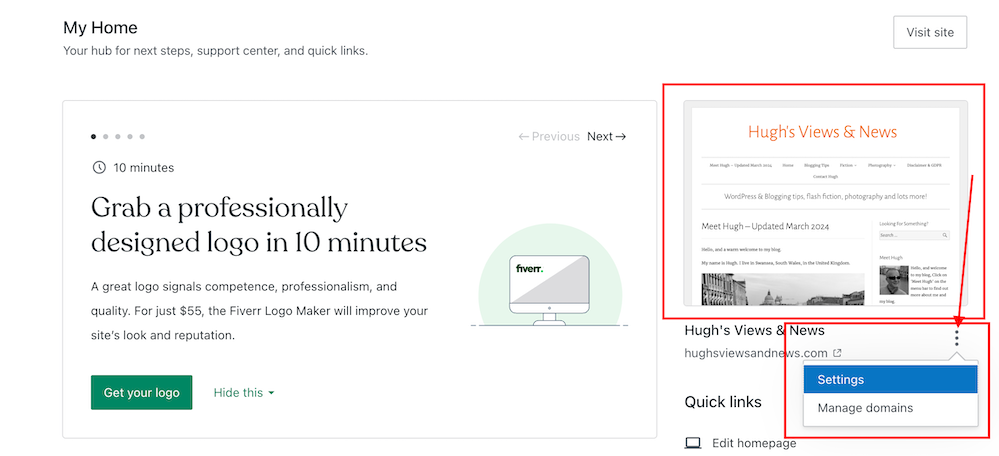
Image highlighting the kebab settings and new menu on the new blog settings feature on WordPress
Click the kebab menu to open a new menu

The menu contains two options – Settings and Manage Domains.

Let’s take a look at the two options

  1. Settings – this option takes you to the General Settings page of your blog.

You can make many changes to your blog on this page, including your blog’s icon (photo or image), name, and tagline.

Image highlighting where to edit your WordPress blog's icon, title and tagline
Edit your blog’s icon, title and tagline
  • Click the ‘Save Settings‘ button if you make any changes.

On the same page, you can also create a logo for your blog via Fiverr logo maker (note that there is a charge for this) and set/change your blog’s primary language and timezone. Remember to save any changes you make.

Another option includes setting privacy settings for your blog.

Privacy – This is where you can set your blog to public viewing (anyone can view it) or private viewing (only visible to you and logged-in members you have approved to view it). There is also a ‘Coming Soon‘ option, so your blog is hidden from view until it’s ready for viewing.

Image showing the 'Privacy' settings on a WordPress blog
Set privacy settings for your blog

Two other options are also available.

If ticked, the ‘Discourage search engines from indexing this site‘ option will prevent search engines from indexing your blog, but note that it is up to search engines to honour your request.

The ‘Prevent third-party sharing‘ option should be ticked if you want to restrict your blog’s content from AI training and third-party use. It will exclude your blog’s public content from WordPress’s network of third-party content and research partners. It also adds known AI bots to the ‘disallow’ list in your blog’s robots.txt file to stop them from crawling your site, though it is up to AI platforms to honour this request.

Click the ‘Save Settings‘ button if you make any changes.

Other settings include –

Accept a gift subscription – turn this setting on to accept gift subscriptions from visitors to your blog.

Footer credit: Here, you can choose or edit a footer credit that appears at the bottom of your blog’s pages and posts.

Site tools – this section allows you to do the following.

  • Register a new domain or change your blog’s URL address.
  • Transfer your blog to another blogging provider.
  • You can reset your blog and start afresh while keeping the same domain/blog name. (If you choose this option, all your posts, pages, and media will be deleted).
  • Delete your blog and give up your blog’s domain/address.

2. Manage Domains — This option takes you to the part of your blog where you can manage your blog’s domains.

It’s worth checking this page to see what domains you have and to see offers for other domains you may be interested in purchasing for your blog.

While you may not visit your blog’s settings page regularly, it’s worth knowing that there is now an even quicker way to find these settings.

Any questions? Leave them in the comments section.

Did you enjoy this post? Then you may also like –

Layout, content, settings, and format might differ on self-hosted blogs.

Click the buttons below to follow Hugh on Social Media

Copyright @ 2024 hughsviewsandnews.com – All rights reserved.


Discover more from Hugh’s Views & News  

Subscribe to get the latest posts sent to your email.

38 responses to “How To Use This New Easy Feature For Your Blog’s Settings On WordPress.”

  1. WP A DAY #26: WordPress performance improvements; Open source and WordPress; WordPress 6.5.3 security update; and more… – Antonio Cambronero avatar

    […] another topic, a new feature in WordPress makes it easier for users to configure their blogs, significantly improving the usability of the system for new users and those less […]

  2. Did You Miss Any Of These? Monthly Round-Up - April 2024 avatar

    […] How To Use This New Easy Feature For Your Blog’s Settings On WordPress. […]

  3. OIKOS™- Art, Books & more avatar

    Thanks for sharing another great information on the hidden features of WordPress. Or should i better say, WordPress debunked by Hugh? Lol Unbelievable, but there must be a lot of youngsters on operative floor of WP. Sometimes they are too much kind of a gamer group. ;-) Best wishes, Michael

    1. Hugh W. Roberts avatar

      I embrace most of the changes WordPress make, Michael. They have to make them to keep up with the competition and keep customers. Not all change is good, but we can usually ignore the changes we don’t like, although I’ll always try them out first and give them some of my time.

  4. EsmeSalon avatar
    EsmeSalon

    Congratulations, Hugh, as you are being featured at SSPS 307.  See you again next week https://esmesalon.com/tag/seniorsalonpitstop/

    1. Hugh W. Roberts avatar

      That’s great news. Thanks so much Esme.

  5. EsmeSalon avatar
    EsmeSalon

    As always very valuable information for WordPress users.
    Thanks so much for participating and sharing at SSPS 306. See you again next week at https://esmesalon.com/tag/seniorsalonpitstop/

  6. V.M.Sang avatar

    Thanks for that, Hugh. Really useful stuff.

    1. Hugh W. Roberts avatar

      I’m delighted it has helped. You may not use the settings much but at least you now know how to find them quickly.

  7. Mac's Opinion avatar

    The user interface between Self hosted WP sites and WP hosted sites is like night and day. To be honest, I wish the self hosted UI was more like yours Hugh.

    All those tips you mentioned are all under the Settings section on the sidebar for those with self hosted WP sites that are wondering.

    Posts like this though are great for bloggers just getting into the blogging world on WordPress. Great job Hugh!

    1. Hugh W. Roberts avatar

      Thank you. I only wish I could help self-hosted bloggers more. So thank you for confirming where those settings are, Mac.

  8. Kymber Hawke avatar

    Thank you for explaining these features. :)

    1. Hugh W. Roberts avatar

      No need to thank me, Kymber. I enjoy sharing this information with you all. It’s a pleasure.

  9. Eugi avatar

    Thank you for this, Hugh. Knowing where to find shortcuts is time-saving and helps to maintain the integrity of one’s blog.

    1. Hugh W. Roberts avatar

      I agree, Eugi. It’s always good knowing where they are.

  10. Colleen Chesebro avatar

    Thanks, Hugh. Another great find!

    1. Hugh W. Roberts avatar

      I’m glad you think so, Colleen. Even though these settings are not accessed much, it’s good to know where they are.

      1. Colleen Chesebro avatar

        Exactly. So many bloggers cling to the old themes and ways. It’s good to be aware of what the platform offers us.

  11. Erika avatar

    Oh, cool! I don’t take (have) the time to check out small changes. So, good to have you showing us new features like this shortcut. Thank you, Hugh!

    1. Hugh W. Roberts avatar

      Usually, when these settings are set, they don’t need editing again for some time, but it’s good to know where they are, Erika.

      1. Erika avatar
  12. Barbara Harper avatar

    I’m a little confused about the third-party sharing option. It sounds like something I’d want to prevent. Is that just talking about AI and bots that are used to generate ads and that kind of thing?

    1. Hugh W. Roberts avatar

      It’s more to stop partners of WordPress from using the contents of your blog for training and development. However, even if you tick the box, it may not stop other AI software (outside of WordPress) from scrolling and using your content for training and development.

      1. Danny Watts avatar

        Will this option prevent sharing? Like to FB or other social media platforms?

        1. Hugh W. Roberts avatar

          No, it won’t, Danny. And nor (as some bloggers have reported) does ticking that box mean your posts will no longer appear on the WordPress Reader.

  13. Terri Webster Schrandt avatar

    It’s always great to see how shortcuts can help us with our blogs, Hugh. Regular admin maintenance is very useful for our peaceful state-of-mind. Thanks for the tutorial.

    1. Hugh W. Roberts avatar

      I think too many bloggers tend to forget about the admin side of blogging, Terri. I read an about me page yesterday on a blog that stated that they were just about to publish their first book in 2015. There were also lots of broken links on the menu of their blog and the old theme they were using made their blog look very outdated.

  14. JezzieG avatar

    Useful stuff, thanks for sharing

    1. Hugh W. Roberts avatar
  15. AM avatar
    AM

    I did not know there was a shortcut to those settings. Nice! Thanks for sharing.

    1. Hugh W. Roberts avatar

      You’re welcome. Glad this post has helped.

Feel free to leave a comment. Engagement helps keep blogs alive and forms community.

I’m Hugh

Welcome to my blog. I’m delighted to have you here. This is the place to discover tips on blogging and WordPress, flash fiction, photography, and more. I enjoy engaging with my readers, so please feel free to explore, join discussions, and contact me. I’m happy to assist! Find out more about me and my blog by clicking the ‘Meet Hugh’ button.

Let’s connect

Subscribe to Hugh’s Views And News

Latest Posts

Follow Hugh in the Fediverse

Hugh's Views & News  
Hugh's Views & News  
@hughsviewsandnews.com@hughsviewsandnews.com

WordPress & Blogging tips, flash fiction, photography and lots more!

403 posts
6 followers

Recommend Blogs To Follow


Boomer Eco Crusader
Boomer Eco Crusader
Live Green | Declutter | Simplify Life

Jacqueline Lambert
Jacqueline Lambert
Award-Winning Travel Humour Writer

Spo-Reflections
Spo-Reflections
To live is to battle with trolls in the vaults of heart and brain. To write; this is to sit in judgment over one's Self. Henrik Ibsen

Anne R. Allen’s Blog… with Ruth Harris
Writing about writing. Mostly.

Fancying France
The musings of a ‘femme d’un certain âge’ who divides her time between SW France and SE England

SONGS AND SCRIPTS AND DUNKING BISCUITS
Every day tales of a winging-it creative

Marsha Ingrao         Always Write
Marsha Ingrao Always Write
Having fun blogging with friends

Curiosities, Castles and Coffee Shops
The musings of a curious mind

WrookieSchU
WrookieSchU
Live life 🙌🏼

WPcomMaven
WPcomMaven
Helping you make the most of your free WordPress.com website since 2011

Second Wind Leisure Perspectives
Fun, Photography & Friends

Share Your Light
Share Your Light
You are a miracle – Let it happen

No Facilities
No Facilities
Random thoughts, life lessons, hopes and dreams

Esther Chilton
Writer, Tutor and Editor

Roaming About
A Life Less Ordinary

Saying nothing in particular
Jan … JT Twissel

The Chicago Files
The Chicago Files
A Canadian Perspective on Living in the Windy City!

Thank you to all my visitors

469,688 hits

253,008 visitors

Most Viewed Posts & Pages

Copyright Protected Blog

COPYRIGHT ©2011-2031 Hugh’s Views And News BLOG – All Rights Reserved.

This work by Hugh W. Roberts, and/or Hugh’s Views And News blog, is licensed under a Creative Commons Attribution-Noncommercial-NoDerivatives 4.0 International License. Unauthorised use and/or duplication of this material (text and images) without express and written permission from this blog’s author and/or owner is strictly prohibited. If you want to use posts, excerpts, photos and links, you may contact me first. You must give full and clear credit to Hugh W. Roberts and Hugh’s Views And News dot com with links to the original content.








