Now This Is Why Keeping Your WordPress Site Updated Matters

WordPress has introduced a useful new feature that benefits all users, including those with a ‘Free’ plan.

With just a few clicks, you can check whether the version of WordPress you are using is up to date, whether any plugins you have installed are current, and if the theme of your WordPress site is the latest release.

Here’s how to verify that all your WordPress installations are up to date. I am using an Apple iMac desktop computer for this guide.

  • Go to the dashboard of your blog and click on Dashboard – Updates.
An image emphasising the 'Update' button on the dashboard of a WordPress blog.
Click the ‘Update’ button.
  • After clicking on Updates, you will see a page that informs you whether you are using the latest version of WordPress, plugins, and the WordPress theme you have installed.
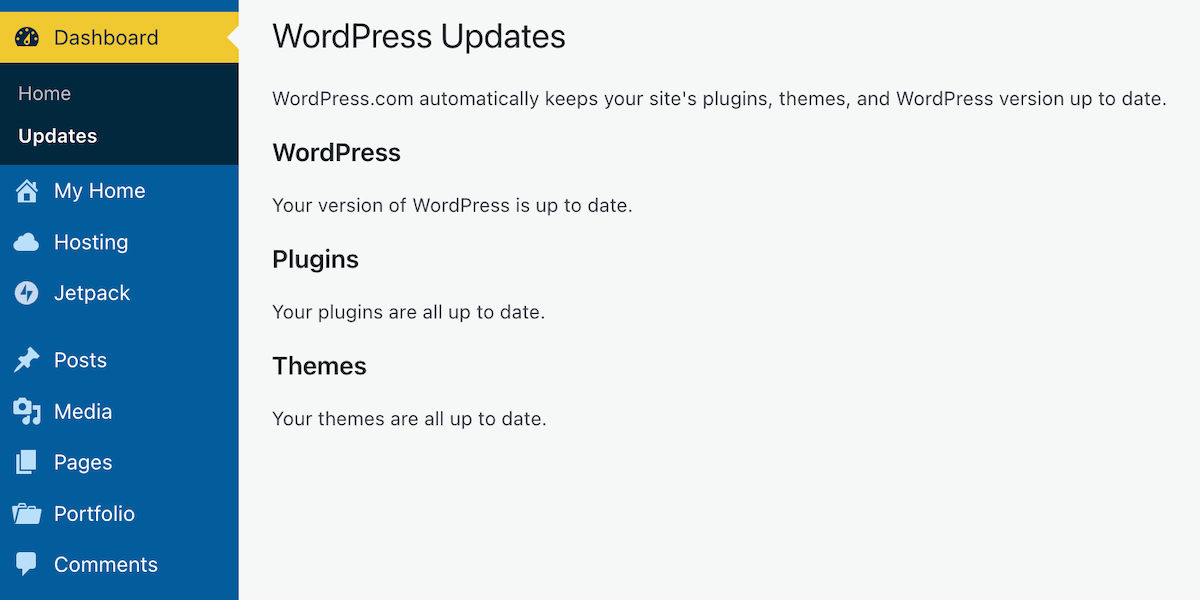
An image of a page on a WordPress blog informing if WordPress, plugins and themes are all up to date.
Is everything on your WordPress blog updated?

If, like me, you are a WordPress.com user, WordPress will keep all these items up to date for you. So, why am I then informing you of this feature? Well, it’s all about retired themes and plugins that cause problems.

If you are using any plugins or a theme that has been retired, even if it appears you have the latest versions, any bugs affecting the theme or plugin since the final update will no longer be fixed because WordPress has withdrawn support.

How do I find out if the WordPress theme I’m using is still supported?

To find out if the WordPress theme you are using is still supported (and receiving updates), visit your blog’s dashboard and click Appearance – Themes. You will see a message indicating your theme is retired if it is no longer supported by WordPress. As we all know, using outdated themes can cause numerous problems for users.

Although a retired theme might not cause problems now, it could in the future. Some users attempt to use a workaround to avoid issues, but this is not advised, as it may lead to further problems. Instead of a workaround, switch to a current theme fully supported by WordPress. You don’t have to move to a Block theme if you prefer not to, since many Classic themes remain supported by WordPress. I am still using a Classic theme (Toujours) on my blog, which is fully supported.

Using an outdated, unsupported theme can lead to several issues. Here are a few.


1. Security vulnerabilities: Without ongoing updates, the theme may become prone to security risks that could compromise your blog.
2. Compatibility issues: As plugins and WordPress itself update, an outdated theme may not function correctly with newer versions, causing layout glitches, functional problems such as not being able to leave comments and issues with WordPress believing you are not logged in.
3. Lack of support: You won’t have access to official support for troubleshooting any issues or queries that arise with the theme. WordPress will advise you to change to a supported theme.
4. Performance issues: Unsupported themes may not be optimised for speed and performance, leading to slower load times.
5. Missed features: Regular updates often include new features and improvements; sticking with an unsupported theme means missing out on these enhancements, which could benefit your blog’s features and user experience.

If you are using a retired theme and refuse to switch to a supported one, there’s no point in blaming WordPress for any problems with your blog. It’s not their fault if you continue to use something they no longer support.

How do I change my WordPress theme?

Refer to the ‘Change Your Theme‘ page for complete details.

How do I change a retired plugin?

The best approach is to find a new plugin that provides similar functionality. You can search the WordPress plugin repository or other trusted sources for alternatives. 

Conclusion:

  • Many users often blame WordPress for blog-related issues, which are frequently due to user error or outdated software on their devices.
  • WordPress has introduced a new feature that allows users, even on the free plan, to check if their WordPress version, plugins, and theme are up to date.
  • To check for updates, navigate to Dashboard – Updates in your blog’s dashboard. If everything is updated, great!
  • However, if you’re using retired themes or plugins, you won’t receive support or fixes for any issues that arise.
  • Unsupported themes can lead to security vulnerabilities, compatibility issues with newer updates, a lack of support, performance problems, and the omission of key features.
  • To determine if your theme is still supported, navigate to Appearance – Themes in the dashboard.
  • If it’s retired, consider switching to a supported theme or plugin for better performance and security.

Have you ever faced issues with outdated themes or plugins on your WordPress blog? How did you go about resolving them? Which themes are you currently using, and have you checked if they are still supported? Do you have any WordPress tips to share with others?

Layout, content, settings, and format might differ on self-hosted blogs.

I’m getting tough with non-engaging comments. Comments such as ‘Nice post’ are marked as spam.

The featured image in this blog post is taken from Pixabay. AI checked spelling and grammar mistakes.

Click the buttons below to follow Hugh on Social Media

Copyright @ 2025 hughsviewsandnews.com – All rights reserved.


Discover more from Hugh’s Views & News  

Subscribe to get the latest posts sent to your email.

62 responses to “Now This Is Why Keeping Your WordPress Site Updated Matters”

  1. Fedora Pancakes avatar

    That is a great feature indeed. It’s been on self-hosted WordPress for years, so it’s wonderful that it has come to WordPress.com.

    1. Hugh W. Roberts avatar

      I think it’s better suited for self-hosted, given that those of us with WordPress.com blogs receive all updates from WordPress anyway. However, it serves as an excellent reminder for us to check that the themes and plugins we use are still supported.

  2.  avatar
    Anonymous

    great info and a timely reminder. WordPress is my favorite former platform I abandoned (still using it sometimes, but now my entire site is on Wix). I loved the engagement here, but the hassle of changing themes when they’re no longer supported (and the major design headaches resulting from that) became too much for me. If only they’d offer an instant change feature that promised no hassle, no disasters! I will check into your recommendation, thanks again, since I still like to use its blog feature and the Reader.

    1. Hugh W. Roberts avatar

      I recall the first time I ever changed my theme on WordPress (many years ago) and how it took me an entire weekend to complete. Over the years, it has become easier to change themes, even the FSE themes. I’m still hesitant to switch to an FSE theme, though. WordPress has already introduced AI that designs a theme for your blog, but only for those who are new to WordPress or want to start over. However, they are working on making this service available to those of us who simply want to change the theme of our blog.

      Engagement is key to blogging, and WordPress is certainly the best blogging platform for fostering engagement. However, I have noticed a decline in engagement across many WordPress blogs, with readers leaving brief, non-engaging comments.

  3. Eugi avatar

    Thank you for your excellent tips, Hugh. I still see many bloggers using outdated themes. They either don’t know or forget the importance of what goes on behind the scenes. I recently changed to a new Full Site Editing (FSE) theme, Clairevoyant, which was easy to set up.

    IMO, some FSE themes are much easier to work with than others. For those interested in FSE themes, I found following the patterns specific to the theme is better than trying to change its structure.

    1. Hugh W. Roberts avatar

      Thank you for the information about the ease of changing to some of the FSE themes Eugi. I seem to recall you have changed themes before. Are there any particular reasons why you change them, or is it just a case of switching to a theme you like more?

      1. Eugi avatar

        You’re welcome, Hugh. It’s just a case of switching to a theme I like more, plus each theme has different features to offer, such as fonts, and styles.

  4. petespringerauthor avatar
    petespringerauthor

    Thanks for this helpful post, Hugh. I’ve been thinking about changing my theme one of these days. I’ve noticed that Grammarly does not work with specific themes.

    1. Hugh W. Roberts avatar

      I stopped using Grammarly after deciding that the AI WordPress offers does as good a job, Pete. I saved myself some money. However, I wasn’t aware that Grammarly does not work with all themes. I wonder if those themes contain a bug or if the theme creator didn’t want them to include working with Grammarly?

      1. petespringerauthor avatar
        petespringerauthor

        Interestingly, some of the themes that previously worked with Grammarly no longer do.

        1. Hugh W. Roberts avatar

          There must be a reason why, but only WordPress will have the answer for that one, Pete.

  5. Liesbet @ Roaming About avatar

    Thanks for the reminder, Hugh. I know my WordPress version is up to date. For some reason this was changed into doing it automatically, which is just fine.

    I update the plugins manually whenever there are new versions, but… my Hemingway theme (which is still supported) has not been updated for years. It works fine and I’m just worried my layout will change or new issues will appear if/when I update the theme. Maybe I should bite the bullet one of these days…

    1. Hugh W. Roberts avatar

      If it’s working fine and is still supported by WordPress, then nothing to worry about, Liesbet. WordPress will continue to fix bugs and any problems reported by other users using the same theme. However, if they do retire the theme, you won’t know about it unless you check or start encountering problems. I’m still using a supported Classic theme, and I’m confident that WordPress will continue to offer Classic themes as an option, although don’t quote me on that.

  6. BookerTalk avatar

    Last week when I tried to access my site i kept getting a  “critical error” message which seemed to relate to the theme I was using but I didn’t recall getting any warnings. All I could do was use recovery mode, de-activate all plug ins and change to a new theme (my existing one had disappeared from the catalogue). What a pain that was to have to change all my settings and install widgets etc etc. i’ll be keeping a very close eye on the updates function in future!

    1. Hugh W. Roberts avatar

      Sadly, WordPress does not inform users that the theme they are using is retired unless the user checks via the dashboard of their blog – Appearance – Themes. If a theme no longer appears on the ‘Themes’ page, then it is a good indication that the theme has been retired and is no longer supported.

      Your comment is an excellent lesson to those who continue to use retired themes.

      1. BookerTalk avatar

        I would have appreciated a more proactive warning – WP really shouldn’t rely on us checking ourselves.

        1. Hugh W. Roberts avatar

          I agree, but I’m glad we have the tools at hand to check things for ourselves.

  7. Colleen Chesebro avatar

    Thanks for this great reminder, Hugh! 👋🏻

  8. Judith Barrow avatar

    Hi Hugh, I did this and all seems okay. But – and I hope you don’t mind – two unrelated questions: I cannot for the life of me add the BlueSky button on my site for some reason, though I have an account. And, also, why has the reblog button changed so that I can’t just reblog someone else’s whole post – or even reblog it at all?

    1. Hugh W. Roberts avatar

      Hi Judith, have you followed the instructions in my post on how to add a Bluesky sharing button?

      Boost Your WordPress Blog’s Reach: A Step-by-Step Guide to Adding a BlueSky Sharing Button

      When did you last change your blog’s theme? Is it a current theme that WordPress still supports?

      Is the reblog problem happening on all the blogs you try to reblog, and what exactly happens when you click on the reblog button?

      1. Judith Barrow avatar

        Thanks, Hugh. Following your instructions I’ve added BlueSky and Threads and deleted X. I think I missed your first post on adding buttons when I came off Twitter. Anyway, that’s done. The theme is still supported, I checked that, thanks againThe reblog happens all the time – either doesn’t work at all, or I get just the title of whoever’s blog it is. Cheers, Judith

        1. Hugh W. Roberts avatar

          Is the title a link to the post, or is there a link included, Judith? Are you using the Block Editor or the Classic Editor when drafting your posts?

          I had a quick look at a reblog button on another blog, and when I clicked ‘Reblog’, a new draft opened with a link to the post in a block.

          I’m glad you were able to add those new sharing buttons.

          1. Judith Barrow avatar

            I’m using the Block Editor, Hugh. I used to be able to just reblog, now it directs me to a blank page -‘New Post’ – nothing like your screenshot.

            1. Hugh W. Roberts avatar

              It sounds like it could be a bug associated with the theme you are using, Judith. I’d recommend reporting it to WordPress along with a screenshot and let them know what device you are using.

  9. Terri Webster Schrandt avatar

    How simple! Before I finished reading, I went to my jetpack app, found the home, and update info, clicked…up to date! BOOM! Then I read the rest of your post Hugh! 😁

    Yes, there are still some minor issues, like WP telling me I’m not logged in, or “Someone” left a comment. I use the app most of the time for reading, commenting, etc, but prefer the PC for crafting posts and preparing images for media. The Jetpack App works in quick tandem with the computer software. Almost instantaneously. Easy to go back and forth from mobile to computer. WordPress knows what its doing.

    Thanks for sharing this and taking the time to help bloggers!

    1. Hugh W. Roberts avatar

      Regarding the ‘not being logged in,’ have you tried clearing the cache on your device, Terri? I found it worked for me. While you’re at it, I also cleared the cookies and download history.

      I also get the ‘Someone’ left a comment, but that’s because I have the settings on my blog configured to allow readers without a WordPress account and without being logged in to leave a comment. Once, that would attract a lot of spam, but now that WordPress hides the majority of spam from us (again, it’s a setting you need to switch on), you won’t see most of the spam. I see a few spam comments each week, although some of what I see still has me scratching my head as to why WordPress displayed it.

      1. Terri Webster Schrandt avatar

        Good reminder to clear the cache!

        So the “someone” issue happens randomly. Here’s a weird example. On the Jetpack app, I get blog post notification from others. Reading these by email doesn’t always work. A “someone” post showed up…but it was ToonSarah’s once I opened the post. Why would it show her name as someone? Its those little glitches, which could be theme- related.
        I also have friends that read my posts who aren’t on WP or use a random hosting service. Those might be the “someone’s.”

        1. Hugh W. Roberts avatar

          That sounds like a Jetpack/theme error, Terri. If it had been a comment, it might have been different, as often I’ve had a ‘someone’ comment and then a similar comment after the person leaving the comment realised they were not logged in.

  10. Esther Chilton avatar

    Thank you for this useful info, Hugh. I find a lot of the time I don’t know where to look to find things like this out, so this is really helpful. And it’s a reminder about the behind the scenes stuff we tend to push to the back of our minds.

    1. Hugh W. Roberts avatar

      Indeed, Esther. I view blog maintenance in the same way as I do when having the boiler serviced. It needs to be checked at least once a year, otherwise things start going wrong.

  11. philosophy through photography avatar

    Hugh, one more clarification. I don’t see the classic editor in the jetpack mobile app. Is that right. The app does not support classic editor

    1. Hugh W. Roberts avatar

      That’s right. The Classic editor is not supported in the Jetpack mobile app.

  12. wrookieschu avatar

    Thanks Hugh! I must check this out on my computer, I pretty much use my phone most of the time and I can’t see a dashboard, although that’s not to say it’s not there.

    1. Hugh W. Roberts avatar

      You can certainly access your blog’s dashboard via the Jetpack App, Wayne. Go to the ‘More’ tab, and you will see most of what you would see on a computer. Since you are a WordPress.com user, WordPress will keep everything updated for you, but I recommend you check whether the theme you are using is still supported.

      1. wrookieschu avatar

        You have just taught me something new again! Thanks Hugh.

  13. philosophy through photography avatar

    Thank you, Hugh.
    In this updated version do we get, ‘Classic’ while drafting the post?

    1. Hugh W. Roberts avatar

      The Classic editor is still available; however, I recommend accessing it via the Classic Block. I’m not confident that the Classic editor (as it used to be) is fully supported anymore. There are also plugins you can download to use the Classic editor. I hope that helps.

      1. philosophy through photography avatar

        Thank you, Hugh, for this information.
        Namaste.

  14. Johnbritto Kurusumuthu avatar

    Thank you for this informative post. It’s a valuable reminder that keeping WordPress updated goes beyond version numbers — ensuring themes and plugins are still supported is just as important. I appreciate the clarification on how retired themes and plugins can quietly introduce security vulnerabilities and compatibility issues. I’ll be reviewing my site’s setup to confirm everything is fully supported. This guidance is especially useful for those of us managing content on WordPress.com where updates are handled automatically. Well done on raising awareness about an often-overlooked aspect of site maintenance.

    1. Hugh W. Roberts avatar

      You’re welcome. I see complaints from many WordPress.com users who blame all their blog issues on WordPress. Many refuse to switch to a supported theme or claim they lack the time to implement the recommendations WordPress provides to fix the problems, yet they continue to blame WordPress. Some say ‘Why fix what isn’t broken?, but WordPress isn’t fixing anything. All they are doing is ensuring that all their users have the latest updates to keep our blogs safe. Unfortunately, some of the older themes can’t be updated due to outdated software or lack of use.

      These behind-the-scenes checks are crucial to ensure everything functions properly. Of course, making sure the devices we use to access our blogs also have the latest updates is just as important.

      1. Johnbritto Kurusumuthu avatar

        Absolutely — you’ve made an excellent point. It’s easy to overlook how much of the responsibility lies with us as users, especially when support is readily available but not acted upon. Staying on a retired theme might seem harmless in the short term, but as you said, it becomes a liability over time. I agree that regular maintenance — both on the blog and on the devices we use to access it — is essential for a secure and smooth experience. WordPress can only do so much if we’re not proactive about the parts we control. Thanks again for highlighting this.

        1. Hugh W. Roberts avatar

          I agree. Unfortunately, some bloggers spend all their time blogging and forget about the behind-the-scenes stuff that we all need to maintain.

Feel free to leave a comment. Engagement helps keep blogs alive and forms community.

I’m Hugh

Welcome to my blog. I’m delighted to have you here. This is the place to discover tips on blogging and WordPress, flash fiction, photography, and more. I enjoy engaging with my readers, so please feel free to explore, join discussions, and contact me. I’m happy to assist! Find out more about me and my blog by clicking the ‘Meet Hugh’ button.

Let’s connect

Subscribe to Hugh’s Views And News

Latest Posts

Follow Hugh in the Fediverse

Hugh's Views & News  
Hugh's Views & News  
@hughsviewsandnews.com@hughsviewsandnews.com

WordPress & Blogging tips, flash fiction, photography and lots more!

402 posts
6 followers

Recommend Blogs To Follow


Boomer Eco Crusader
Boomer Eco Crusader
Live Green | Declutter | Simplify Life

Jacqueline Lambert
Jacqueline Lambert
Award-Winning Travel Humour Writer

Spo-Reflections
Spo-Reflections
To live is to battle with trolls in the vaults of heart and brain. To write; this is to sit in judgment over one's Self. Henrik Ibsen

Anne R. Allen’s Blog… with Ruth Harris
Writing about writing. Mostly.

Fancying France
The musings of a ‘femme d’un certain âge’ who divides her time between SW France and SE England

SONGS AND SCRIPTS AND DUNKING BISCUITS
Every day tales of a winging-it creative

Marsha Ingrao         Always Write
Marsha Ingrao Always Write
Having fun blogging with friends

Curiosities, Castles and Coffee Shops
The musings of a curious mind

WrookieSchU
WrookieSchU
Live life 🙌🏼

WPcomMaven
WPcomMaven
Helping you make the most of your free WordPress.com website since 2011

Second Wind Leisure Perspectives
Fun, Photography & Friends

Share Your Light
Share Your Light
You are a miracle – Let it happen

No Facilities
No Facilities
Random thoughts, life lessons, hopes and dreams

Esther Chilton
Writer, Tutor and Editor

Roaming About
A Life Less Ordinary

Saying nothing in particular
Jan … JT Twissel

The Chicago Files
The Chicago Files
A Canadian Perspective on Living in the Windy City!

Thank you to all my visitors

469,299 hits

252,728 visitors

Most Viewed Posts & Pages

Copyright Protected Blog

COPYRIGHT ©2011-2031 Hugh’s Views And News BLOG – All Rights Reserved.

This work by Hugh W. Roberts, and/or Hugh’s Views And News blog, is licensed under a Creative Commons Attribution-Noncommercial-NoDerivatives 4.0 International License. Unauthorised use and/or duplication of this material (text and images) without express and written permission from this blog’s author and/or owner is strictly prohibited. If you want to use posts, excerpts, photos and links, you may contact me first. You must give full and clear credit to Hugh W. Roberts and Hugh’s Views And News dot com with links to the original content.